Loại Phòng
Trang này cho phép cấu hình các loại phòng trong khách sạn. Mỗi loại phòng xác định tên, giá cơ bản, sức chứa, đặc điểm và tiện nghi — là nền tảng cho việc đặt phòng và quản lý kho.
Tổng Quan

Trang gồm 2 phần chính:
- Thống kê nhanh — 4 thẻ thống kê tóm tắt kho phòng
- Bảng danh sách — Toàn bộ loại phòng với đầy đủ thông tin
Thống Kê Nhanh
4 thẻ thống kê tự động cập nhật theo dữ liệu thực:
| Thẻ | Ý nghĩa |
|---|---|
| ① Tổng loại | Tổng số loại phòng đang có |
| ② Loại hoạt động | Số loại phòng đang ở trạng thái Active |
| ③ Giá trung bình | Giá cơ bản trung bình của tất cả loại phòng (VND) |
| ④ Sức chứa tối đa | Sức chứa lớn nhất trong tất cả loại phòng |
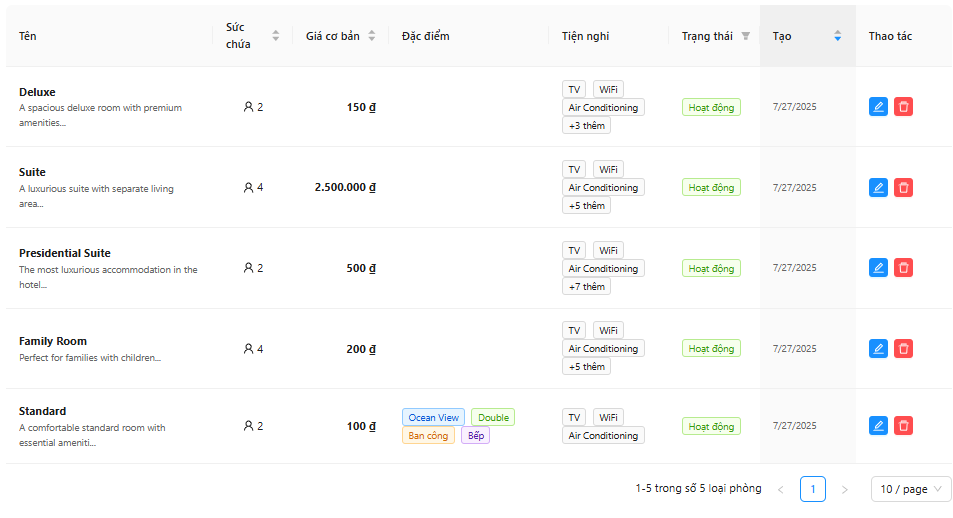
Bảng Danh Sách Loại Phòng
Cột Thông Tin
| Cột | Nội dung |
|---|---|
| (Thumbnail) | Ảnh đại diện của loại phòng (placeholder nếu chưa có ảnh) |
| Tên | Tên loại phòng + đoạn trích mô tả |
| Sức chứa | Số khách tối đa |
| Giá cơ bản | Giá/đêm (VND) |
| Đặc điểm | Tags xanh — các đặc điểm của phòng |
| Tiện nghi | Tags — tối đa 3 hiển thị, còn lại hiện "+N more" |
| Trạng thái | 🟢 Active / 🔴 Inactive |
| Ngày tạo | Ngày tạo loại phòng |
| Thao tác | Nút Sửa (xanh) + Nút Xóa (đỏ) |
Có thể nhấp tiêu đề cột để sắp xếp (Sức chứa, Giá cơ bản, Ngày tạo). Cột Trạng thái hỗ trợ lọc nhanh.
Thêm Loại Phòng Mới

Nhấp Add Room Type (góc phải trên) để mở form thêm mới.

Các Trường Thông Tin
| # | Trường | Bắt buộc | Mô tả |
|---|---|---|---|
| ① | Tên loại phòng | ✓ | Tên rõ ràng, mô tả (VD: "Deluxe Ocean View", "Family Suite") |
| ② | Sức chứa | ✓ | Số khách tối đa: 1–10 |
| ③ | Mô tả | ✓ | Mô tả chi tiết loại phòng cho khách xem |
| ④ | Giá cơ bản (VNĐ) | ✓ | Giá/đêm, nhập số (VD: 2250000) — hệ thống tự thêm dấu phẩy |
| ⑤ | Trạng thái (Active) | — | Tick để kích hoạt — phòng được phép đặt. Mặc định: bật |
| ⑥ | Đặc điểm (Features) | — | Chọn nhiều từ danh sách (xem bên dưới) |
| ⑦ | Tiện nghi (Amenities) | — | Chọn nhiều từ danh sách (xem bên dưới) |
Đặc Điểm (Features)
Chọn các đặc điểm phù hợp từ danh sách:
Non-smoking · Smoking · City View · Ocean View · Mountain View · Garden View · Pool View · Balcony · Kitchen · Kitchenette · Workspace · Bathtub · Shower · Accessible · Soundproof · Pet-friendly
Tiện Nghi (Amenities)
WiFi · Air Conditioning · TV · Mini Bar · Safe · Hair Dryer · Coffee Machine · Room Service · Laundry Service · Concierge · Spa Services · Fitness Center · Swimming Pool · Restaurant · Bar · Parking
Nhấp OK để lưu, Cancel để hủy.
Chỉnh Sửa Loại Phòng
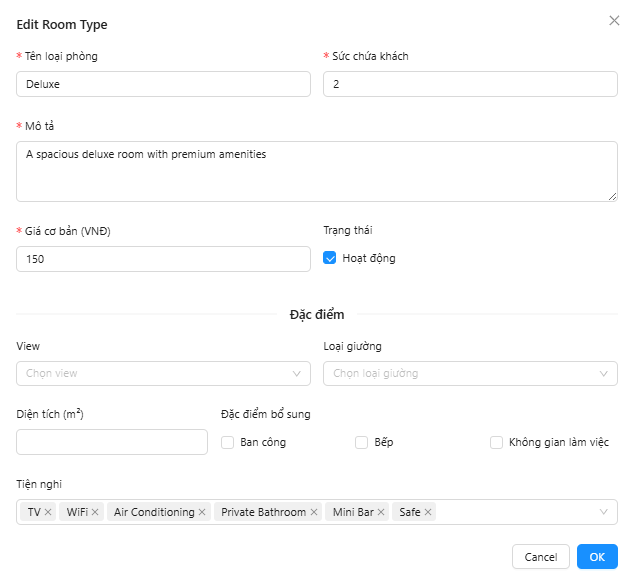
Nhấp nút ✏️ (Edit) ở hàng cần sửa. Form giống Add nhưng có thêm:
| # | Trường | Ghi chú |
|---|---|---|
| ①–⑥ | Như Add modal | Đã điền sẵn dữ liệu hiện tại |
| ⑦ | Ảnh (Photos) | Chỉ xuất hiện khi chỉnh sửa — upload ảnh phòng (JPG/PNG, tối đa 5MB mỗi ảnh) |
Upload ảnh
Tính năng upload ảnh chỉ khả dụng khi chỉnh sửa loại phòng đã tồn tại (không có khi tạo mới). Ảnh đã upload có thể xóa bằng nút ✕ góc ảnh.
Xóa Loại Phòng
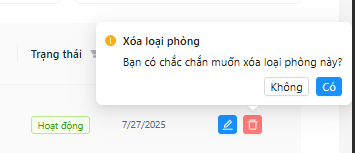
- Nhấp nút 🗑️ (Delete) ở hàng cần xóa
- Hộp xác nhận Popconfirm xuất hiện:
- ② Yes — Xác nhận xóa vĩnh viễn
- ③ No — Hủy, không xóa
Xóa không thể hoàn tác
Hãy đảm bảo không còn phòng nào đang sử dụng loại phòng này trước khi xóa.
Mẹo & Thực Hành Tốt Nhất
Đặt tên rõ ràng
Tên loại phòng nên phản ánh đặc điểm nổi bật nhất: VD "Deluxe Ocean View King" rõ hơn "Phòng Deluxe 2". Tên rõ ràng giúp nhân viên chọn đúng khi đặt phòng.
Phân cấp giá hợp lý
Khoảng cách giá giữa các loại phòng nên tối thiểu 20–30% để tạo động lực upsell rõ ràng. VD: Standard 1.5M → Deluxe 2.25M (+50%) → Suite 3M (+33%).
Trước khi vô hiệu hóa (Inactive)
Bỏ tick Active sẽ ẩn loại phòng khỏi form đặt phòng mới. Đảm bảo không có đặt phòng tương lai nào đang dùng loại phòng này.
Ảnh minh họa
Upload ảnh chất lượng cao (tỷ lệ 4:3 hoặc 16:9) để hiển thị thumbnail đẹp trong bảng. Chỉnh sửa loại phòng trước → lưu → upload ảnh.
Câu Hỏi Thường Gặp
Tạo loại phòng mới như thế nào?
- Nhấp Add Room Type
- Điền Tên, Sức chứa, Mô tả, Giá cơ bản (tất cả bắt buộc)
- Chọn Features và Amenities phù hợp (tùy chọn)
- Đảm bảo Active được tick
- Nhấp OK
Làm sao để thêm ảnh cho loại phòng?
Tính năng upload ảnh chỉ xuất hiện khi chỉnh sửa (không có khi tạo mới): 1. Nhấp ✏️ Edit trên loại phòng đã tạo 2. Cuộn xuống phần Photos 3. Click vào vùng upload hoặc kéo thả file ảnh vào 4. Nhấp OK để lưu
Làm sao để thay đổi giá cơ bản?
- Nhấp ✏️ Edit trên loại phòng
- Sửa trường Giá cơ bản (VNĐ)
- Nhấp OK
Thay đổi giá chỉ ảnh hưởng đến đặt phòng mới — các đặt phòng đã xác nhận giữ nguyên giá gốc.
Loại phòng không hiển thị trong form đặt phòng?
Kiểm tra loại phòng có đang ở trạng thái Active không: 1. Nhấp ✏️ Edit 2. Đảm bảo checkbox Active được tick 3. Nhấp OK
Không thấy nút 'Add Room Type'?
Bạn chưa có quyền room_type:create. Liên hệ quản trị viên để cấp quyền.
Liên Kết Liên Quan
- Danh Sách Phòng — Quản lý phòng theo từng loại đã cấu hình
- Quản Lý Trạng Thái Phòng — Thay đổi trạng thái phòng
- Tạo Đặt Phòng — Chọn loại phòng khi đặt