Bỏ qua

Lịch Đặt Phòng (Booking Calendar)

Tổng Quan

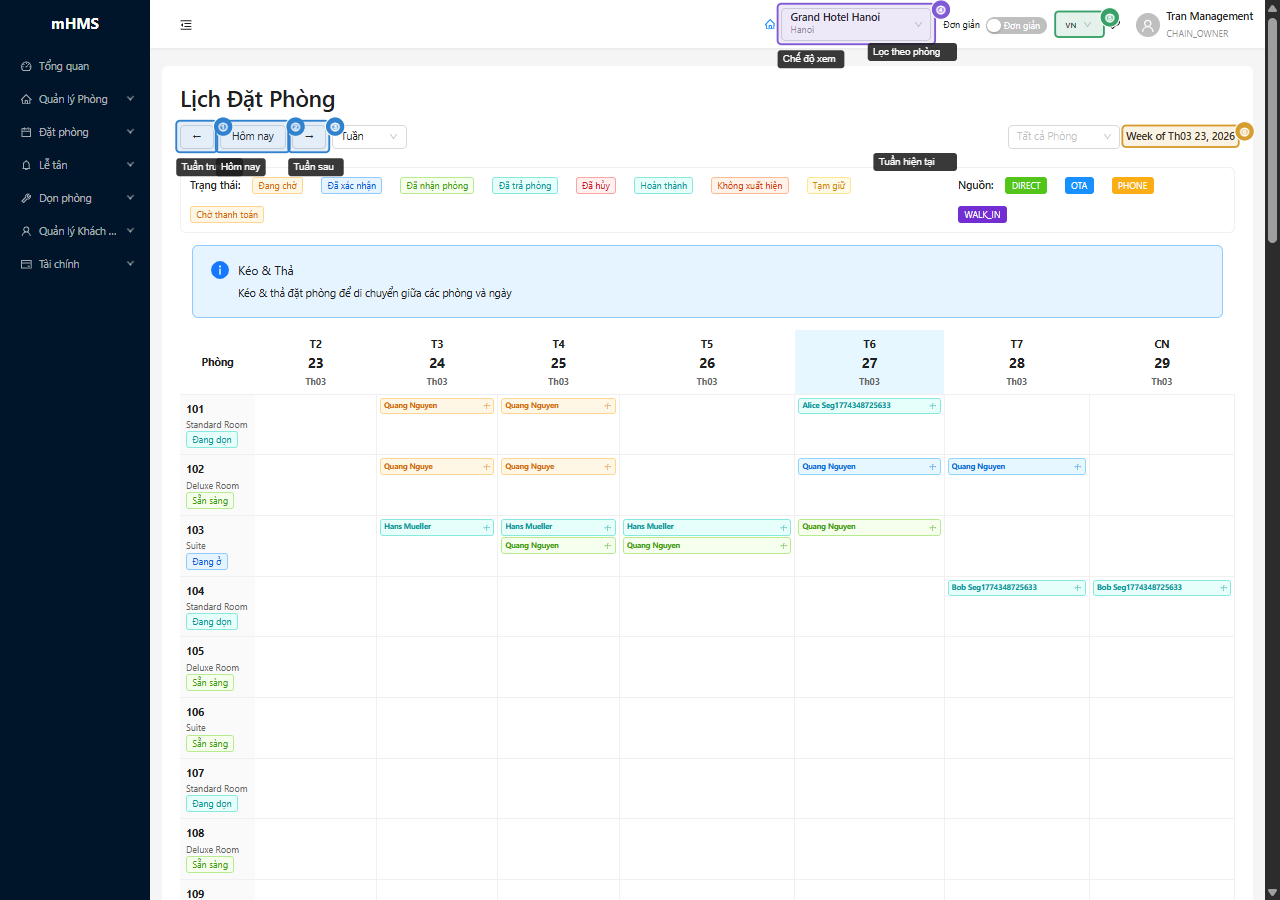
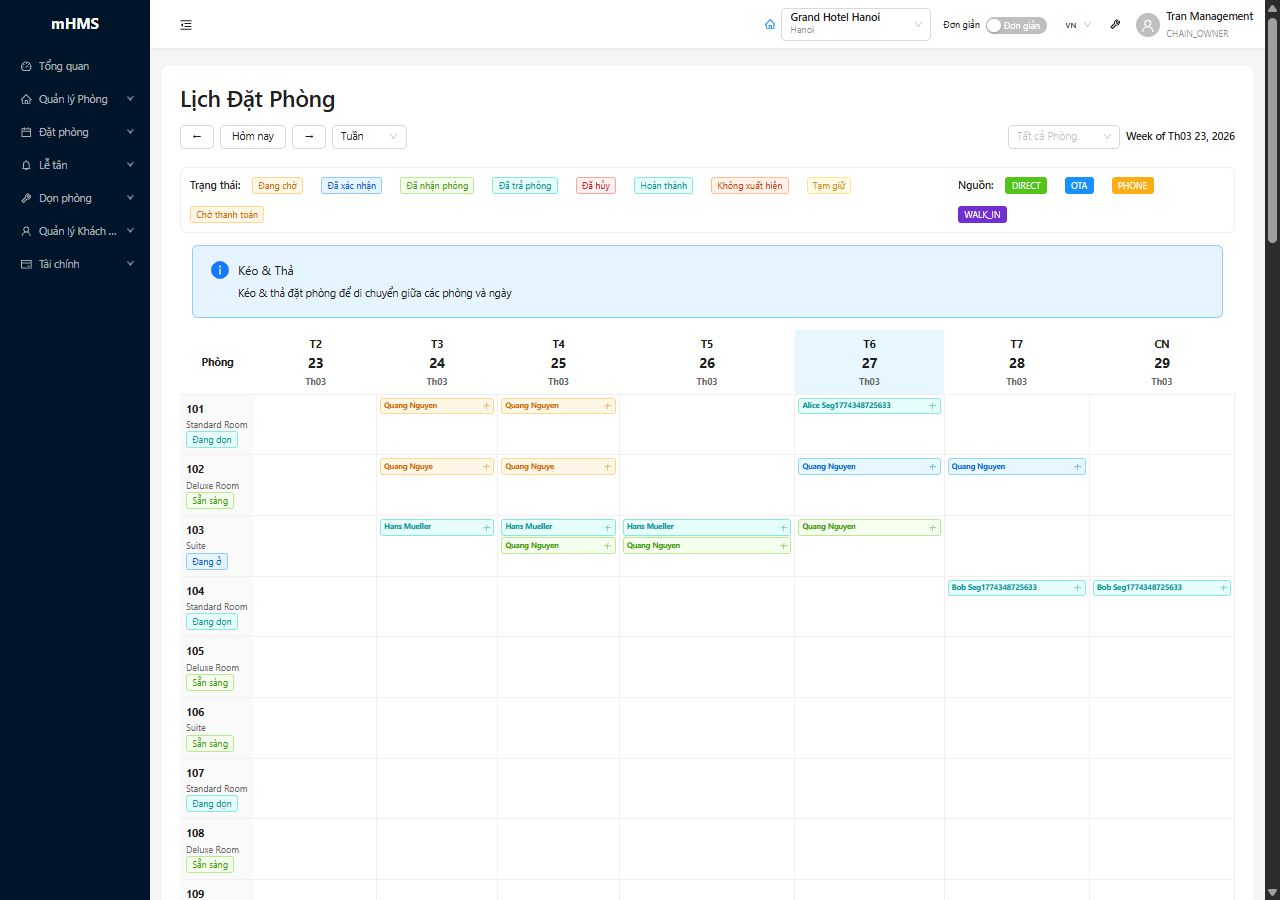
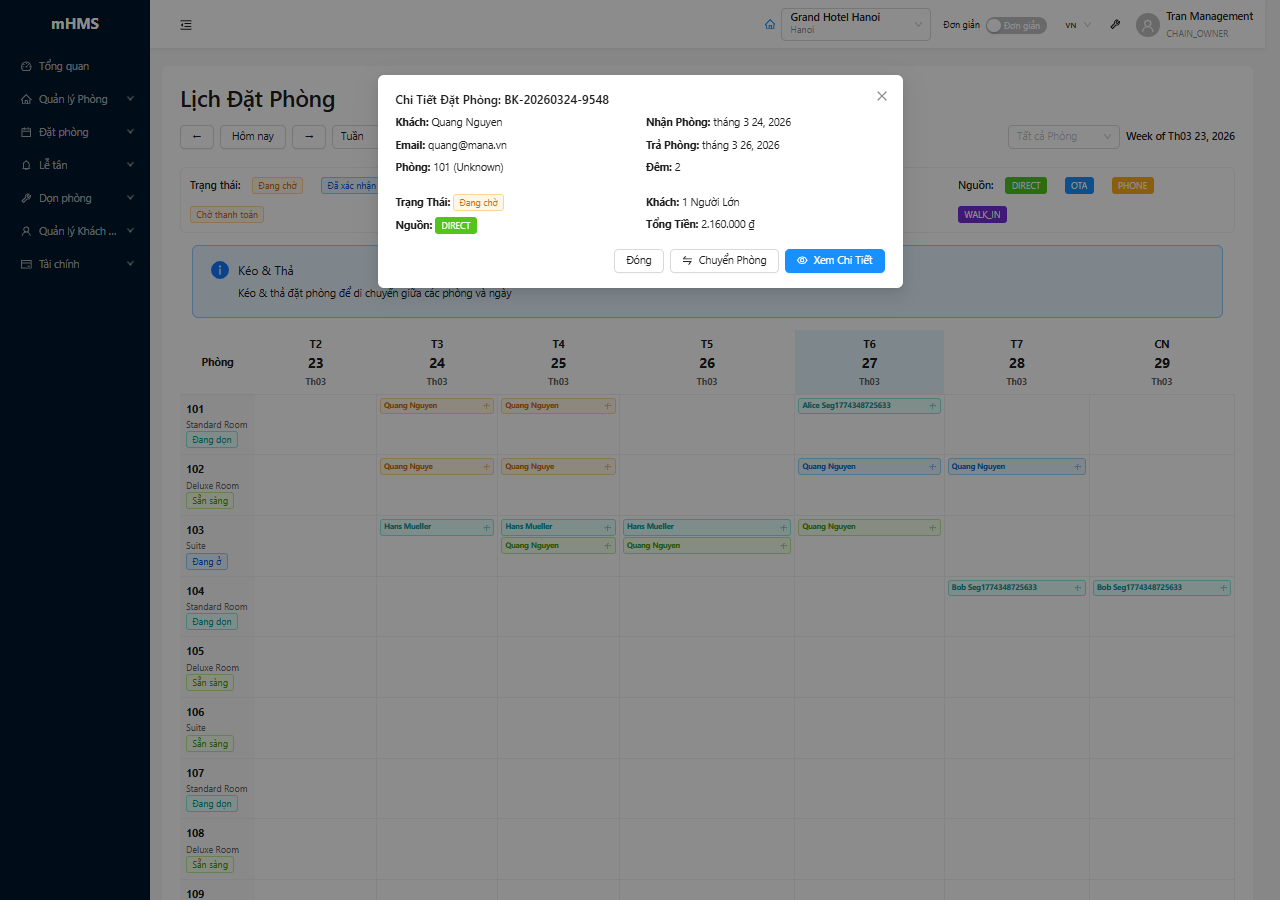
Trang Booking Calendar là công cụ trực quan để xem và quản lý tất cả các đặt phòng theo dạng lịch (calendar view). Đây là công cụ lý tưởng để: - Visualize bookings theo thời gian - Identify availability gaps - Plan resource allocation - Track arrivals và departures - Manage room assignments - Optimize occupancy

Booking Calendar Overview 📸 Chụp từ: https://sazi.gp.mana.vn/bookings/calendar

Calendar Workflow

graph TD
    A[Booking Calendar] --> B[Select View]
    B --> C[Monthly View]
    B --> D[Weekly View]
    B --> E[Daily View]
    B --> F[Room Timeline]

    C --> G[View Arrivals/Departures]
    D --> H[Detailed Schedule]
    E --> I[Hourly Breakdown]
    F --> J[Room Occupancy]

    G --> K[Create Booking]
    H --> K
    I --> K
    J --> K

    G --> L[Modify Booking]
    H --> L
    I --> L
    J --> L

    K --> M[Update Calendar]
    L --> M

Key Features

Calendar Views: - 📅 Monthly View - Overview of entire month - 📆 Weekly View - Detailed week schedule - 🕐 Daily View - Hour-by-hour timeline - 🏨 Room Timeline - Gantt chart by room - 📊 Grid View - Table format

Interactive Features: - 🖱️ Drag & drop booking modification - ➕ Click-to-create new booking - 🔍 Hover tooltips với booking details - 🎨 Color-coding by booking status - 🔔 Visual alerts for conflicts - 📱 Mobile responsive

Advanced Capabilities: - 📈 Occupancy visualization - 🏷️ Multi-room assignments - 🔄 Real-time updates - 📤 Export calendar data - 🖨️ Print-friendly formats - ⚡ Quick actions on events


1. Calendar Views

1.1 Monthly View

Monthly Calendar View 📸 Chụp từ: Monthly calendar tab

Monthly Calendar Layout:

                    December 2024                        [Today] [◀ Prev] [Next ▶]
┌──────────────────────────────────────────────────────────────────────────────────┐
│  Mon    │  Tue    │  Wed    │  Thu    │  Fri    │  Sat    │  Sun    │          │
├──────────┼─────────┼─────────┼─────────┼─────────┼─────────┼─────────┤          │
│         │         │         │         │    1    │    2    │    3    │          │
│         │         │         │         │  📥 2   │  📥 5   │  🏨 7   │          │
│         │         │         │         │         │  📤 1   │         │          │
├─────────┼─────────┼─────────┼─────────┼─────────┼─────────┼─────────┤          │
│    4    │    5    │    6    │    7    │    8    │    9    │   10    │          │
│  🏨 7   │  🏨 8   │  🏨 9   │  🏨 10  │  🏨 12  │  🏨 15  │  🏨 18  │          │
│  📤 2   │  📥 3   │         │  📥 5   │  📤 3   │  📥 8   │  📤 5   │          │
├─────────┼─────────┼─────────┼─────────┼─────────┼─────────┼─────────┤          │
│   11    │   12    │   13    │   14    │   15    │   16    │   17    │          │
│  🏨 20  │  🏨 22  │  🏨 24  │  🏨 25  │  🏨 28  │  🏨 30  │  🏨 32  │          │
│  📥 6   │  📤 4   │  📥 7   │  📤 3   │  📥 9   │  📤 6   │  📥 8   │          │
├─────────┼─────────┼─────────┼─────────┼─────────┼─────────┼─────────┤          │
│   18    │   19    │   20    │   21    │   22    │   23    │   24    │          │
│  🏨 35  │  🏨 38  │  🏨 40  │  🏨 42  │  🏨 45  │  🏨 48  │  🏨 50  │  Legend: │
│  📤 7   │  📥 10  │  📤 8   │  📥 12  │  📤 9   │  📥 15  │  📤 10  │  📥 Check-in│
├─────────┼─────────┼─────────┼─────────┼─────────┼─────────┼─────────┤  📤 Check-out│
│   25    │   26    │   27    │   28    │   29    │   30    │   31    │  🏨 In-house│
│  🏨 52  │  🏨 55  │  🏨 58  │  🏨 60  │  🏨 58  │  🏨 55  │  🏨 52  │  ⚠️ Conflict│
│  📥 18  │  📤 15  │  📥 20  │  📤 18  │  📥 12  │  📤 15  │  📤 20  │          │
└──────────┴─────────┴─────────┴─────────┴─────────┴─────────┴─────────┴──────────┘

Occupancy Summary:
━━━━━━━━━━━━━━━━━━━━━━━━━━━━━━━━━━━━━━━━━━━━━━━━━━━━━━━━━━━━━━━━━━━━━━━━━━━━━━━
Week 1 (1-7):   ████████████░░░░░░░░  65%  |  Week 2 (8-14):  ██████████████░░░░  78%
Week 3 (15-21): ████████████████░░░░  85%  |  Week 4 (22-31): ██████████████████  92%
Month Average: 80% occupancy  |  Total Bookings: 245  |  Revenue: 458.75M VND

Monthly View Features:

  1. Day Cells:
  2. Date number at top
  3. Indicators: 📥 (arrivals), 📤 (departures), 🏨 (in-house count)
  4. Clickable để view details for that day
  5. Color intensity based on occupancy level
  6. Today highlighted with border

  7. Occupancy Visualization:

  8. Background color gradient:
    • 🟢 Light green: < 60% occupancy
    • 🟡 Yellow: 60-80% occupancy
    • 🟠 Orange: 80-95% occupancy
    • 🔴 Red: > 95% occupancy (near full)
  9. Number badges for quick reference

  10. Interactive Actions:

  11. Click date → View day details
  12. Click indicator → Filter by arrivals/departures
  13. Hover day → Tooltip với breakdown
  14. Double-click → Create booking for date

1.2 Weekly View

Weekly Calendar View 📸 Chụp từ: Weekly calendar tab

Weekly Calendar Layout:

Week of December 18-24, 2024                           [◀ Prev Week] [This Week] [Next Week ▶]
┌────────────────────────────────────────────────────────────────────────────────────────────┐
│ Time    │ Mon 18 │ Tue 19 │ Wed 20 │ Thu 21 │ Fri 22 │ Sat 23 │ Sun 24 │                  │
├─────────┼────────┼────────┼────────┼────────┼────────┼────────┼────────┤                  │
│ 00:00   │        │        │        │        │        │        │        │                  │
│ 06:00   │        │        │        │        │        │        │        │                  │
│ 12:00   │        │        │        │ [Late │        │        │        │                  │
│         │        │        │        │Checkout│        │        │        │                  │
│ 14:00   │ [Check-in: 3 guests]    │ [Check-in: 5 guests]    │ [Check-in: 8 guests]        │
│         │ • John Doe (201)        │ • Jane Smith (305)      │ • Michael Lee (401)         │
│         │ • Tom Hardy (202)       │ • Sarah Connor (306)    │ • Group: ABC Corp (5 rooms) │
│         │ • Lisa White (301)      │ ...                     │ ...                         │
├─────────┼────────┼────────┼────────┼────────┼────────┼────────┼────────┤                  │
│ 15:00   │        │ [Early │        │        │        │        │        │                  │
│         │        │Check-in│        │        │        │        │        │                  │
├─────────┼────────┼────────┼────────┼────────┼────────┼────────┼────────┤  Weekly Stats:   │
│ 18:00   │        │        │        │        │        │        │        │                  │
│ 20:00   │        │        │        │        │        │        │        │  Total Arrivals: │
│ 22:00   │        │        │        │        │        │        │        │      42 guests   │
└─────────┴────────┴────────┴────────┴────────┴────────┴────────┴────────┘                  │
│                                                                          Total Departures:│
│ Departures:                                                                  38 guests   │
│ 10:00   │ [Early │        │        │        │        │ [Checkout: 6]      │            │
│         │Checkout│        │        │        │        │ • Standard process │  Occupancy: │
│ 12:00   │ [Checkout: 8 guests]    │ [Checkout: 10 guests]  │ • VIP Fast Track│      85%  │
│         │ • Room inspections      │ • Rush cleaning        │ • Group checkout│            │
│ 14:00   │        │ [Late  │        │        │        │        │        │  Revenue:    │
│         │        │Checkout│        │        │        │        │        │  85.5M VND   │
└─────────┴────────┴────────┴────────┴────────┴────────┴────────┴────────┴──────────────────┘

Weekly View Features:

  1. Time Slots:
  2. Hourly breakdown (customizable intervals)
  3. Check-in/Check-out times highlighted
  4. Early/late indicators
  5. Grouped events per time slot

  6. Event Cards:

  7. Guest name + room number
  8. Booking status badge
  9. Special flags (VIP, Group, Corporate)
  10. Expandable for full details
  11. Color-coded by status

  12. Weekly Statistics:

  13. Total arrivals/departures
  14. Daily occupancy trend
  15. Revenue projection
  16. Housekeeping workload

1.3 Daily View

Daily Calendar View 📸 Chụp từ: Daily calendar tab

Daily Calendar Layout:

Thursday, December 21, 2024                    [◀ Yesterday] [Today] [Tomorrow ▶]
┌──────────────────────────────────────────────────────────────────────────────────┐
│                          TIMELINE VIEW                                           │
├──────────┬───────────────────────────────────────────────────────────────────────┤
│ 06:00 AM │                                                                       │
│          │                                                                       │
├──────────┼───────────────────────────────────────────────────────────────────────┤
│ 08:00 AM │ 🍳 Breakfast Service Peak                                            │
│          │    • 45 guests expected                                              │
├──────────┼───────────────────────────────────────────────────────────────────────┤
│ 10:00 AM │ 📤 Early Checkouts (3)                                               │
│          │    ┌──────────────────────────────────────────────────────┐          │
│          │    │ ✅ #BK-001234 - John Doe - Room 201                 │          │
│          │    │    Status: Checked out 09:45 AM                      │          │
│          │    │    Payment: ✅ Settled - 8,078,400 VND               │          │
│          │    │    [View Details] [Print Invoice]                    │          │
│          │    └──────────────────────────────────────────────────────┘          │
├──────────┼───────────────────────────────────────────────────────────────────────┤
│ 12:00 PM │ 📤 Standard Checkouts (8)                                            │
│          │    • Room 305 - Jane Smith - ⏳ In Progress                          │
│          │    • Room 401 - Michael Lee - ✅ Completed                           │
│          │    • Room 502 - Sarah Connor - ⏳ Pending Payment                    │
│          │    • Room 203, 204, 207, 301, 308 - In Progress                      │
│          │    🧹 Housekeeping Alert: 8 rooms need cleaning                      │
├──────────┼───────────────────────────────────────────────────────────────────────┤
│ 02:00 PM │ 📥 Check-in Time Starts                                              │
│          │    Expected Arrivals: 12 guests                                      │
│          │    ┌──────────────────────────────────────────────────────┐          │
│          │    │ 🏨 Rooms Ready: 10/12                                │          │
│          │    │ ⏳ In Cleaning: 2 (ETA: 2:30 PM)                     │          │
│          │    └──────────────────────────────────────────────────────┘          │
├──────────┼───────────────────────────────────────────────────────────────────────┤
│ 02:30 PM │ 📥 Arrival: #BK-001235 - VIP Guest                                   │
│          │    ┌──────────────────────────────────────────────────────┐          │
│          │    │ 🌟 VIP - Tom Wilson                                  │          │
│          │    │ Room: 601 (Presidential Suite)                       │          │
│          │    │ Status: ⏳ Awaiting Check-in                         │          │
│          │    │ Special: Welcome amenity prepared                    │          │
│          │    │ [Check-in] [View Booking] [Contact Guest]           │          │
│          │    └──────────────────────────────────────────────────────┘          │
├──────────┼───────────────────────────────────────────────────────────────────────┤
│ 03:00 PM │ 📥 Group Arrival: ABC Corporation (5 rooms)                          │
│ 04:00 PM │ 📥 Standard Arrivals (6 guests)                                      │
│ 05:00 PM │ ⚠️ Late Arrival Expected: #BK-001240 (8:00 PM ETA)                   │
├──────────┼───────────────────────────────────────────────────────────────────────┤
│ 06:00 PM │ 🍽️ Dinner Service Begins                                            │
│ 07:00 PM │    • Restaurant capacity: 80 seats                                   │
│ 08:00 PM │    • Expected diners: 55 (in-house guests + walk-ins)               │
├──────────┼───────────────────────────────────────────────────────────────────────┤
│ 09:00 PM │                                                                       │
│ 10:00 PM │ 🌙 Night Audit Preparation                                           │
├──────────┼───────────────────────────────────────────────────────────────────────┤
│ 11:00 PM │ 📊 Day Summary:                                                      │
│          │    • Checkouts: 11 ✅ | Arrivals: 12 ✅                              │
│          │    • Occupancy: 85% (51/60 rooms)                                    │
│          │    • Revenue: 12,850,000 VND                                         │
│          │    • Issues: 0 🎉                                                    │
└──────────┴───────────────────────────────────────────────────────────────────────┘

Daily View Features:

  1. Hourly Timeline:
  2. Events plotted chronologically
  3. Check-in/out events highlighted
  4. Service events (breakfast, dinner)
  5. Housekeeping status updates

  6. Event Details:

  7. Expandable event cards
  8. Quick action buttons
  9. Status indicators
  10. Real-time updates

  11. Daily Summary:

  12. Total checkouts/arrivals
  13. Current occupancy
  14. Revenue generated
  15. Issues/alerts

1.4 Room Timeline View

Room Timeline View 📸 Chụp từ: Room timeline tab

Room Timeline (Gantt Chart):

Room Timeline - Week of Dec 18-24, 2024                          [Zoom: + -] [Filter ▼]
┌──────────────────────────────────────────────────────────────────────────────────────┐
│ Room │ Dec 18 │ Dec 19 │ Dec 20 │ Dec 21 │ Dec 22 │ Dec 23 │ Dec 24 │ Status         │
├──────┼────────┼────────┼────────┼────────┼────────┼────────┼────────┼────────────────┤
│ 201  │ [======== John Doe #001234 ========]       │ [Clean]│        │ ✅ Confirmed   │
│      │        Deluxe Ocean - $2.5M/night          │        │        │                │
├──────┼────────┼────────┼────────┼────────┼────────┼────────┼────────┼────────────────┤
│ 202  │        │ [============ Jane Smith #001235 ============]       │ 🏨 Checked In  │
│      │        │        Standard Double - $1.8M/night                │                │
├──────┼────────┼────────┼────────┼────────┼────────┼────────┼────────┼────────────────┤
│ 203  │ [===== Tom Hardy #001236 =====]    │        │ [OOO - Maint.] │ ⚠️ Maintenance │
│      │   Exec Suite - $4.5M/night         │        │                │                │
├──────┼────────┼────────┼────────┼────────┼────────┼────────┼────────┼────────────────┤
│ 301  │ [Available ──────────────────────] │        │        │        │ 🟢 Available   │
├──────┼────────┼────────┼────────┼────────┼────────┼────────┼────────┼────────────────┤
│ 305  │        │        │ [Sarah Connor #001237]   │ [Dirty]│        │ 🧹 Needs Clean │
│      │        │        │   Standard - $1.8M       │        │        │                │
├──────┼────────┼────────┼────────┼────────┼────────┼────────┼────────┼────────────────┤
│ 401  │ [================== Michael Lee #001238 ==================]   │ ✅ Confirmed   │
│      │           Presidential Suite - $8M/night                      │                │
├──────┼────────┼────────┼────────┼────────┼────────┼────────┼────────┼────────────────┤
│ 502  │ [VIP Group - ABC Corp #001239 (5 rooms)] │        │        │ 👥 Group       │
│ 503  │ [───────────────────────────────────────] │        │        │ 👥 Group       │
│ 504  │ [───────────────────────────────────────] │        │        │ 👥 Group       │
│ 505  │ [───────────────────────────────────────] │        │        │ 👥 Group       │
│ 506  │ [───────────────────────────────────────] │        │        │ 👥 Group       │
└──────┴────────┴────────┴────────┴────────┴────────┴────────┴────────┴────────────────┘

Legend:
[═══ Booking ═══]  ✅ Confirmed   🏨 Checked In   🟢 Available   🧹 Dirty   ⚠️ OOO/Maintenance
[Clean]            🔄 Turnover    👥 Group        ⏳ Pending     ❌ Blocked

Drag booking to modify dates | Click to view details | Right-click for quick actions

Room Timeline Features:

  1. Gantt Bars:
  2. Horizontal bars = Booking duration
  3. Color-coded by status:
    • 🟦 Blue: Confirmed
    • 🟩 Green: Checked In
    • 🟨 Yellow: Pending
    • ⬜ Gray: Available
    • 🟥 Red: OOO/Maintenance
  4. Guest name + booking code on bar
  5. Hover for full details

  6. Interactive Actions:

  7. Drag & Drop: Move booking to different dates
  8. Resize: Extend/shorten booking duration
  9. Click: Open booking details modal
  10. Right-click: Context menu (Edit, Cancel, etc.)
  11. Double-click: Quick check-in/out

  12. Room Status Indicators:

  13. Clean/Dirty status
  14. Maintenance blocks
  15. Availability gaps
  16. Turnover time visualization

  17. Filters & Zoom:

  18. Filter by room type
  19. Filter by floor
  20. Filter by status
  21. Zoom in/out time scale (day/week/month)

2. Calendar Features

2.1 Color Coding System

Color Coding Legend 📸 Chụp từ: Legend panel

Booking Status Colors:

┌─────────────────────────────────────────────────────────────────┐
│ COLOR LEGEND                                                    │
├─────────────────────────────────────────────────────────────────┤
│                                                                 │
│ Booking Status:                                                 │
│ ████ Blue     - Confirmed (Awaiting arrival)                   │
│ ████ Green    - Checked In (Currently in-house)                │
│ ████ Yellow   - Pending (Awaiting confirmation/payment)        │
│ ████ Gray     - Checked Out (Completed)                        │
│ ████ Red      - Cancelled                                      │
│ ████ Orange   - Modified (Recently changed)                    │
│ ████ Purple   - No-Show                                        │
│                                                                 │
│ Room Status:                                                    │
│ ▓▓▓▓ Dark Green  - Clean & Ready                              │
│ ▓▓▓▓ Light Gray  - Dirty (Needs cleaning)                     │
│ ▓▓▓▓ Brown       - Inspected (Ready for next guest)           │
│ ▓▓▓▓ Red         - Out of Order (Maintenance)                 │
│ ▓▓▓▓ Yellow      - In Cleaning (Housekeeping in progress)     │
│                                                                 │
│ Special Indicators:                                             │
│ 🌟 VIP Guest                                                    │
│ 🔁 Repeat Guest                                                 │
│ 👥 Group Booking                                                │
│ 🏢 Corporate                                                    │
│ ⚠️ Conflict/Issue                                               │
│ 🎂 Special Occasion                                             │
│ 💍 Honeymoon                                                    │
│                                                                 │
│ [Customize Colors] [Reset to Default]                          │
└─────────────────────────────────────────────────────────────────┘

2.2 Hover Tooltips

Hover Tooltip Example 📸 Chụp từ: Hover over booking event

Tooltip Content:

┌────────────────────────────────────────────┐
│ Booking #BK-2024-001234                    │
├────────────────────────────────────────────┤
│ Guest: 🌟 John Doe (VIP)                   │
│ Room: 201 - Deluxe Ocean View              │
│                                            │
│ Check-in:  Dec 20, 14:00                   │
│ Check-out: Dec 23, 12:00                   │
│ Nights: 3                                  │
│                                            │
│ Status: ✅ Confirmed                        │
│ Source: Direct Booking                     │
│ Amount: 7,500,000 VND                      │
│                                            │
│ Special Requests:                          │
│ • High floor                               │
│ • Ocean view                               │
│ • Early check-in                           │
│                                            │
│ [View Details] [Quick Check-in]            │
└────────────────────────────────────────────┘

2.3 Drag & Drop Booking Modification

Drag and Drop 📸 Chụp từ: Dragging booking to new dates

Drag & Drop Workflow:

graph TD
    A[Click & Hold Booking] --> B[Drag to New Dates]
    B --> C{Availability Check}
    C -->|Available| D[Show Preview]
    C -->|Conflict| E[Show Warning]

    D --> F[Drop to Confirm]
    E --> F

    F --> G{User Confirms?}
    G -->|Yes| H[Update Booking]
    G -->|No| I[Revert to Original]

    H --> J[Recalculate Pricing]
    J --> K[Send Updated Confirmation]
    K --> L[Update Calendar]

Drag & Drop Features:

  1. Visual Feedback:
  2. Ghost image while dragging
  3. Drop zones highlighted
  4. Conflicts shown in red
  5. Available slots in green

  6. Smart Validation:

  7. Automatic availability check
  8. Room status verification
  9. Rate availability check
  10. Conflict detection

  11. Confirmation Dialog:

    ┌──────────────────────────────────────────────────┐
    │ Confirm Booking Modification                     │
    ├──────────────────────────────────────────────────┤
    │                                                  │
    │ Booking: #BK-2024-001234 - John Doe              │
    │                                                  │
    │ Original Dates:                                  │
    │ • Check-in:  Dec 20, 2024                       │
    │ • Check-out: Dec 23, 2024                       │
    │ • Nights: 3                                      │
    │ • Total: 7,500,000 VND                          │
    │                                                  │
    │ New Dates:                                       │
    │ • Check-in:  Dec 22, 2024                       │
    │ • Check-out: Dec 25, 2024                       │
    │ • Nights: 3                                      │
    │ • Total: 8,250,000 VND (+10% weekend rate)      │
    │                                                  │
    │ ⚠️ Changes:                                       │
    │ • Price increased by 750,000 VND                │
    │ • Weekend rates apply                           │
    │                                                  │
    │ ☐ Send updated confirmation to guest            │
    │ ☐ Notify housekeeping of change                 │
    │                                                  │
    │           [Cancel] [Confirm Changes]             │
    └──────────────────────────────────────────────────┘
    

2.4 Quick Create Booking

Quick Create Booking 📸 Chụp từ: Click empty date slot

Quick Create Workflow:

Step 1: Click Empty Slot

You clicked: December 25, 2024
Available rooms: 8 rooms

┌──────────────────────────────────────────┐
│ Quick Create Booking                     │
├──────────────────────────────────────────┤
│                                          │
│ Check-in:  [Dec 25, 2024 ▼] [14:00 ▼]  │
│ Check-out: [Dec 27, 2024 ▼] [12:00 ▼]  │
│ Nights: 2                                │
│                                          │
│ Guests: [2 ▼] Adults  [0 ▼] Children    │
│                                          │
│ Room Type: [Deluxe Ocean View ▼]        │
│                                          │
│ Available Rooms:                         │
│ • Room 201 - Clean ✅                    │
│ • Room 202 - Clean ✅                    │
│ • Room 203 - In Cleaning ⏳              │
│                                          │
│ Rate: 2,500,000 VND/night                │
│ Total: 5,000,000 VND                     │
│                                          │
│       [Full Form] [Quick Book]           │
└──────────────────────────────────────────┘

Step 2: Guest Selection

┌──────────────────────────────────────────┐
│ Guest Information                        │
├──────────────────────────────────────────┤
│                                          │
│ Search Guest:                            │
│ [🔍 Email, phone, or name________]       │
│                                          │
│ Recent Guests:                           │
│ • John Doe (john.doe@email.com) 🌟      │
│ • Jane Smith (jane.smith@email.com)     │
│ • Tom Wilson (tom.wilson@email.com) 🔁  │
│                                          │
│ [+ Create New Guest]                     │
│                                          │
│            [Back] [Continue]             │
└──────────────────────────────────────────┘

Step 3: Confirmation

┌──────────────────────────────────────────┐
│ Confirm Booking                          │
├──────────────────────────────────────────┤
│                                          │
│ Guest: John Doe                          │
│ Room: 201 - Deluxe Ocean View            │
│ Dates: Dec 25-27, 2024 (2 nights)        │
│ Total: 5,000,000 VND                     │
│                                          │
│ Payment: [Pay at Hotel ▼]                │
│                                          │
│ ☑ Send confirmation email                │
│ ☑ Assign room automatically              │
│                                          │
│       [Cancel] [Create Booking]          │
└──────────────────────────────────────────┘

2.5 Context Menu (Right-Click)

Context Menu 📸 Chụp từ: Right-click on booking

┌─────────────────────────────────┐
│ Booking Actions                 │
├─────────────────────────────────┤
│ 👁️ View Details                 │
│ ✏️ Edit Booking                 │
│ 🔄 Modify Dates (Drag & Drop)   │
│ ──────────────────────────────  │
│ 🏨 Check-in Guest               │
│ 🚪 Check-out Guest              │
│ 💳 Process Payment              │
│ ──────────────────────────────  │
│ 📧 Send Confirmation            │
│ 📞 Contact Guest                │
│ 📝 Add Note                     │
│ ──────────────────────────────  │
│ 🏷️ Change Room                  │
│ ⬆️ Upgrade Room                 │
│ 🔁 Duplicate Booking            │
│ ──────────────────────────────  │
│ ❌ Cancel Booking               │
│ 🗑️ Delete Booking               │
└─────────────────────────────────┘

3.1 Calendar Filters

Calendar Filters Panel 📸 Chụp từ: Filters sidebar

┌─────────────────────────────────────────────┐
│ CALENDAR FILTERS                            │
├─────────────────────────────────────────────┤
│                                             │
│ Date Range:                                 │
│ From: [Dec 1, 2024 ▼]                      │
│ To:   [Dec 31, 2024 ▼]                     │
│                                             │
│ Booking Status:                             │
│ ☑ Confirmed      ☑ Checked In              │
│ ☐ Pending        ☐ Checked Out             │
│ ☐ Cancelled      ☐ No-Show                 │
│                                             │
│ Room Types:                                 │
│ ☑ All Types                                 │
│ ☐ Standard       ☐ Deluxe                  │
│ ☐ Suite          ☐ Villa                   │
│                                             │
│ Room Status:                                │
│ ☑ Show Available Rooms                     │
│ ☑ Show Occupied Rooms                      │
│ ☑ Show Maintenance Rooms                   │
│ ☐ Hide Dirty Rooms                         │
│                                             │
│ Guest Types:                                │
│ ☐ VIP Only       ☐ Corporate Only          │
│ ☐ Groups Only    ☐ Repeat Guests           │
│                                             │
│ Booking Source:                             │
│ ☑ Direct         ☑ Booking.com             │
│ ☑ Agoda          ☐ Expedia                 │
│ ☐ Phone          ☐ Walk-in                 │
│                                             │
│ Show Events:                                │
│ ☑ Arrivals       ☑ Departures              │
│ ☑ In-house       ☑ Maintenance             │
│ ☑ Housekeeping   ☐ Special Events          │
│                                             │
│      [Reset All] [Apply Filters]            │
└─────────────────────────────────────────────┘

Calendar Search 📸 Chụp từ: Search bar

┌──────────────────────────────────────────────────────────┐
│ 🔍 Search calendar...                           [Search] │
│    Guest name, booking code, room number, or date        │
└──────────────────────────────────────────────────────────┘

Search Examples:
• "John Doe"         → Highlights all bookings for John Doe
• "#BK-001234"       → Jumps to specific booking
• "Room 201"         → Shows room 201 timeline
• "December 25"      → Jumps to Dec 25 view
• "VIP"              → Filters VIP guests only
• "Checked In"       → Shows only checked-in bookings

Search Results:

┌──────────────────────────────────────────────────────────┐
│ Search Results for "John Doe"                     [✕]    │
├──────────────────────────────────────────────────────────┤
│                                                          │
│ Found 3 bookings:                                        │
│                                                          │
│ 1. #BK-2024-001234                                       │
│    Dec 20-23, 2024 | Room 201 | ✅ Confirmed            │
│    [Jump to Date] [View Details]                         │
│                                                          │
│ 2. #BK-2024-000892 (Past)                                │
│    Nov 15-18, 2024 | Room 305 | ✅ Checked Out          │
│    [View Details]                                        │
│                                                          │
│ 3. #BK-2024-001456 (Upcoming)                            │
│    Jan 10-15, 2025 | Room 401 | ⏳ Pending              │
│    [Jump to Date] [View Details]                         │
│                                                          │
└──────────────────────────────────────────────────────────┘


4. Occupancy Visualization

4.1 Occupancy Heatmap

Occupancy Heatmap 📸 Chụp từ: Toggle heatmap view

Heatmap View:

Occupancy Heatmap - December 2024                    [Show: Occupancy % ▼]
┌──────────────────────────────────────────────────────────────────────────┐
│  Mon    │  Tue    │  Wed    │  Thu    │  Fri    │  Sat    │  Sun    │    │
├──────────┼─────────┼─────────┼─────────┼─────────┼─────────┼─────────┤    │
│         │         │         │         │    1    │    2    │    3    │    │
│         │         │         │         │   45%   │   68%   │   82%   │    │
│         │         │         │         │  🟢     │  🟡     │  🟠     │    │
├─────────┼─────────┼─────────┼─────────┼─────────┼─────────┼─────────┤    │
│    4    │    5    │    6    │    7    │    8    │    9    │   10    │    │
│   75%   │   78%   │   80%   │   82%   │   85%   │   90%   │   92%   │    │
│  🟡     │  🟡     │  🟠     │  🟠     │  🟠     │  🟠     │  🔴     │    │
├─────────┼─────────┼─────────┼─────────┼─────────┼─────────┼─────────┤    │
│   11    │   12    │   13    │   14    │   15    │   16    │   17    │    │
│   88%   │   90%   │   92%   │   93%   │   95%   │   98%   │   100%  │    │
│  🟠     │  🟠     │  🔴     │  🔴     │  🔴     │  🔴     │  🔴     │    │
├─────────┼─────────┼─────────┼─────────┼─────────┼─────────┼─────────┤    │
│   18    │   19    │   20    │   21    │   22    │   23    │   24    │    │
│   100%  │   100%  │   100%  │   100%  │   98%   │   95%   │   93%   │  ↑ │
│  🔴     │  🔴     │  🔴     │  🔴     │  🔴     │  🔴     │  🔴     │  │ │
├─────────┼─────────┼─────────┼─────────┼─────────┼─────────┼─────────┤  │ │
│   25    │   26    │   27    │   28    │   29    │   30    │   31    │100%│
│   90%   │   88%   │   85%   │   82%   │   78%   │   75%   │   70%   │  │ │
│  🟠     │  🟠     │  🟠     │  🟠     │  🟡     │  🟡     │  🟡     │  ↓ │
└──────────┴─────────┴─────────┴─────────┴─────────┴─────────┴─────────┴ 0%─┘

Legend:                              Month Statistics:
🟢 0-60%   Low Occupancy             ─────────────────────────────────────
🟡 60-80%  Moderate Occupancy        Average Occupancy: 85.3%
🟠 80-95%  High Occupancy            Peak Day: Dec 17-21 (100%)
🔴 95-100% Near/Full Capacity        Lowest Day: Dec 1 (45%)
                                     Revenue: 458,750,000 VND

4.2 Availability Grid

Availability Grid 📸 Chụp từ: Toggle availability grid

Room Availability Matrix:

Room Availability - Week of Dec 18-24, 2024              [Export] [Print]
┌─────────┬─────┬─────┬─────┬─────┬─────┬─────┬─────┬──────────────┐
│ Room    │ Mon │ Tue │ Wed │ Thu │ Fri │ Sat │ Sun │ Availability │
├─────────┼─────┼─────┼─────┼─────┼─────┼─────┼─────┼──────────────┤
│ 201     │  X  │  X  │  X  │  ✓  │  ✓  │  ✓  │  ✓  │ 4/7 days     │
│ 202     │  ✓  │  X  │  X  │  X  │  X  │  X  │  ✓  │ 2/7 days     │
│ 203     │  X  │  X  │  X  │  M  │  M  │  ✓  │  ✓  │ 2/7 days     │
│ 301     │  ✓  │  ✓  │  ✓  │  ✓  │  ✓  │  ✓  │  ✓  │ 7/7 days     │
│ 305     │  X  │  X  │  ✓  │  D  │  ✓  │  ✓  │  ✓  │ 5/7 days     │
│ 401     │  X  │  X  │  X  │  X  │  X  │  X  │  X  │ 0/7 days     │
│ 502-506 │  G  │  G  │  G  │  G  │  G  │  ✓  │  ✓  │ 2/7 days     │
├─────────┼─────┼─────┼─────┼─────┼─────┼─────┼─────┼──────────────┤
│ TOTAL   │ 1/7 │ 2/7 │ 3/7 │ 2/7 │ 3/7 │ 6/7 │ 6/7 │              │
│Available│ 14% │ 28% │ 42% │ 28% │ 42% │ 85% │ 85% │              │
└─────────┴─────┴─────┴─────┴─────┴─────┴─────┴─────┴──────────────┘

Legend:
✓ = Available       X = Occupied        M = Maintenance
D = Dirty/Cleaning  G = Group Booking  (Color-coded in actual view)

Quick Actions:
• Click ✓ to create booking for that room/date
• Click X to view current booking
• Click M to view maintenance schedule

5. Calendar Management

5.1 Block/Unblock Dates

Block Dates 📸 Chụp từ: Block dates function

Block Dates Modal:

┌──────────────────────────────────────────────────────────┐
│ Block Dates                                       [✕]    │
├──────────────────────────────────────────────────────────┤
│                                                          │
│ BLOCK CONFIGURATION                                      │
│                                                          │
│ Date Range:                                              │
│ From: [Dec 15, 2024 ▼]                                  │
│ To:   [Dec 20, 2024 ▼]                                  │
│ Days: 6 days                                             │
│                                                          │
│ Apply To:                                                │
│ ● All Rooms (60 rooms)                                   │
│ ○ Specific Room Types:                                   │
│   ☐ Standard  ☐ Deluxe  ☐ Suite  ☐ Villa               │
│ ○ Specific Rooms:                                        │
│   [Select rooms... ▼]                                    │
│                                                          │
│ Block Reason:                                            │
│ [Renovation/Maintenance ▼]                               │
│                                                          │
│ Options:                                                 │
│ • Renovation/Maintenance                                 │
│ • Private Event                                          │
│ • Seasonal Closure                                       │
│ • Overbooking Prevention                                 │
│ • Other (Specify)                                        │
│                                                          │
│ Additional Notes:                                        │
│ ┌────────────────────────────────────────────────────┐  │
│ │Annual maintenance - HVAC system upgrade           │  │
│ │Expected completion: Dec 20                         │  │
│ └────────────────────────────────────────────────────┘  │
│                                                          │
│ ⚠️ Impact:                                                │
│ • 60 rooms blocked for 6 days                           │
│ • 360 room-nights affected                              │
│ • Potential revenue loss: ~54M VND                      │
│ • 12 existing bookings affected (will need relocation)  │
│                                                          │
│ ☐ Cancel existing bookings in this period               │
│ ☑ Attempt to relocate affected bookings                 │
│ ☑ Send notification to operations team                  │
│                                                          │
│              [Cancel] [Block Dates]                      │
└──────────────────────────────────────────────────────────┘

Blocked Period Visualization:

Calendar with Blocked Period:

December 2024
┌────────────────────────────────────────────────────────┐
│ 15  │ 16  │ 17  │ 18  │ 19  │ 20  │ 21  │ 22  │      │
│ ▓▓▓ │ ▓▓▓ │ ▓▓▓ │ ▓▓▓ │ ▓▓▓ │ ▓▓▓ │     │     │      │
│Block│Block│Block│Block│Block│Block│Avail│Avail│      │
│🔒   │🔒   │🔒   │🔒   │🔒   │🔒   │     │     │      │
└────────────────────────────────────────────────────────┘

Blocked periods shown with:
• Striped/hatched background (▓▓▓)
• Lock icon (🔒)
• Tooltip explaining block reason
• Cannot create new bookings in blocked period

5.2 Special Events

Special Events 📸 Chụp từ: Add special event

Add Special Event:

┌──────────────────────────────────────────────────────────┐
│ Add Special Event                                 [✕]    │
├──────────────────────────────────────────────────────────┤
│                                                          │
│ Event Type: [Conference/Meeting ▼]                      │
│                                                          │
│ Options:                                                 │
│ • Conference/Meeting                                     │
│ • Wedding                                                │
│ • Corporate Event                                        │
│ • Holiday/Festival                                       │
│ • Maintenance Period                                     │
│ • Peak Season Marker                                     │
│ • Custom Event                                           │
│                                                          │
│ Event Name:                                              │
│ [International Tech Summit 2024___________]              │
│                                                          │
│ Date:                                                    │
│ Start: [Dec 18, 2024 ▼] [09:00 ▼]                      │
│ End:   [Dec 20, 2024 ▼] [18:00 ▼]                      │
│                                                          │
│ Impact on Bookings:                                      │
│ ● High demand expected (Increase rates)                 │
│ ○ Block availability (Private event)                    │
│ ○ No impact (Information only)                          │
│                                                          │
│ Rate Adjustment:                                         │
│ ☑ Apply special pricing                                 │
│ Increase: [25] % above base rate                        │
│ Minimum Stay: [2] nights                                │
│                                                          │
│ Display Settings:                                        │
│ ☑ Show on calendar                                      │
│ ☑ Show on booking engine                                │
│ ☑ Notify staff                                          │
│ Color: [🎨 Orange ▼]                                     │
│                                                          │
│ Description:                                             │
│ ┌────────────────────────────────────────────────────┐  │
│ │Major tech conference. Expect 300+ attendees.      │  │
│ │Room block: 50 rooms reserved for conference.      │  │
│ │Meeting rooms 1-3 reserved.                         │  │
│ └────────────────────────────────────────────────────┘  │
│                                                          │
│             [Cancel] [Add Event]                         │
└──────────────────────────────────────────────────────────┘

Event Display on Calendar:

December 2024 with Special Event
┌──────────────────────────────────────────────────────────┐
│      ...      │ 18    │ 19    │ 20    │ 21    │ ...     │
│               │🎪 TECH SUMMIT EVENT 🎪│       │         │
│               │ 📥 15 │ 🏨 50 │ 📤 12 │       │         │
│               │ Rates:│+25%   │+25%   │Normal │         │
│               │ Min 2N│       │       │       │         │
└──────────────────────────────────────────────────────────┘

5.3 Recurring Events

Recurring Events 📸 Chụp từ: Create recurring event

Recurring Event Configuration:

┌──────────────────────────────────────────────────────────┐
│ Recurring Event Settings                          [✕]    │
├──────────────────────────────────────────────────────────┤
│                                                          │
│ Event: Weekly Manager Meeting                           │
│                                                          │
│ Recurrence Pattern:                                      │
│ ● Weekly                                                 │
│ ○ Monthly                                                │
│ ○ Custom                                                 │
│                                                          │
│ Weekly Recurrence:                                       │
│ Repeat every [1] week(s) on:                            │
│ ☐ Mon  ☑ Tue  ☐ Wed  ☐ Thu  ☐ Fri  ☐ Sat  ☐ Sun       │
│                                                          │
│ Time:                                                    │
│ [10:00 AM ▼] - [11:00 AM ▼]                            │
│                                                          │
│ Range of Recurrence:                                     │
│ Start: [Jan 1, 2025 ▼]                                  │
│ ● End by: [Dec 31, 2025 ▼]                              │
│ ○ End after: [__] occurrences                           │
│ ○ No end date                                            │
│                                                          │
│ Preview: This event will occur 52 times                  │
│                                                          │
│ Exceptions:                                              │
│ Skip on holidays: ☑                                      │
│ Custom exceptions:                                       │
│ [+ Add Exception Date]                                   │
│                                                          │
│          [Cancel] [Create Recurring Event]               │
└──────────────────────────────────────────────────────────┘

6. Export & Print

6.1 Export Calendar

Export Calendar 📸 Chụp từ: Export options

┌──────────────────────────────────────────────────────────┐
│ Export Calendar                                   [✕]    │
├──────────────────────────────────────────────────────────┤
│                                                          │
│ EXPORT RANGE                                             │
│ From: [Dec 1, 2024 ▼]                                   │
│ To:   [Dec 31, 2024 ▼]                                  │
│                                                          │
│ EXPORT FORMAT                                            │
│ ● Excel (.xlsx)     - Detailed spreadsheet              │
│ ○ CSV (.csv)        - Simple data export                │
│ ○ PDF Calendar      - Printable calendar                │
│ ○ iCal (.ics)       - Import to Google/Outlook          │
│ ○ Google Calendar   - Sync with Google Calendar         │
│ ○ Image (PNG)       - Screenshot of calendar            │
│                                                          │
│ VIEW TO EXPORT                                           │
│ ● Monthly View                                           │
│ ○ Weekly View                                            │
│ ○ Daily View                                             │
│ ○ Room Timeline                                          │
│ ○ Availability Grid                                      │
│                                                          │
│ INCLUDE                                                  │
│ ☑ Booking details (Guest, Room, Dates)                  │
│ ☑ Status and source information                         │
│ ☑ Pricing and payment details                           │
│ ☑ Special requests and notes                            │
│ ☑ Occupancy statistics                                  │
│ ☐ Guest contact information (Privacy sensitive)         │
│ ☐ Internal staff notes                                  │
│                                                          │
│ FILTERS                                                  │
│ Apply current filters: ☑                                │
│ (Confirmed, Checked In bookings only)                   │
│                                                          │
│ FILE NAME                                                │
│ [Calendar_Dec2024_Export]                                │
│                                                          │
│            [Cancel] [Export]                             │
└──────────────────────────────────────────────────────────┘

6.2 Print Calendar

Print Calendar 📸 Chụp từ: Print preview

Print Options:

┌──────────────────────────────────────────────────────────┐
│ Print Calendar                                    [✕]    │
├──────────────────────────────────────────────────────────┤
│                                                          │
│ LAYOUT                                                   │
│ Orientation: ● Landscape  ○ Portrait                     │
│ Paper Size:  [A4 ▼]                                     │
│                                                          │
│ VIEW                                                     │
│ ● Monthly Calendar (Full month on one page)             │
│ ○ Weekly Schedule (Each week on separate page)          │
│ ○ Room Timeline (Gantt chart view)                      │
│                                                          │
│ INCLUDE                                                  │
│ ☑ Hotel logo and branding                               │
│ ☑ Occupancy statistics                                  │
│ ☑ Legend (color coding explanation)                     │
│ ☑ Notes section for handwritten comments                │
│ ☐ Detailed booking information (Guest names)            │
│                                                          │
│ COLOR                                                    │
│ ● Color (Recommended)                                    │
│ ○ Grayscale (Save ink)                                  │
│                                                          │
│ PREVIEW                                                  │
│ ┌────────────────────────────────────────────────────┐  │
│ │        HOTEL SAZI - December 2024                  │  │
│ │                                                    │  │
│ │  [Monthly calendar preview with color-coded cells] │  │
│ │                                                    │  │
│ │  Occupancy: 85.3% | Revenue: 458.75M VND          │  │
│ └────────────────────────────────────────────────────┘  │
│                                                          │
│         [Cancel] [Print Preview] [Print]                 │
└──────────────────────────────────────────────────────────┘

7. Mobile Calendar View

7.1 Mobile Monthly View

Mobile Monthly View 📸 Chụp từ: Mobile browser - monthly view

┌─────────────────────────────┐
│ ≡ Calendar        [+]  [⚙️] │
├─────────────────────────────┤
│    ◀ December 2024 ▶        │
├─────────────────────────────┤
│ S  M  T  W  T  F  S         │
├─────────────────────────────┤
│ 1  2  3  4  5  6  7         │
│    📥 📥 📥 📤 📥           │
│                             │
│ 8  9 10 11 12 13 14         │
│ 📥 📤 📥 📤 📥 📤 📥       │
│                             │
│15 16 17 18 19 20 21         │
│📥 📤 📥 📤 📥 📤 📥       │
│                             │
│22 23 24 25 26 27 28         │
│📥 📤 📥 📥 📤 📥 📤       │
│                             │
│29 30 31                     │
│📥 📤 📥                     │
├─────────────────────────────┤
│ 📊 Month Stats              │
│ Occupancy: 85.3%            │
│ Arrivals: 42                │
│ Departures: 38              │
│ Revenue: 458.75M            │
├─────────────────────────────┤
│ [Today] [Week] [List]       │
└─────────────────────────────┘

7.2 Mobile Day Details

Mobile Day Details 📸 Chụp từ: Tap on date in mobile

┌─────────────────────────────┐
│ [← Back] Dec 25, 2024       │
├─────────────────────────────┤
│ 📥 Arrivals (12)            │
│ ┌───────────────────────┐   │
│ │ 2:00 PM               │   │
│ │ 🌟 John Doe           │   │
│ │ Room 201              │   │
│ │ [Check-in]            │   │
│ └───────────────────────┘   │
│ ┌───────────────────────┐   │
│ │ 2:30 PM               │   │
│ │ Jane Smith            │   │
│ │ Room 305              │   │
│ │ [Check-in]            │   │
│ └───────────────────────┘   │
│ [+10 more arrivals]         │
├─────────────────────────────┤
│ 📤 Departures (8)           │
│ ┌───────────────────────┐   │
│ │ 12:00 PM              │   │
│ │ Tom Hardy             │   │
│ │ Room 202              │   │
│ │ [Check-out]           │   │
│ └───────────────────────┘   │
│ [+7 more departures]        │
├─────────────────────────────┤
│ 🏨 In-house: 52 guests      │
│ 🧹 Housekeeping: 8 rooms    │
├─────────────────────────────┤
│ [+ New Booking]             │
└─────────────────────────────┘

8. Tips & Best Practices

8.1 Calendar Navigation Tips

Keyboard Shortcuts:

╔═══════════════════════════════════════════════════════════╗
║              CALENDAR KEYBOARD SHORTCUTS                   ║
╠═══════════════════════════════════════════════════════════╣
║ NAVIGATION                                                ║
║ ─────────────────────────────────────────────────────────║
║ ←/→             Previous/Next day                         ║
║ ↑/↓             Previous/Next week                        ║
║ PageUp/Down     Previous/Next month                       ║
║ Home            Go to today                               ║
║ T               Jump to today                             ║
║ G               Go to specific date (opens dialog)        ║
║                                                           ║
║ VIEW SWITCHING                                            ║
║ ─────────────────────────────────────────────────────────║
║ M               Monthly view                              ║
║ W               Weekly view                               ║
║ D               Daily view                                ║
║ R               Room timeline view                        ║
║ A               Availability grid                         ║
║                                                           ║
║ ACTIONS                                                   ║
║ ─────────────────────────────────────────────────────────║
║ N               New booking (on selected date)            ║
║ Enter           View booking details                      ║
║ E               Edit selected booking                     ║
║ Delete          Cancel booking (with confirmation)        ║
║ Ctrl+C          Copy booking                              ║
║ Ctrl+V          Paste booking (to different date)        ║
║                                                           ║
║ FILTERS                                                   ║
║ ─────────────────────────────────────────────────────────║
║ F               Toggle filters panel                      ║
║ /               Quick search                              ║
║ Esc             Clear search/filters                      ║
║                                                           ║
║ OTHER                                                     ║
║ ─────────────────────────────────────────────────────────║
║ P               Print calendar                            ║
║ Ctrl+E          Export calendar                           ║
║ ?               Show keyboard shortcuts                   ║
║ F5              Refresh calendar                          ║
╚═══════════════════════════════════════════════════════════╝

8.2 Best Practices

Daily Routine:

MORNING (8:00 AM):
1. Open calendar to Today view
2. Review arrivals for the day
   • Check room readiness
   • Verify special requests
   • Confirm payment status
3. Review departures for the day
   • Prepare checkout folios
   • Schedule housekeeping
4. Check for overbooking warnings
5. Review maintenance schedule

THROUGHOUT DAY:
1. Monitor real-time updates
2. Adjust room assignments as needed
3. Handle walk-ins and modifications
4. Update room status after cleaning

EVENING (6:00 PM):
1. Check for no-shows
2. Review tomorrow's arrivals
3. Confirm room availability
4. Send reminder emails

Weekly Planning:

MONDAY:
• Review week ahead in weekly view
• Identify high/low occupancy days
• Plan staffing accordingly
• Check for special events

WEDNESDAY:
• Mid-week availability check
• Review weekend bookings
• Adjust rates if needed

FRIDAY:
• Weekend preparation
• Confirm group bookings
• Review next week's forecast

Monthly Planning:

BEGINNING OF MONTH:
• Review monthly calendar in heatmap view
• Identify occupancy trends
• Plan promotional campaigns for low periods
• Schedule maintenance during low occupancy

MID-MONTH:
• Review performance vs forecast
• Adjust remaining month strategy
• Plan next month's events

END OF MONTH:
• Generate monthly report
• Analyze occupancy patterns
• Export data for revenue meeting
• Plan next month's calendar

8.3 Common Workflows

Workflow 1: Handle Walk-in Booking

1. Switch to Daily View (shortcut: D)
2. Click on today's date
3. Click [+ Quick Create]
4. Select available room from list
5. Enter guest details
6. Set payment method
7. Create booking
8. Calendar auto-updates
9. Room marked as occupied

Workflow 2: Resolve Overbooking

1. Calendar shows conflict warning (⚠️ red alert)
2. Click on conflicting date
3. View list of affected bookings
4. Options:
   a) Relocate to different room:
      • Drag booking to available room
      • System checks compatibility
      • Confirm change
   b) Upgrade to higher category:
      • Right-click booking
      • Select "Upgrade Room"
      • Choose upgraded room
   c) Relocate to partner hotel:
      • Cancel booking with full refund
      • Arrange transportation
5. Notify guest of change
6. Update calendar

Workflow 3: Plan Group Booking

1. Switch to Room Timeline view
2. Select date range for group
3. Check availability of multiple rooms
4. Use Availability Grid to identify floor/section
5. Reserve rooms:
   • Click first available room
   • Create booking
   • Link to group master booking
   • Repeat for all group rooms
6. Assign same color to group bookings
7. Add group event marker to calendar
8. Set group billing account

Workflow 4: Schedule Maintenance

1. Switch to Monthly View
2. Identify low occupancy period
3. Click "Block Dates"
4. Select rooms for maintenance
5. Set block reason: "Maintenance"
6. System shows impact analysis
7. Review affected bookings (if any)
8. Confirm block
9. Calendar shows blocked period (🔒)
10. Notify housekeeping and maintenance

9. Troubleshooting & FAQs

FAQ 1: Làm thế nào để nhanh chóng tìm availability cho specific dates?

Câu trả lời:

Có 3 cách để check availability:

Cách 1: Availability Grid (Nhanh nhất)

1. Click tab "Availability Grid"
2. Select date range (e.g., Dec 25-27)
3. Grid shows all rooms với status:
   ✓ = Available
   X = Occupied
   M = Maintenance
4. Click ✓ cell để create booking immediately

Cách 2: Room Timeline View

1. Switch to "Room Timeline"
2. Scroll to desired dates
3. Look for gaps (white space) between bookings
4. Gaps = Available rooms
5. Click gap để create booking

Cách 3: Quick Search

1. Use search bar: "December 25"
2. Calendar jumps to Dec 25
3. Click the date
4. Popup shows:
   • Available rooms: 8 rooms
   • List of available rooms with room types
   • Click [Quick Book] on any room

Pro Tip:

Keyboard shortcut for fastest check:
1. Press 'G' (Go to date)
2. Type date: "12/25"
3. Press 'A' (Availability view)
4. See all available rooms instantly

FAQ 2: Calendar hiển thị conflict warning (⚠️), làm thế nào để resolve?

Câu trả lời:

Conflict xảy ra khi có 2+ bookings cho cùng room và overlapping dates.

Bước 1: Identify the Conflict

1. Calendar shows ⚠️ warning icon on conflicted date
2. Click on the warning icon
3. Conflict Details popup appears:

┌──────────────────────────────────────────────┐
│ ⚠️ Room Conflict Detected                    │
├──────────────────────────────────────────────┤
│ Room 201 has overlapping bookings:           │
│                                              │
│ Booking A: #BK-001234 - John Doe             │
│ Dates: Dec 20-23 (Confirmed first)          │
│                                              │
│ Booking B: #BK-001235 - Jane Smith           │
│ Dates: Dec 22-25 (Created later)            │
│                                              │
│ Overlap: Dec 22-23 (2 nights)                │
│                                              │
│ [View Resolution Options]                    │
└──────────────────────────────────────────────┘

Bước 2: Resolution Options

Option A: Relocate Later Booking

1. In conflict popup, click "Relocate Booking B"
2. System suggests alternative rooms:
   • Room 202 (Same type - Deluxe Ocean View) ✅
   • Room 203 (Same type) ✅
   • Room 301 (Upgrade - Executive Suite) ⬆️
3. Select Room 202
4. System updates:
   • Booking B moved to Room 202
   • Timeline updated automatically
   • Conflict resolved ✅
5. Send email to Jane Smith:
   "Room changed from 201 to 202 (same room type).
    Apologies for inconvenience."

Option B: Modify Earlier Booking Dates

1. Click "Modify Booking A"
2. Drag & drop to shorten stay:
   • Original: Dec 20-23
   • Modified: Dec 20-22 (Check out before conflict)
3. System recalculates pricing
4. Confirm change
5. Contact John Doe to inform about date change
6. Offer compensation if needed

Option C: Split Between Rooms

For longer stays where relocation is disruptive:
1. Keep Booking A in Room 201 for Dec 20-22
2. Move Booking A to Room 202 for Dec 22-23
3. Create "Room Change" event in calendar
4. Notify guest about room change during stay
5. Offer room upgrade or discount for inconvenience

Option D: Upgrade Conflicting Booking

1. Click "Upgrade Booking B"
2. Select higher category room:
   • Presidential Suite (Room 601) - Available
3. Mark as complimentary upgrade
4. Send notification to Jane Smith:
   "We've upgraded you to Presidential Suite
    at no extra charge due to overbooking."
5. Turn negative into positive experience

Bước 3: Prevent Future Conflicts

1. Go to Settings → Calendar Settings
2. Enable "Real-time Conflict Detection"
3. Set "Auto-alert on Double Booking"
4. Configure "Approval Required for Overrides"
5. Train staff on proper booking procedures

System Prevention Features:

• Auto-block: System blocks room immediately on booking
• Warning alerts: Red warning before confirming conflicting booking
• Approval workflow: Manager approval needed for overrides
• Audit log: Track who created conflicting bookings

FAQ 3: Làm thế nào để customize calendar color coding cho team riêng?

Câu trả lời:

Calendar color scheme có thể customize để match workflow của team bạn.

Bước 1: Access Color Settings

1. Click ⚙️ Settings icon on calendar
2. Select "Display Settings"
3. Click "Customize Colors"
4. Color Customization panel opens

Bước 2: Customize by Booking Status

┌──────────────────────────────────────────────┐
│ BOOKING STATUS COLORS                        │
├──────────────────────────────────────────────┤
│ Confirmed:      [🎨 Blue ▼]     ████        │
│ Checked In:     [🎨 Green ▼]    ████        │
│ Pending:        [🎨 Yellow ▼]   ████        │
│ Checked Out:    [🎨 Gray ▼]     ████        │
│ Cancelled:      [🎨 Red ▼]      ████        │
│ No-Show:        [🎨 Purple ▼]   ████        │
│ Modified:       [🎨 Orange ▼]   ████        │
└──────────────────────────────────────────────┘

Tips for choosing colors:
• Use high-contrast colors for easy distinction
• Consistent with your brand colors
• Consider color-blind friendly palette
• Test on different screens

Bước 3: Customize by Booking Source

┌──────────────────────────────────────────────┐
│ BOOKING SOURCE COLORS                        │
├──────────────────────────────────────────────┤
│ Direct:         [🎨 Blue ▼]     ████        │
│ Booking.com:    [🎨 Navy ▼]     ████        │
│ Agoda:          [🎨 Teal ▼]     ████        │
│ Expedia:        [🎨 Purple ▼]   ████        │
│ Phone:          [🎨 Green ▼]    ████        │
│ Walk-in:        [🎨 Yellow ▼]   ████        │
│ Corporate:      [🎨 Brown ▼]    ████        │
└──────────────────────────────────────────────┘

Use Case: Differentiate OTA vs Direct bookings
• OTA bookings: Cooler colors (Blue, Purple, Teal)
• Direct bookings: Warmer colors (Orange, Yellow, Green)
• Easy to spot channel mix at a glance

Bước 4: Customize by Guest Type

┌──────────────────────────────────────────────┐
│ GUEST TYPE INDICATORS                        │
├──────────────────────────────────────────────┤
│ VIP:            [⭐ Gold Star]              │
│ Repeat Guest:   [🔁 Green Badge]            │
│ Group:          [👥 Purple Badge]           │
│ Corporate:      [🏢 Blue Badge]             │
│ Special Event:  [🎂 Pink Badge]             │
└──────────────────────────────────────────────┘

Badges overlay on booking color for dual info

Bước 5: Save Color Schemes

1. After customizing, click "Save as Preset"
2. Name your scheme: "Team Revenue View"
3. Share with team members:
   • Click "Share Preset"
   • Select team members
   • They can apply same color scheme
4. Create multiple presets for different use cases:
   • "Front Desk View" - Status focused
   • "Revenue View" - Source focused
   • "Operations View" - Room status focused

Pre-built Templates:

System provides ready-to-use templates:
• Classic (Default)
• High Contrast (Accessibility)
• Pastel (Soft colors)
• Vibrant (Bold colors)
• Monochrome (Grayscale)
• Brand Colors (Match hotel branding)

Advanced: Conditional Coloring

Set rules for dynamic coloring:

Rule 1: High-Value Bookings
• If Total > 10,000,000 VND
• Then Border: Gold (3px thick)
• To highlight premium bookings

Rule 2: Long Stays
• If Nights > 7
• Then Background: Darker shade
• To identify extended stays

Rule 3: Payment Pending
• If Payment Status = Unpaid
• Then Add ⚠️ icon overlay
• To flag payment issues

FAQ 4: Làm thế nào để sync calendar với Google Calendar hoặc Outlook?

Câu trả lời:

Calendar sync giúp staff view bookings trên personal calendar apps.

Option A: Export iCal Feed (Recommended)

Bước 1: Get Calendar Feed URL

1. In Booking Calendar, click ⚙️ Settings
2. Select "Calendar Sync"
3. Click "Generate iCal Feed URL"
4. Copy the URL:
   https://sazi.gp.mana.vn/api/calendar/feed/abc123def456

⚠️ Security Note:
• URL contains unique token for your account
• Do not share publicly
• Can regenerate if compromised

Bước 2: Add to Google Calendar

1. Open Google Calendar
2. Click ➕ next to "Other calendars"
3. Select "From URL"
4. Paste the iCal feed URL
5. Click "Add Calendar"
6. Calendar appears in sidebar
7. Auto-syncs every 12 hours

Settings:
• Rename calendar to "Hotel Bookings"
• Choose color
• Set visibility (only you / team)

Bước 3: Add to Outlook

1. Open Outlook Calendar
2. Go to "Add Calendar" → "From Internet"
3. Paste iCal feed URL
4. Click OK
5. Calendar subscribes and syncs

For Outlook Desktop:
• File → Account Settings → Internet Calendars
• Click "New"
• Paste URL
• Name: "Hotel Bookings"
• Update frequency: 1 hour

Option B: Two-Way Sync (Advanced)

Using Google Calendar API:

1. Go to Settings → Integrations
2. Click "Connect Google Calendar"
3. Authorize access
4. Select sync options:

┌──────────────────────────────────────────────┐
│ GOOGLE CALENDAR SYNC SETTINGS                │
├──────────────────────────────────────────────┤
│ Sync Direction:                              │
│ ● Two-way (Recommended)                      │
│ ○ One-way (Hotel → Google only)             │
│ ○ Import only (Google → Hotel only)         │
│                                              │
│ What to Sync:                                │
│ ☑ Arrivals (Check-in events)                │
│ ☑ Departures (Check-out events)             │
│ ☑ Housekeeping tasks                        │
│ ☐ Internal notes (Privacy)                  │
│                                              │
│ Calendar:                                    │
│ [Hotel Bookings ▼]                           │
│ (Select destination calendar)                │
│                                              │
│ Sync Frequency:                              │
│ ● Real-time (Instant sync)                   │
│ ○ Every hour                                 │
│ ○ Every 12 hours                             │
│                                              │
│ [Disconnect] [Save & Sync Now]               │
└──────────────────────────────────────────────┘

Sync Behavior:

Creating event in Google Calendar:
• Creates tentative booking in hotel system
• Marked as "Pending Confirmation"
• Staff must confirm in hotel system

Modifying event in hotel system:
• Updates automatically in Google Calendar
• Notification sent to attendees

Cancelling booking in hotel:
• Event marked as cancelled in Google Calendar
• Optionally deleted after 7 days

Option C: Manual Export/Import

For one-time imports:

1. Export from hotel calendar:
   • Click Export → iCal (.ics)
   • Select date range
   • Download file

2. Import to Google Calendar:
   • Settings → Import & Export
   • Choose file
   • Select target calendar
   • Click Import

3. Import to Outlook:
   • File → Open & Export → Import/Export
   • Import iCalendar (.ics) file
   • Browse to downloaded file
   • Import

Troubleshooting Sync Issues:

Issue: Calendar not updating

1. Check internet connection
2. Verify feed URL still valid:
   • Paste in browser
   • Should download .ics file
3. Force refresh:
   • Google Calendar: Settings → refresh calendar
   • Outlook: Right-click calendar → Update
4. Re-subscribe if needed

Issue: Duplicate events

Cause: Multiple sync methods active
Fix:
1. Disable all sync methods
2. Delete duplicate calendar
3. Re-enable only one sync method
4. Wait for clean sync

Issue: Events missing

1. Check date range filter
2. Verify sync settings include needed event types
3. Check privacy/sharing settings
4. Review sync logs in Settings → Calendar Sync → Logs

FAQ 5: Làm thế nào để quickly bulk-update room assignments cho arrivals hôm nay?

Câu trả lời:

Bulk room assignment giúp tiết kiệm thời gian khi có nhiều arrivals.

Scenario:

Hôm nay có 15 arrivals
Cần assign rooms cho tất cả
Một số có room preferences, một số VIP

Bước 1: View Today's Arrivals

1. Switch to Daily View (shortcut: D)
2. Or use filter: "Today's Arrivals"
3. Calendar shows list of arrivals:

┌──────────────────────────────────────────────┐
│ ARRIVALS TODAY (15)                   [Auto] │
├──────────────────────────────────────────────┤
│ ☐ #BK-001234  John Doe      Deluxe   ⏳ No Room
│ ☐ #BK-001235  Jane Smith    Standard ✅ 305  │
│ ☐ #BK-001236  Tom Wilson 🌟 Suite    ⏳ No Room
│ ☐ #BK-001237  Sarah Lee     Deluxe   ⏳ No Room
│ ... (11 more)                                │
│                                              │
│ Unassigned: 12 | Assigned: 3                 │
│                                              │
│ [Bulk Assign Rooms]                          │
└──────────────────────────────────────────────┘

Bước 2: Auto-Assignment

1. Click [Auto] button for automatic assignment
2. System assigns based on:

┌──────────────────────────────────────────────┐
│ AUTO-ASSIGNMENT RULES                        │
├──────────────────────────────────────────────┤
│ Priority Order:                              │
│ 1. VIP guests → Best rooms in category       │
│ 2. Repeat guests → Favorite room (if avail)  │
│ 3. Special requests → Matching criteria      │
│ 4. Standard guests → First available         │
│                                              │
│ Preferences to Match:                        │
│ ☑ Floor level (High/Low)                     │
│ ☑ View type (Ocean/City/Garden)             │
│ ☑ Room features (Balcony, Bathtub, etc.)    │
│ ☑ Proximity (Near/Far from elevator)        │
│                                              │
│ Room Selection:                              │
│ ● Clean rooms only                           │
│ ○ Include rooms in cleaning (if ready on time) │
│                                              │
│ [Cancel] [Run Auto-Assignment]               │
└──────────────────────────────────────────────┘

Bước 3: Review Auto-Assignment Results

┌──────────────────────────────────────────────┐
│ AUTO-ASSIGNMENT RESULTS                      │
├──────────────────────────────────────────────┤
│ ✅ Successfully assigned: 10 bookings        │
│ ⚠️ Partial match: 2 bookings                 │
│ ❌ Cannot assign: 0 bookings                 │
│                                              │
│ Assignments:                                 │
│ • John Doe      → Room 201 (High floor ✓)   │
│ • Tom Wilson 🌟 → Room 601 (Best suite ✓)   │
│ • Sarah Lee     → Room 202 (Ocean view ✓)   │
│ ... (7 more)                                 │
│                                              │
│ Partial Matches (Need Review):               │
│ • Michael Chen  → Room 305 (Low floor ⚠️)   │
│   Requested high floor, only low floor avail │
│   [Override] [Find Alternative]              │
│                                              │
│ • Lisa Wong     → Room 208 (City view ⚠️)   │
│   Requested ocean view, not available        │
│   [Override] [Upgrade to Suite]              │
│                                              │
│    [Reject All] [Modify] [Confirm Assignments] │
└──────────────────────────────────────────────┘

Bước 4: Manual Adjustments (if needed)

For partial matches or preferences:

1. Click [Find Alternative] on Michael Chen
2. System shows alternatives:

┌──────────────────────────────────────────────┐
│ ALTERNATIVE ROOMS FOR MICHAEL CHEN           │
├──────────────────────────────────────────────┤
│ Requested: Deluxe, High Floor                │
│                                              │
│ Available Options:                           │
│ ● Room 205 (Deluxe, Floor 2) - High ✓       │
│   Match: 100% | Status: Clean ✅             │
│                                              │
│ ○ Room 301 (Exec Suite, Floor 3) - Upgrade  │
│   Match: 90% | Upgrade cost: +1.5M VND      │
│                                              │
│ ○ Room 208 (Deluxe, Floor 2) - High ✓       │
│   Match: 90% | City view (requested Ocean)  │
│                                              │
│ [Cancel] [Assign Room 205]                   │
└──────────────────────────────────────────────┘

3. Select Room 205 (perfect match)
4. System updates assignment

Bước 5: Confirm All Assignments

1. Review final assignments list
2. Click [Confirm Assignments]
3. System performs:

┌──────────────────────────────────────────────┐
│ CONFIRMING ROOM ASSIGNMENTS...               │
├──────────────────────────────────────────────┤
│ ✅ Updating 12 bookings...                   │
│ ✅ Blocking assigned rooms...                │
│ ✅ Generating key cards...                   │
│ ✅ Notifying housekeeping...                 │
│ ✅ Sending confirmation emails...            │
│                                              │
│ COMPLETED ✅                                  │
│                                              │
│ 12 rooms assigned successfully               │
│ Ready for check-in at 2:00 PM                │
│                                              │
│ [View Calendar] [Print Room List]            │
└──────────────────────────────────────────────┘

Alternative: Manual Drag & Drop Assignment

If you prefer manual control:

1. Open Room Timeline view
2. See today's arrivals on left panel
3. See available rooms on timeline
4. Drag each booking to desired room:

   [John Doe Booking] ──drag──→ Room 201 ──drop──→ ✅

5. System validates:
   • Room availability ✅
   • Room type match ✅
   • Rate compatibility ✅

6. If match, assignment confirmed
7. Repeat for all arrivals

Visual feedback:
• Valid drop zone: Green highlight
• Invalid drop: Red X appears
• Partial match: Yellow warning

Quick Assign via Context Menu:

Fast method for individual assignments:

1. Right-click booking in calendar
2. Select "Assign Room" → submenu opens
3. Submenu shows available rooms:
   ┌────────────────────────────┐
   │ Assign Room to John Doe    │
   ├────────────────────────────┤
   │ Available Deluxe Rooms:    │
   │ • Room 201 (High, Ocean) ✅│
   │ • Room 202 (High, Ocean) ✅│
   │ • Room 205 (High, City) ✅ │
   │ • Room 208 (Low, Ocean)    │
   └────────────────────────────┘
4. Click room to assign instantly
5. Move to next booking

Print Room Assignment Sheet:

After assignments, print for front desk:

1. Click [Print Room List]
2. Checklist format:

═══════════════════════════════════════════════
      TODAY'S ARRIVALS - ROOM ASSIGNMENTS
          Thursday, December 21, 2024
═══════════════════════════════════════════════

Time    Guest Name        Room    Status    Notes
────────────────────────────────────────────────
2:00 PM John Doe          201     Ready     VIP
2:00 PM Jane Smith        305     Ready     -
2:30 PM Tom Wilson        601     Ready     Suite
3:00 PM Sarah Lee         202     Ready     Ocean view
3:00 PM Michael Chen      205     Ready     High floor
... (10 more)

Keys Prepared: ☐  Welcome Amenities: ☐
Front Desk: ____________  Time: _______
═══════════════════════════════════════════════

3. Distribute to reception desk
4. Check off as guests arrive

FAQ 6: Làm thế nào để identify và fill revenue opportunities (gaps) in calendar?

Câu trả lời:

Calendar có tools để identify revenue opportunities và optimize occupancy.

Bước 1: Enable Revenue Opportunity View

1. Go to Settings → Display Settings
2. Enable "Highlight Revenue Opportunities"
3. Calendar updates to show:
   • Gap Analysis
   • Pricing Recommendations
   • Upsell Opportunities

Bước 2: View Gap Analysis

Monthly View with Gaps Highlighted:

December 2024 - Revenue Opportunity View
┌──────────────────────────────────────────────────────────┐
│      ...     │ 15    │ 16    │ 17    │ 18    │ ...      │
│              │ 88%   │ 90%   │ 100%  │ 💡40% │          │
│              │       │       │       │  GAP! │          │
│              │       │       │       │ 24/60 │          │
│              │       │       │       │ rooms │          │
└──────────────────────────────────────────────────────────┘

💡 = Revenue Opportunity
Gap = Available rooms significantly above average

Bước 3: Analyze the Gap

Click on gap day (Dec 18) để see details:

┌──────────────────────────────────────────────────────────┐
│ REVENUE OPPORTUNITY - December 18, 2024          [✕]    │
├──────────────────────────────────────────────────────────┤
│ Current Occupancy: 40% (24/60 rooms)                    │
│ Average Occupancy: 85%                                  │
│ Opportunity: -45% below average 📉                      │
│                                                          │
│ AVAILABLE INVENTORY                                      │
│ • Standard Double: 12 rooms available                   │
│ • Deluxe Ocean View: 15 rooms available                 │
│ • Executive Suite: 6 rooms available                    │
│ • Presidential Suite: 3 rooms available                 │
│                                                          │
│ REVENUE ANALYSIS                                         │
│ Current Revenue: 18.5M VND (24 rooms)                   │
│ Potential Revenue: 46.8M VND (60 rooms @ 80% occ)       │
│ Opportunity Loss: 28.3M VND (-61%)                      │
│                                                          │
│ RECOMMENDED ACTIONS                                      │
│ 1. 🏷️ Flash Sale Campaign                               │
│    • Discount: 30% off Standard/Deluxe                  │
│    • Target: Last-minute bookers                        │
│    • Est. pickup: +20 rooms                             │
│    • Revenue gain: +12.5M VND (net)                     │
│                                                          │
│ 2. 📧 Email Campaign to Members                          │
│    • Segment: Gold/Platinum members                     │
│    • Offer: Member exclusive rate                       │
│    • Est. pickup: +8 rooms                              │
│    • Revenue gain: +6.2M VND                            │
│                                                          │
│ 3. 🌐 OTA Promotion                                      │
│    • Boost on Booking.com/Agoda                         │
│    • Genius deal / Featured listing                     │
│    • Est. pickup: +6 rooms                              │
│    • Revenue gain: +4.1M VND (after commission)         │
│                                                          │
│ [Launch Flash Sale] [Send Email] [Boost OTA] [Custom]   │
└──────────────────────────────────────────────────────────┘

Bước 4: Launch Quick Campaign

Option: Flash Sale

1. Click [Launch Flash Sale]
2. Configure campaign:

┌──────────────────────────────────────────────────────────┐
│ FLASH SALE CONFIGURATION                         [✕]    │
├──────────────────────────────────────────────────────────┤
│ Target Date: December 18, 2024                          │
│                                                          │
│ Discount:                                                │
│ • Standard Double: 30% off (1,260,000 VND)              │
│ • Deluxe Ocean: 25% off (1,875,000 VND)                 │
│ • Executive Suite: 20% off (3,600,000 VND)              │
│                                                          │
│ Promotion Period:                                        │
│ Start: [Now - Dec 15, 10:00] ▼                          │
│ End: [Dec 17, 23:59] ▼                                  │
│ (48-hour flash sale)                                     │
│                                                          │
│ Channels:                                                │
│ ☑ Website Banner                                         │
│ ☑ Email to subscribers                                   │
│ ☑ Social Media posts                                     │
│ ☑ OTA promotions                                         │
│                                                          │
│ Inventory Limit:                                         │
│ Release: [25] rooms for flash sale                       │
│ Reserve: 11 rooms for walk-ins/groups                    │
│                                                          │
│ Expected Results:                                        │
│ • Pickup: 18-22 rooms (72-88% success)                  │
│ • Revenue: +11.2M VND (avg)                             │
│ • Occupancy lift: +37% → 77% total                      │
│                                                          │
│          [Cancel] [Preview] [Launch Campaign]            │
└──────────────────────────────────────────────────────────┘

3. Click [Launch Campaign]
4. System:
   • Creates promotional rate
   • Updates website
   • Sends emails
   • Posts to social media
   • Activates OTA promotions

Bước 5: Monitor Campaign Performance

Real-time dashboard:

┌──────────────────────────────────────────────────────────┐
│ FLASH SALE PERFORMANCE - December 18                     │
├──────────────────────────────────────────────────────────┤
│ Time Elapsed: 6 hours | Remaining: 42 hours              │
│                                                          │
│ BOOKINGS                                                 │
│ New Bookings: 8 rooms                                   │
│ Progress: [████░░░░░░░░░░░] 36% of target (25 rooms)   │
│                                                          │
│ REVENUE                                                  │
│ Generated: 6.2M VND                                     │
│ Projected Total: 17.2M VND (if trend continues)         │
│                                                          │
│ BY SOURCE                                                │
│ • Website: 4 bookings                                   │
│ • Email: 2 bookings                                     │
│ • Booking.com: 2 bookings                               │
│ • Social: 0 bookings                                    │
│                                                          │
│ UPDATED CALENDAR                                         │
│ Dec 18 Occupancy: 53% (32/60 rooms) ↑ +13%             │
│ Remaining Opportunity: 28 rooms                          │
│                                                          │
│ [Adjust Campaign] [Extend Duration] [Stop Campaign]     │
└──────────────────────────────────────────────────────────┘

Alternative: Smart Pricing

Enable dynamic pricing based on demand:

1. Settings → Revenue Management
2. Enable "Smart Pricing"
3. Configure rules:

┌──────────────────────────────────────────────┐
│ SMART PRICING RULES                          │
├──────────────────────────────────────────────┤
│ Low Demand (< 60% occupancy):                │
│ • Decrease price by: 15-30%                  │
│ • Minimum rate: 80% of base rate             │
│                                              │
│ High Demand (> 90% occupancy):               │
│ • Increase price by: 20-40%                  │
│ • Maximum rate: 150% of base rate            │
│                                              │
│ Lead Time Pricing:                           │
│ • Last minute (< 3 days): -20%               │
│ • Early bird (> 30 days): -10%               │
│                                              │
│ Competitor Pricing:                          │
│ ☑ Monitor competitor rates                   │
│ ☑ Match or beat by: 5%                       │
│                                              │
│ [Save Rules]                                 │
└──────────────────────────────────────────────┘

System auto-adjusts rates daily
Calendar shows recommended prices

Kết Luận

Trang Booking Calendar là công cụ visualization mạnh mẽ để quản lý đặt phòng theo thời gian. Với các view modes linh hoạt, color coding trực quan, và interactive features như drag-and-drop, calendar giúp staff:

Key Takeaways:

Multiple View Modes - Monthly, Weekly, Daily, Room Timeline cho different perspectives ✅ Visual Clarity - Color coding, status indicators, occupancy heatmap ✅ Interactive Management - Drag & drop, quick create, context menus ✅ Smart Features - Auto-assignment, conflict detection, gap analysis ✅ Export & Sync - iCal, Google Calendar, Outlook integration ✅ Revenue Optimization - Identify gaps, launch campaigns, smart pricing ✅ Mobile Responsive - Manage calendar on the go

Next Steps: - Danh Sách Đặt Phòng - Tạo Đặt Phòng Mới - Quản Lý Xung Đột


Tài liệu này được tạo để hỗ trợ staff sử dụng Booking Calendar một cách hiệu quả nhất.