Bỏ qua

Housekeeping Tasks (Nhiệm Vụ Dọn Phòng)

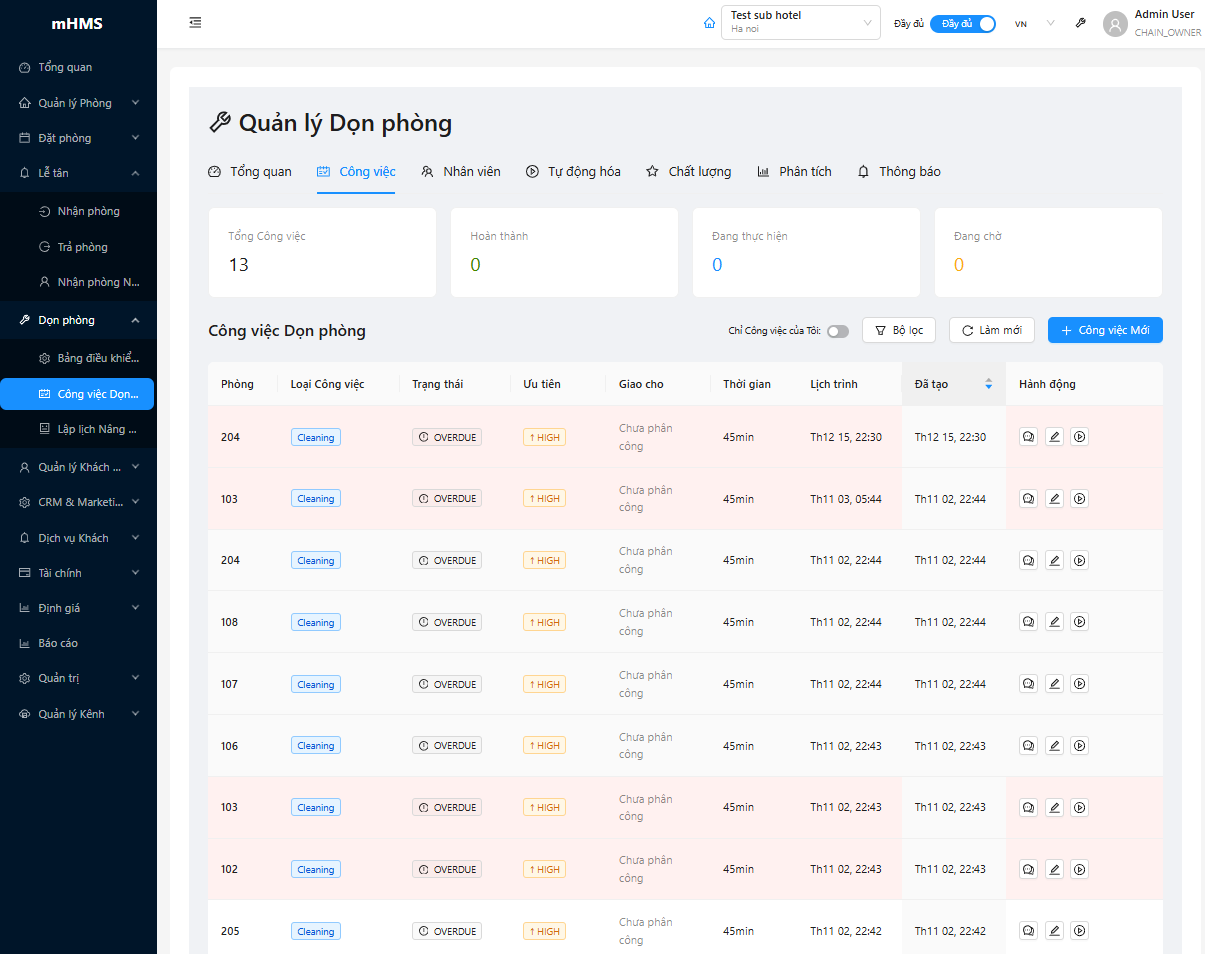
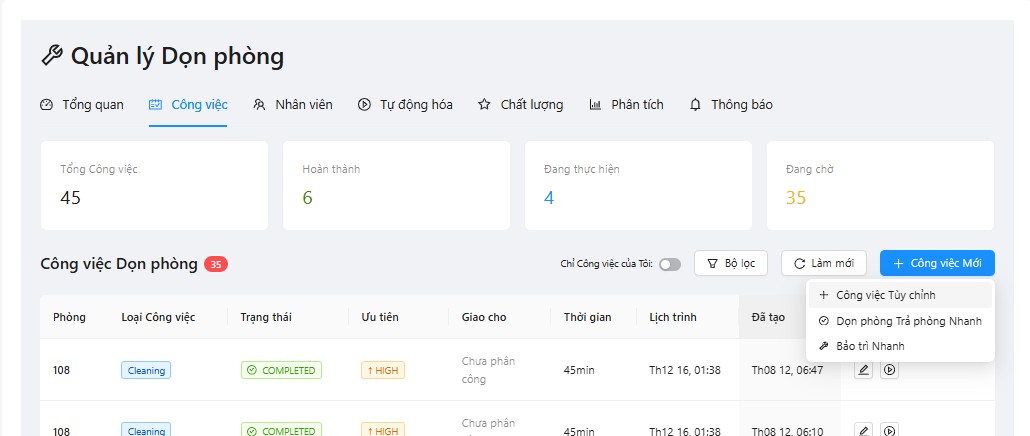
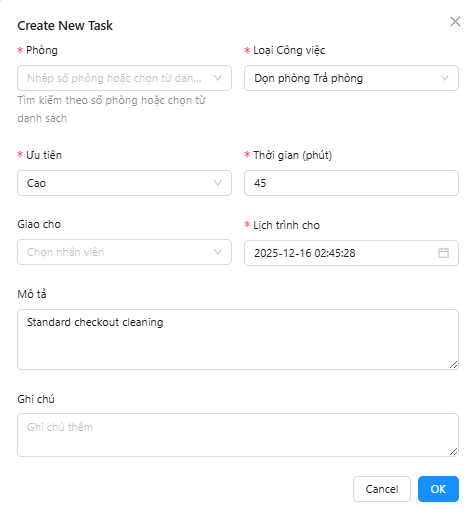
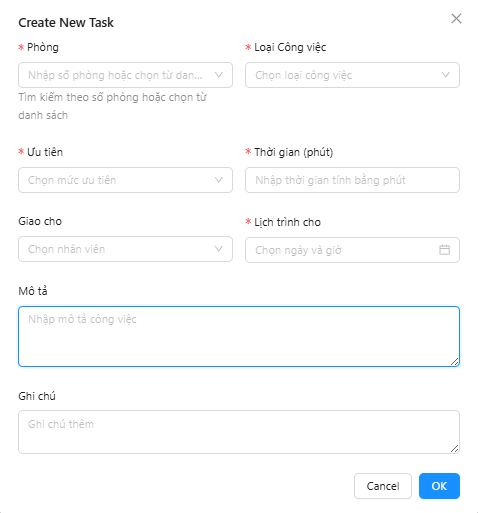
Housekeeping Tasks là trang quản lý chi tiết các nhiệm vụ dọn phòng, cho phép gán công việc cho nhân viên, theo dõi tiến độ, và quản lý chất lượng dịch vụ housekeeping.

📸 Chụp từ: http://localhost:8901/housekeeping/tasks

Housekeeping Tasks

Hướng dẫn chụp ảnh màn hình: 1. Truy cập: http://localhost:8901/housekeeping/tasks 2. Đảm bảo đã có dữ liệu mẫu (tasks, assignments, staff) 3. Chụp toàn bộ màn hình task list với filters và actions 4. Lưu ảnh tại: mkdocs/docs/assets/images/housekeeping/housekeeping-tasks.png


Tổng Quan

Trang Housekeeping Tasks cung cấp:

  • Danh sách nhiệm vụ chi tiết với khả năng lọc và sắp xếp
  • Gán công việc cho nhân viên housekeeping
  • Theo dõi tiến độ real-time từ mobile app
  • Quản lý chất lượng với inspection checklist
  • Báo cáo sự cố và maintenance requests
  • Task timeline và performance analytics

Task Management Workflow

graph TD
    A[Create Task] --> B{Task Type}
    B -->|Checkout| C[High Priority]
    B -->|Stayover| D[Medium Priority]
    B -->|Vacant| E[Low Priority]

    C --> F[Auto-Assign to Staff]
    D --> F
    E --> F

    F --> G[Staff Mobile App]
    G --> H[Start Task]
    H --> I[In Progress]
    I --> J[Complete Task]

    J --> K{Inspection}
    K -->|Pass| L[Room Clean]
    K -->|Fail| M[Re-clean]
    M --> H

    L --> N[Update Room Status]
    N --> O[Notify Reception]

    style A fill:#e3f2fd
    style C fill:#ffcdd2
    style D fill:#fff9c4
    style E fill:#c8e6c9
    style L fill:#a5d6a7

1. Task List Interface

1.1. Header & Filter Bar

📸 Chụp từ: http://localhost:8901/housekeeping/tasks

Task Filters

Hướng dẫn chụp ảnh: 1. Focus vào phần header và filter bar 2. Hiển thị các filter options (Status, Priority, Staff, Room Type) 3. Lưu tại: mkdocs/docs/assets/images/housekeeping/task-filters.png

Filter & Search Options:

┌──────────────────── HOUSEKEEPING TASKS ────────────────────┐
│                                                             │
│ [🔍 Search]  [Filter by Status ▼]  [Priority ▼]  [Staff ▼]│
│                                                             │
│ Quick Filters:                                              │
│ ├─ [All (48)]  [Pending (20)]  [In Progress (12)]         │
│ ├─ [Completed (28)]  [Overdue (3)]  [Inspection (7)]      │
│ └─ [High Priority (15)]  [My Tasks]  [Unassigned (5)]     │
│                                                             │
│ View: [📋 List]  [📅 Calendar]  [👥 By Staff]  [🏢 By Floor]│
│                                                             │
└─────────────────────────────────────────────────────────────┘

Filter Options:

  1. Status Filter:
  2. ✅ All Tasks (48)
  3. 🔵 Pending (20)
  4. 🟡 In Progress (12)
  5. 🟢 Completed (28)
  6. 🔴 Overdue (3)
  7. 🟣 Inspection Required (7)

  8. Priority Filter:

  9. 🔴 High Priority (15 tasks)
  10. 🟡 Medium Priority (20 tasks)
  11. 🟢 Low Priority (13 tasks)

  12. Staff Filter:

  13. 👤 All Staff
  14. 👤 Mai Lan (8 tasks)
  15. 👤 Hoa (10 tasks)
  16. 👤 Linh (12 tasks)
  17. 👤 Unassigned (5 tasks)

  18. Room Type Filter:

  19. 🏨 All Types
  20. 🛏️ Standard Room
  21. 🛏️🛏️ Deluxe Room
  22. 🏆 Suite
  23. 🎯 VIP Room

1.2. Task List Table

📸 Chụp từ: http://localhost:8901/housekeeping/tasks

Task List Table

Hướng dẫn chụp ảnh: 1. Chụp toàn bộ task table với nhiều rows 2. Hiển thị các columns: Room, Type, Priority, Assigned To, Status, Progress 3. Lưu tại: mkdocs/docs/assets/images/housekeeping/task-list-table.png

Task Table Layout:

┌────┬──────┬───────────────┬────────┬──────────┬──────────┬──────────┬─────────┐
│ #  │ Room │  Task Type    │Priority│Assigned  │  Status  │ Progress │ Actions │
│    │      │               │        │   To     │          │          │         │
├────┼──────┼───────────────┼────────┼──────────┼──────────┼──────────┼─────────┤
│ 1  │ 201  │ Checkout      │ 🔴 High│ Mai Lan  │🟡Progress│ [████░░] │ [View]  │
│    │Suite │ Deep Clean    │        │          │ 35/45min │  70%     │ [Edit]  │
│    │      │               │        │          │          │          │         │
├────┼──────┼───────────────┼────────┼──────────┼──────────┼──────────┼─────────┤
│ 2  │ 305  │ Stayover      │🟡Medium│ Hoa      │🟢Complete│ [██████] │ [View]  │
│    │Deluxe│ Daily Service │        │          │ 18/20min │  100%    │[Inspect]│
│    │      │               │        │          │          │          │         │
├────┼──────┼───────────────┼────────┼──────────┼──────────┼──────────┼─────────┤
│ 3  │ 401  │ Checkout      │ 🔴 High│Unassigned│🔵Pending │ [░░░░░░] │ [Assign]│
│    │Deluxe│ Deep Clean    │        │          │ Not Start│   0%     │ [View]  │
│    │      │               │        │          │          │          │         │
├────┼──────┼───────────────┼────────┼──────────┼──────────┼──────────┼─────────┤
│ 4  │ 512  │ Vacant        │🟢 Low  │ Linh     │🔵Pending │ [░░░░░░] │ [View]  │
│    │Suite │ Touch-up      │        │          │ Scheduled│   0%     │ [Start] │
│    │      │               │        │          │  2:00 PM │          │         │
├────┼──────┼───────────────┼────────┼──────────┼──────────┼──────────┼─────────┤
│ 5  │ 308  │ Turn-down     │🟡Medium│ Mai Lan  │🔵Pending │ [░░░░░░] │ [View]  │
│    │Stand.│ Evening Svc   │        │          │Scheduled │   0%     │ [Edit]  │
│    │      │               │        │          │  6:00 PM │          │         │
└────┴──────┴───────────────┴────────┴──────────┴──────────┴──────────┴─────────┘

Column Details:

  1. Room:
  2. Room number + Room type
  3. Click to view room details

  4. Task Type:

  5. Checkout Clean (Deep clean after guest departure)
  6. Stayover Service (Daily service for occupied rooms)
  7. Vacant Touch-up (Light cleaning for vacant rooms)
  8. Turn-down Service (Evening service)
  9. Deep Clean (Monthly/quarterly deep cleaning)
  10. Maintenance Clean (After repairs)

  11. Priority:

  12. 🔴 High: Urgent (checkout with early check-in)
  13. 🟡 Medium: Standard (stayover, scheduled tasks)
  14. 🟢 Low: Can wait (vacant rooms, touch-ups)

  15. Assigned To:

  16. Staff name or "Unassigned"
  17. Click to reassign

  18. Status:

  19. 🔵 Pending: Not started
  20. 🟡 In Progress: Currently being cleaned
  21. 🟢 Completed: Finished, awaiting inspection
  22. 🟣 Inspection: Under quality check
  23. ✅ Approved: Passed inspection
  24. 🔴 Overdue: Past deadline

  25. Progress:

  26. Visual progress bar
  27. Time spent / Estimated time
  28. Percentage completion

1.3. Bulk Actions

📸 Chụp từ: http://localhost:8901/housekeeping/tasks

Bulk Actions

Hướng dẫn chụp ảnh: 1. Select multiple tasks (checkboxes) 2. Hiển thị bulk action bar 3. Lưu tại: mkdocs/docs/assets/images/housekeeping/task-bulk-actions.png

Bulk Operations:

┌─────────────── BULK ACTIONS (5 tasks selected) ───────────────┐
│                                                                │
│ [Assign to Staff ▼]  [Change Priority ▼]  [Set Status ▼]     │
│ [Export to Excel]  [Print Checklist]  [Cancel Selection]      │
│                                                                │
└────────────────────────────────────────────────────────────────┘

Available Bulk Actions:

  1. Assign to Staff: Gán nhiều tasks cho 1 nhân viên
  2. Change Priority: Đổi mức độ ưu tiên
  3. Set Status: Cập nhật trạng thái hàng loạt
  4. Export to Excel: Xuất danh sách tasks
  5. Print Checklist: In checklist cho nhân viên

2. Task Details & Management

2.1. Task Detail View

📸 Chụp từ: http://localhost:8901/housekeeping/tasks

Task Details Modal

Hướng dẫn chụp ảnh: 1. Click vào 1 task để mở detail modal 2. Hiển thị full task information 3. Lưu tại: mkdocs/docs/assets/images/housekeeping/task-detail-modal.png

Task Detail Modal:

┌──────────────────── TASK DETAILS ─────────────────────┐
│                                                        │
│ TASK #HK-2025-00123                                   │
│ Room 201 - Suite - Floor 2                            │
│                                                        │
│ ═══════════════════════════════════════════════════   │
│                                                        │
│ TASK INFORMATION:                                      │
│ ├─ Type:         Checkout Deep Clean                  │
│ ├─ Priority:     🔴 High                              │
│ ├─ Status:       🟡 In Progress                       │
│ ├─ Created:      Jan 23, 2025 - 11:05 AM             │
│ ├─ Due:          Jan 23, 2025 - 2:00 PM              │
│ └─ Est. Time:    45 minutes                           │
│                                                        │
│ ASSIGNMENT:                                            │
│ ├─ Assigned to:  Mai Lan                             │
│ ├─ Assigned at:  11:10 AM                            │
│ ├─ Started at:   11:25 AM                            │
│ ├─ Time spent:   35 minutes                          │
│ └─ Progress:     70% (35/45 min)                     │
│                                                        │
│ ROOM DETAILS:                                          │
│ ├─ Room Type:    Suite (60 m²)                       │
│ ├─ Bed Type:     King Bed + Sofa Bed                │
│ ├─ Occupancy:    Check-out completed                 │
│ ├─ Guest:        Nguyễn Văn An (VIP)                │
│ ├─ Nights:       3 nights                            │
│ └─ Next Booking: Today 3:00 PM (Check-in)           │
│                                                        │
│ SPECIAL INSTRUCTIONS:                                  │
│ ├─ ⚠️ VIP Guest - Extra attention required          │
│ ├─ 🔄 Room turnover: 1 hour window                  │
│ ├─ 🍾 Champagne setup needed for next guest         │
│ └─ 🎁 Welcome amenities package                     │
│                                                        │
│ CHECKLIST: (15/20 items completed)                    │
│ ✅ Strip and change bed linens                        │
│ ✅ Clean and disinfect bathroom                       │
│ ✅ Vacuum carpets and floors                          │
│ ✅ Dust all surfaces and furniture                    │
│ ✅ Clean windows and mirrors                          │
│ ✅ Empty and clean trash bins                         │
│ ✅ Restock bathroom amenities                         │
│ ✅ Restock minibar items                              │
│ ⬜ Deep clean kitchen area                            │
│ ⬜ Polish furniture                                    │
│ ⬜ Check and replace light bulbs                      │
│ ⬜ Set welcome amenities                              │
│ ⬜ Final inspection                                    │
│                                                        │
│ SUPPLIES USED:                                         │
│ ├─ Bed linens set (King)                             │
│ ├─ Towel set (Bath x2, Hand x2, Face x4)            │
│ ├─ Bathroom amenities kit                            │
│ ├─ Minibar items (Water x4, Snacks)                 │
│ └─ Cleaning supplies                                  │
│                                                        │
│ PHOTOS: (3 uploaded)                                   │
│ [📷 Before]  [📷 During]  [📷 After]                  │
│                                                        │
│ ACTIONS:                                               │
│ [Start Task] [Pause] [Complete] [Report Issue]        │
│ [Reassign] [Change Priority] [Add Notes] [Close]      │
│                                                        │
└────────────────────────────────────────────────────────┘

2.2. Task Assignment

📸 Chụp từ: http://localhost:8901/housekeeping/tasks

Assign Staff Modal

Hướng dẫn chụp ảnh: 1. Click "Assign" trên 1 unassigned task 2. Hiển thị staff selection modal với workload info 3. Lưu tại: mkdocs/docs/assets/images/housekeeping/assign-staff-modal.png

Staff Assignment Modal:

┌────────────── ASSIGN TASK TO STAFF ──────────────┐
│                                                   │
│ Task: Room 401 - Checkout Deep Clean             │
│ Priority: 🔴 High                                │
│ Estimated Time: 45 minutes                        │
│                                                   │
│ ═════════════════════════════════════════════     │
│                                                   │
│ SELECT STAFF MEMBER:                              │
│                                                   │
│ ⭕ Mai Lan                                        │
│    ├─ Floor Assignment: Floor 4                  │
│    ├─ Current Workload: 8 tasks (63% complete)  │
│    ├─ In Progress: Room 405 (15 min remaining)  │
│    ├─ Pending: 2 tasks                           │
│    ├─ Available at: 12:15 PM                     │
│    └─ Performance: 4.8/5.0 ⭐                    │
│                                                   │
│ ○ Hoa                                             │
│    ├─ Floor Assignment: Floor 3                  │
│    ├─ Current Workload: 10 tasks (70% complete) │
│    ├─ In Progress: Room 308 (10 min remaining)  │
│    ├─ Pending: 2 tasks                           │
│    ├─ Available at: 12:30 PM                     │
│    └─ Performance: 4.9/5.0 ⭐⭐                  │
│                                                   │
│ ○ Linh                                            │
│    ├─ Floor Assignment: Floor 5-6                │
│    ├─ Current Workload: 12 tasks (50% complete) │
│    ├─ In Progress: 2 rooms                       │
│    ├─ Pending: 4 tasks                           │
│    ├─ Available at: 1:00 PM                      │
│    └─ Performance: 4.5/5.0 ⭐                    │
│                                                   │
│ ⚙️ ASSIGNMENT OPTIONS:                            │
│ ├─ ☑️ Notify staff immediately                   │
│ ├─ ☑️ Send mobile app notification               │
│ ├─ ☐ Schedule for specific time                  │
│ └─ ☐ Add to staff queue                          │
│                                                   │
│ SPECIAL INSTRUCTIONS:                             │
│ ┌─────────────────────────────────────────────┐  │
│ │ VIP guest, extra care needed.               │  │
│ │ Quick turnaround required (next check-in    │  │
│ │ at 3 PM).                                   │  │
│ └─────────────────────────────────────────────┘  │
│                                                   │
│ RECOMMENDED: Mai Lan (Best availability & floor) │
│                                                   │
│ [Assign & Notify]  [Schedule]  [Cancel]          │
│                                                   │
└───────────────────────────────────────────────────┘

Assignment Factors:

  1. Floor Match: Nhân viên phụ trách tầng đó
  2. Current Workload: Số tasks đã assigned
  3. Availability: Thời gian rảnh sớm nhất
  4. Performance Rating: Chất lượng làm việc
  5. Task Type Experience: Kinh nghiệm với loại task

3. Best Practices

3.1. Task Assignment Best Practices

Optimal Assignment Strategy:

  1. Floor-Based Assignment:
  2. Assign tasks by floor to minimize travel time
  3. Example: Mai Lan (Floor 4), Hoa (Floor 3), Linh (Floor 5-6)

  4. Workload Balance:

  5. Target: 10-12 tasks per staff per day
  6. Consider task complexity (checkout = 3x stayover)

  7. Priority Handling:

  8. High priority (checkout + early check-in): Assign to fastest staff
  9. VIP rooms: Assign to senior/experienced staff
  10. Standard tasks: Distribute evenly

  11. Time Management:

  12. Schedule stayover during guest-out hours (10 AM - 2 PM)
  13. Buffer time between checkout and check-in (minimum 1 hour)
  14. Group similar tasks together

3.2. Quality Control Guidelines

Inspection Standards:

  1. Mandatory Inspection:
  2. All VIP/Suite rooms: 100% inspection
  3. Checkout rooms with same-day check-in: 100%
  4. Standard rooms: Random 20% sampling
  5. New staff work: 100% for first month

  6. Inspection Criteria:

  7. Minimum pass score: 90% (36/40 items)
  8. Critical failures: Automatic re-clean
  9. Minor issues: Touch-up acceptable

  10. Re-clean Policy:

  11. Same staff must re-clean (learning)
  12. Quality score impact: -5 points per re-clean
  13. 3+ re-cleans per week: Retraining required

3.3. Efficiency Tips

Time-Saving Techniques:

  1. Task Batching:
  2. Clean same room types together
  3. Stock cart for multiple rooms
  4. Group tasks by floor

  5. Supply Management:

  6. Pre-stock carts each morning
  7. Keep backup supplies on each floor
  8. Request supplies proactively

  9. Communication:

  10. Use mobile app for real-time updates
  11. Report issues immediately
  12. Coordinate with reception on priorities

4. Troubleshooting

Common Issues & Solutions

Issue 1: Task Not Appearing on Mobile - Cause: Sync delay or notification disabled - Solution: Pull to refresh, check notification settings

Issue 2: Cannot Complete Task - Cause: Checklist incomplete - Solution: Ensure all mandatory items checked

Issue 3: Inspection Failed Repeatedly - Cause: Quality issues or unclear standards - Solution: Review checklist with supervisor, request training

Issue 4: Overdue Tasks - Cause: Workload imbalance or insufficient time - Solution: Reassign tasks, adjust time estimates

Issue 5: Maintenance Request Not Processed - Cause: Incorrect category or priority - Solution: Contact supervisor, escalate if urgent


5. Keyboard Shortcuts

Desktop Interface:

Task Management:
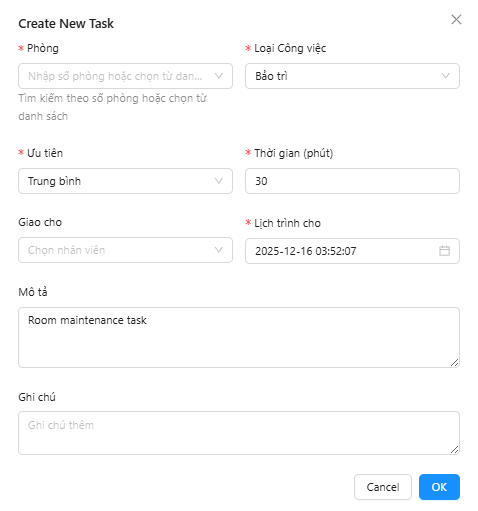
- Ctrl+N:       Create new task
- Ctrl+F:       Focus search bar
- Ctrl+R:       Refresh task list
- Ctrl+P:       Print task list
- Ctrl+E:       Export to Excel

Task Actions:
- Alt+A:        Assign selected task
- Alt+S:        Start task
- Alt+C:        Complete task
- Alt+I:        Open inspection
- Alt+M:        Report maintenance

Navigation:
- Tab:          Next field
- Shift+Tab:    Previous field
- Enter:        Confirm/Submit
- Esc:          Cancel/Close modal

← Quay lại Dashboard | Trang chủ →