Bỏ qua

Danh Sách Đặt Phòng (Booking List)

Tổng Quan

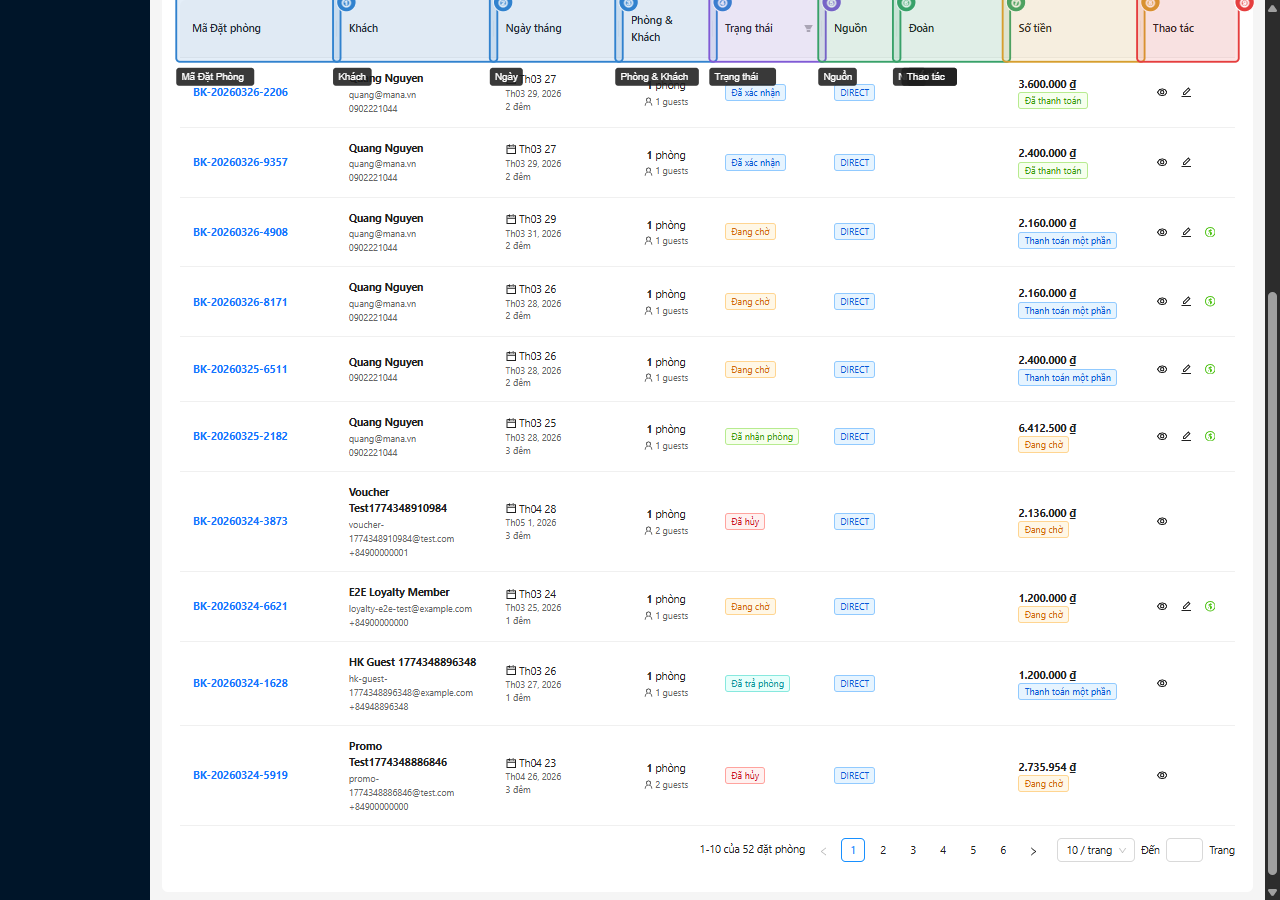
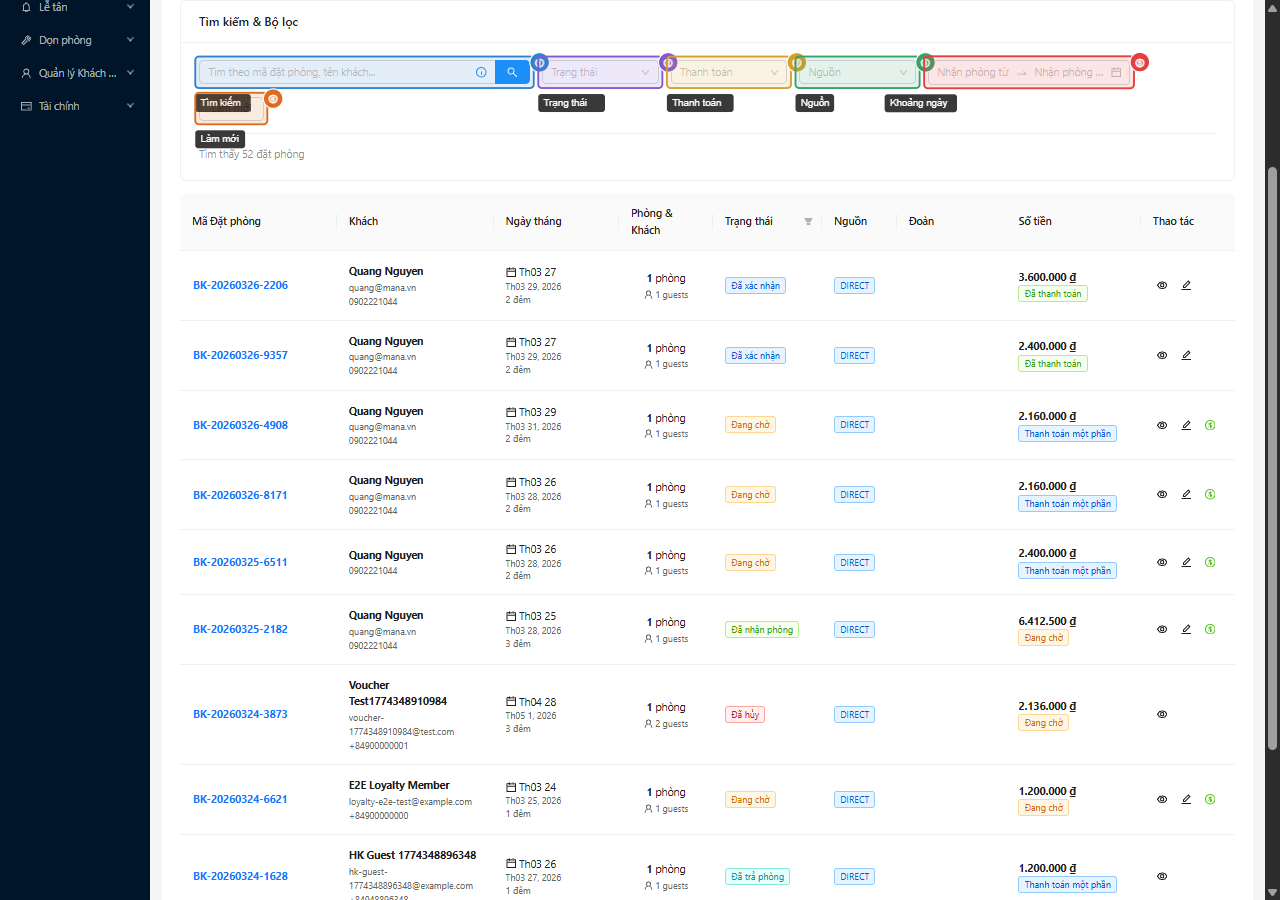
Trang Booking List là trung tâm quản lý tất cả các đặt phòng trong hệ thống. Đây là nơi bạn có thể xem, tìm kiếm, lọc, và thực hiện các thao tác quản lý với bookings như xem chi tiết, chỉnh sửa, hủy, check-in/out, và nhiều hơn nữa.

Booking List Overview 📸 Chụp từ: https://sazi.gp.mana.vn/bookings

Workflow Quản Lý Booking

graph LR
    A[Booking List] --> B[View Details]
    A --> C[Filter & Search]
    A --> D[Bulk Actions]

    B --> E[Edit Booking]
    B --> F[Check-in]
    B --> G[Check-out]
    B --> H[Cancel]

    C --> I[By Status]
    C --> J[By Date Range]
    C --> K[By Guest]
    C --> L[By Room Type]

    D --> M[Bulk Check-in]
    D --> N[Bulk Export]
    D --> O[Bulk Assign Rooms]

    E --> P[Update Guest Info]
    E --> Q[Modify Dates]
    E --> R[Add Services]

    F --> S[Assign Room]
    F --> T[Generate Folio]

    G --> U[Calculate Final Bill]
    G --> V[Process Payment]

    H --> W[Apply Cancellation Policy]
    H --> X[Process Refund]

Key Features

Viewing & Navigation: - 📋 Multiple view modes (Table, Card, Calendar, Timeline) - 🔍 Powerful search và advanced filters - 📊 Real-time booking statistics - 🎯 Quick filters by status, date, channel

Booking Management: - ✏️ Edit booking details - 🏨 Check-in/Check-out operations - ❌ Cancel bookings với refund calculation - 🔄 Modify bookings (dates, rooms, guests) - 📄 Generate invoices và confirmations

Bulk Operations: - ☑️ Multi-select bookings - 🚀 Bulk check-in/check-out - 📤 Export to Excel/CSV/PDF - 📧 Send bulk confirmation emails - 🏷️ Bulk status updates

Advanced Features: - 📅 Calendar integration - 🔔 Booking alerts và notifications - 📈 Performance metrics - 🔗 Channel source tracking - 💰 Revenue analytics


1. Dashboard & Overview

1.1 Booking Statistics Cards

Phần đầu trang hiển thị các KPIs quan trọng:

Booking Dashboard Statistics 📸 Chụp từ: Dashboard section at top

4 Main KPI Cards:

┌─────────────────────────────────────────────────────────────────────────┐
│  📊 Total Bookings        🏨 Arrivals Today    🚪 Departures Today       │
│      245                      12                    8                    │
│  ↑ +12% vs last month    On schedule           3 early check-out         │
├─────────────────────────────────────────────────────────────────────────┤
│  💰 Total Revenue         📈 Occupancy %                                 │
│  458,750,000 VND             82.5%                                       │
│  This month              ↑ +5% vs last week                              │
└─────────────────────────────────────────────────────────────────────────┘

KPI Metrics Explained:

  1. Total Bookings
  2. Count: Total active bookings
  3. Trend: Comparison với previous period
  4. Clickable: Opens bookings breakdown modal

  5. Arrivals Today

  6. Count: Expected check-ins hôm nay
  7. Status: On time, Late, Early
  8. Action: Click để filter arrivals

  9. Departures Today

  10. Count: Expected check-outs hôm nay
  11. Status: Early check-out count
  12. Action: Click để filter departures

  13. Total Revenue

  14. Amount: Sum of all booking revenue
  15. Period: Current month/week
  16. Trend: Growth percentage

  17. Occupancy %

  18. Percentage: Current occupancy rate
  19. Calculation: (Occupied Rooms / Total Rooms) × 100
  20. Trend: Comparison với baseline

1.2 Quick Actions Bar

Quick Actions Bar 📸 Chụp từ: Top action bar

┌─────────────────────────────────────────────────────────────────────┐
│ [➕ New Booking]  [📥 Import]  [📤 Export]  [📧 Send Emails]  [⚙️] │
└─────────────────────────────────────────────────────────────────────┘

Action Buttons:

  • New Booking: Redirect to Create Booking page
  • Import: Bulk import bookings from Excel/CSV
  • Export: Export danh sách to various formats
  • Send Emails: Bulk send confirmation/reminder emails
  • Settings: Customize booking list display

2. View Modes

2.1 Table View (Default)

Booking List Table View 📸 Chụp từ: Main table view

Table Layout:

┌──────────────────────────────────────────────────────────────────────────────────────────┐
│ ☐ Booking Code    Guest         Check-in    Check-out   Nights  Room      Status  Total  │
├──────────────────────────────────────────────────────────────────────────────────────────┤
│ ☐ #BK-2024-001234 John Doe      25 Dec 24   27 Dec 24     2    201       ✅ Confirmed    │
│                   📧 📱          14:00       12:00              Deluxe    2,500,000 VND   │
│                   VIP Guest                                     Ocean                     │
│                   [View] [Edit] [Check-in] [Cancel]                      [•••]            │
├──────────────────────────────────────────────────────────────────────────────────────────┤
│ ☐ #BK-2024-001235 Jane Smith    26 Dec 24   28 Dec 24     2    Standard  🏨 Checked In   │
│                   📧            15:00       12:00              Double    1,800,000 VND   │
│                   Booking.com                                   305                       │
│                   [View] [Services] [Check-out]                         [•••]            │
├──────────────────────────────────────────────────────────────────────────────────────────┤
│ ☐ #BK-2024-001236 Michael Lee   27 Dec 24   30 Dec 24     3    Suite     ⏳ Pending      │
│                   📧 📱          14:00       12:00              Exec.     4,500,000 VND   │
│                   Corporate                                     401                       │
│                   [View] [Edit] [Confirm] [Cancel]                      [•••]            │
└──────────────────────────────────────────────────────────────────────────────────────────┘

Table Columns:

  1. Checkbox: Multi-select cho bulk actions
  2. Booking Code: Unique identifier (clickable)
  3. Guest: Name + contact icons + tags (VIP, Repeat, etc.)
  4. Check-in: Date + Time + Early/Late indicators
  5. Check-out: Date + Time
  6. Nights: Number of nights
  7. Room: Room number + Room type
  8. Status: Badge với color-coding
  9. Total: Total booking amount
  10. Actions: Quick action buttons
  11. More (•••): Dropdown menu với additional actions

Status Badges:

✅ Confirmed       - Booking confirmed, awaiting arrival
🏨 Checked In      - Guest currently in-house
✅ Checked Out     - Completed stay
⏳ Pending         - Awaiting confirmation/payment
⚠️ No Show         - Guest didn't arrive
❌ Cancelled       - Booking cancelled
🔄 Modified        - Recently modified
💳 Pending Payment - Payment pending
🔒 Guaranteed      - Guaranteed booking (credit card hold)

Guest Tags/Badges:

🌟 VIP             - VIP guest
🔁 Repeat          - Returning guest
🏢 Corporate       - Corporate booking
👥 Group           - Group booking
🎂 Birthday        - Special occasion
💍 Honeymoon       - Honeymoon package

2.2 Card View

Booking List Card View 📸 Chụp từ: Toggle to Card view

┌─────────────────────────────┐  ┌─────────────────────────────┐
│ #BK-2024-001234             │  │ #BK-2024-001235             │
│ ✅ Confirmed                │  │ 🏨 Checked In               │
│                             │  │                             │
│ 👤 John Doe (VIP)           │  │ 👤 Jane Smith               │
│ 📧 john.doe@email.com       │  │ 📧 jane.smith@email.com     │
│ 📱 +84 123 456 789          │  │                             │
│                             │  │                             │
│ 📅 25-27 Dec 2024 (2N)      │  │ 📅 26-28 Dec 2024 (2N)      │
│ 🏨 Room 201 - Deluxe Ocean  │  │ 🏨 Room 305 - Standard      │
│ 💰 2,500,000 VND            │  │ 💰 1,800,000 VND            │
│                             │  │                             │
│ 🌐 Direct Booking           │  │ 🌐 Booking.com              │
│                             │  │                             │
│ [View] [Edit] [Check-in]    │  │ [View] [Services] [Checkout]│
└─────────────────────────────┘  └─────────────────────────────┘

Card Features: - Compact visual representation - Color-coded borders by status - Quick stats at a glance - Hover effects với additional info - Responsive grid layout (2-4 columns)

2.3 Calendar View

Booking List Calendar View 📸 Chụp từ: Calendar tab

Calendar Layout:

                    December 2024
┌───────────────────────────────────────────────────────────┐
│  Mon    Tue    Wed    Thu    Fri    Sat    Sun           │
├───────────────────────────────────────────────────────────┤
│         │      │      │      │      │  1   │  2           │
│         │      │      │      │      │      │              │
├─────────┼──────┼──────┼──────┼──────┼──────┼──────────────┤
│   3     │  4   │  5   │  6   │  7   │  8   │  9           │
│         │      │      │      │      │      │              │
├─────────┼──────┼──────┼──────┼──────┼──────┼──────────────┤
│  10     │ 11   │ 12   │ 13   │ 14   │ 15   │ 16           │
│         │      │      │      │      │      │              │
├─────────┼──────┼──────┼──────┼──────┼──────┼──────────────┤
│  17     │ 18   │ 19   │ 20   │ 21   │ 22   │ 23           │
│         │      │      │      │      │      │              │
├─────────┼──────┼──────┼──────┼──────┼──────┼──────────────┤
│  24     │ 25   │ 26   │ 27   │ 28   │ 29   │ 30           │
│         │ 📥3  │ 🏨5  │ 🏨6  │ 📤2  │      │              │
│         │      │ 📥2  │ 📤1  │      │      │              │
└─────────┴──────┴──────┴──────┴──────┴──────┴──────────────┘

Legend:
📥 Check-ins (Arrivals)
📤 Check-outs (Departures)
🏨 In-house guests

Calendar Features: - Monthly/Weekly/Daily view toggle - Color-coded events (arrivals, departures, in-house) - Click date để view bookings for that day - Hover tooltip với booking details - Drag-and-drop để modify booking dates

2.4 Timeline View

Booking List Timeline View 📸 Chụp từ: Timeline tab

Timeline Gantt Chart:

Room  │ 20 Dec │ 21 Dec │ 22 Dec │ 23 Dec │ 24 Dec │ 25 Dec │ 26 Dec │
──────┼────────┼────────┼────────┼────────┼────────┼────────┼────────┤
201   │        │ [John Doe - #001234]    →       │        │        │
      │        │ ✅ Confirmed                     │        │        │
──────┼────────┼────────┼────────┼────────┼────────┼────────┼────────┤
202   │ [Jane Smith - #001235] →│        │        │        │        │
      │ 🏨 Checked In           │        │        │        │        │
──────┼────────┼────────┼────────┼────────┼────────┼────────┼────────┤
301   │        │        │        │ [Michael Lee - #001236]   →      │
      │        │        │        │ ⏳ Pending                        │
──────┼────────┼────────┼────────┼────────┼────────┼────────┼────────┤
305   │ [Available]     →        │ [Maintenance] →│        │        │
──────┴────────┴────────┴────────┴────────┴────────┴────────┴────────┘

Timeline Features: - Horizontal bars representing booking duration - Color-coded by booking status - Shows room availability gaps - Maintenance/OOO blocks visible - Hover để view booking details - Drag bars để extend/modify dates - Zoom in/out time scale


3. Search & Filters

Global Search Bar 📸 Chụp từ: Top search bar

┌──────────────────────────────────────────────────────────┐
│ 🔍 Search bookings...                            [Search]│
│    Booking code, guest name, email, phone, or room       │
└──────────────────────────────────────────────────────────┘

Searchable Fields: - Booking Code (#BK-2024-001234) - Guest Name (John Doe) - Email (john.doe@email.com) - Phone (+84 123 456 789) - Room Number (201, 305) - Confirmation Number

Search Features: - Auto-complete suggestions - Fuzzy matching - Search history - Advanced search toggle

3.2 Quick Filters

Quick Filters Bar 📸 Chụp từ: Filter chips below search

┌─────────────────────────────────────────────────────────────────────┐
│ Filters: [All] [Today's Arrivals] [Today's Departures] [In-house]  │
│          [Pending] [Confirmed] [Cancelled] [Clear All]              │
└─────────────────────────────────────────────────────────────────────┘

Quick Filter Options:

  1. All: Show all bookings
  2. Today's Arrivals: Check-in date = Today
  3. Today's Departures: Check-out date = Today
  4. In-house: Currently checked in
  5. Pending: Status = Pending
  6. Confirmed: Status = Confirmed
  7. Cancelled: Status = Cancelled
  8. This Week: Date range = Current week
  9. This Month: Date range = Current month

3.3 Advanced Filters

Advanced Filters Panel 📸 Chụp từ: Click "Advanced Filters" button

┌─────────────────────────────────────────────────────────────┐
│ Advanced Filters                                      [Close]│
├─────────────────────────────────────────────────────────────┤
│ Date Range                                                   │
│ Check-in:  [From: ________] [To: ________]                  │
│ Check-out: [From: ________] [To: ________]                  │
│                                                              │
│ Status (Multi-select)                                        │
│ ☑ Confirmed    ☑ Checked In    ☐ Checked Out               │
│ ☑ Pending      ☐ Cancelled     ☐ No Show                   │
│                                                              │
│ Booking Source                                               │
│ ☑ Direct       ☑ Booking.com   ☐ Agoda                     │
│ ☑ Expedia      ☐ Phone         ☐ Walk-in                   │
│                                                              │
│ Room Type                                                    │
│ ☑ All Types    ☐ Standard      ☐ Deluxe                    │
│ ☐ Suite        ☐ Villa         ☐ Apartment                 │
│                                                              │
│ Guest Type                                                   │
│ ☐ VIP          ☐ Repeat        ☐ Corporate                 │
│ ☐ Group        ☐ First-time                                │
│                                                              │
│ Payment Status                                               │
│ ☐ Paid         ☐ Partially Paid  ☐ Unpaid                  │
│ ☐ Refunded     ☐ Pending                                   │
│                                                              │
│ Price Range                                                  │
│ Min: [_________] VND    Max: [_________] VND                │
│ [────────────────●──────] (500k - 10M)                      │
│                                                              │
│ Nights Range                                                 │
│ Min: [1] nights    Max: [30] nights                         │
│                                                              │
│ Special Flags                                                │
│ ☐ Has special requests    ☐ Has add-ons                     │
│ ☐ Has discounts           ☐ Modified booking                │
│ ☐ Guaranteed              ☐ Non-refundable                  │
│                                                              │
│            [Reset All]           [Apply Filters]             │
└─────────────────────────────────────────────────────────────┘

Filter Combinations: - Multiple filters can be combined - Filters apply with AND logic - Real-time result count display - Save filter presets for quick access

3.4 Saved Filters

Saved Filter Presets 📸 Chụp từ: Saved filters dropdown

┌────────────────────────────────────────┐
│ 📌 My Saved Filters                    │
├────────────────────────────────────────┤
│ 🏨 Check-ins This Week                 │
│ 🚪 Check-outs Today                    │
│ ⏳ Pending Confirmations                │
│ 🌟 VIP Guests                           │
│ 🌐 OTA Bookings                         │
│ 💰 High-Value Bookings (>5M)           │
│                                        │
│ [+ Create New Filter]                  │
└────────────────────────────────────────┘

4. Booking Actions

4.1 View Booking Details

View Booking Details Modal 📸 Chụp từ: Click "View" button

┌────────────────────────────────────────────────────────────────────┐
│ Booking Details - #BK-2024-001234                            [✕]   │
├────────────────────────────────────────────────────────────────────┤
│ Tabs: [Overview] [Guest] [Pricing] [History] [Notes]              │
├────────────────────────────────────────────────────────────────────┤
│ OVERVIEW TAB                                                       │
│                                                                    │
│ Status: ✅ Confirmed                  Created: 15 Dec 2024, 10:30 │
│ Booking Code: #BK-2024-001234         By: John (Front Desk)       │
│                                                                    │
│ STAY DETAILS                                                       │
│ Check-in:  25 Dec 2024, 14:00                                     │
│ Check-out: 27 Dec 2024, 12:00                                     │
│ Nights: 2                                                          │
│ Adults: 2 | Children: 1 (Age 8) | Infants: 0                      │
│                                                                    │
│ ROOM ASSIGNMENT                                                    │
│ Room Type: Deluxe Ocean View                                       │
│ Room Number: 201                                                   │
│ Bed: 1 King Bed                                                    │
│ Rate Plan: BAR (Best Available Rate)                               │
│                                                                    │
│ GUEST INFORMATION                                                  │
│ Primary Guest: John Doe (VIP)                                      │
│ Email: john.doe@email.com                                          │
│ Phone: +84 123 456 789                                             │
│ Nationality: Vietnam                                               │
│                                                                    │
│ PRICING SUMMARY                                                    │
│ Room Charges (2 nights):        5,000,000 VND                     │
│ Extra Bed:                        600,000 VND                     │
│ Add-ons (Breakfast, Airport):   1,200,000 VND                     │
│ Subtotal:                        6,800,000 VND                     │
│ Service Charge (10%):              680,000 VND                     │
│ VAT (8%):                          598,400 VND                     │
│ ─────────────────────────────────────────────                     │
│ Total:                           8,078,400 VND                     │
│                                                                    │
│ PAYMENT                                                            │
│ Method: Pay at Hotel                                               │
│ Status: 💳 Pending Payment                                         │
│ Paid: 0 VND                                                        │
│ Balance Due: 8,078,400 VND                                         │
│                                                                    │
│ SPECIAL REQUESTS                                                   │
│ • Early check-in (before 14:00)                                    │
│ • High floor                                                       │
│ • Extra bed required                                               │
│ • Anniversary celebration - arrange flowers and wine               │
│                                                                    │
│ SOURCE & CHANNEL                                                   │
│ Source: Direct Booking                                             │
│ Channel: Website                                                   │
│ Referrer: Google Organic                                           │
│                                                                    │
│ CANCELLATION POLICY                                                │
│ Type: Moderate                                                     │
│ Free Cancellation Until: 20 Dec 2024, 18:00                        │
│ After Deadline: 1 night charge                                     │
│ No-Show: Full amount charged                                       │
│                                                                    │
│                [Edit] [Check-in] [Cancel Booking] [Print]          │
└────────────────────────────────────────────────────────────────────┘

Tab Features:

Overview Tab: (shown above) - Complete booking summary - All essential information at a glance - Quick action buttons

Guest Tab: Guest Information Tab 📸 Chụp từ: Guest tab in booking details

GUEST INFORMATION TAB

Primary Guest
────────────────────────────────────
Title: Mr.
Name: John Doe
Email: john.doe@email.com
Phone: +84 123 456 789
Alternate Phone: +84 987 654 321
Date of Birth: 15 May 1985 (39 years old)
Nationality: Vietnam
ID Type: Passport
ID Number: AB1234567
Address: 123 Main Street, District 1, Ho Chi Minh City

Guest Tags: 🌟 VIP, 🔁 Repeat Guest
Member Tier: Gold Member
Total Stays: 12
Total Spent: 48,500,000 VND
Last Stay: 15 Nov 2024

Additional Guests (Room 2)
────────────────────────────────────
Name: Jane Doe
Relationship: Spouse
Email: jane.doe@email.com
Phone: +84 987 654 321

Preferences
────────────────────────────────────
Room Preferences:
• High floor
• Away from elevator
• Non-smoking

Dietary Requirements:
• Vegetarian
• No peanuts (allergy)

Special Occasions:
• Anniversary (26 Dec)

Guest History
────────────────────────────────────
Previous Bookings: 12
Average Nights: 2.5
Favorite Room Type: Deluxe Ocean View
Average Spend: 4,041,667 VND/booking
Last Feedback: ⭐⭐⭐⭐⭐ (5/5) - "Excellent service!"

            [Edit Guest Info] [View Full History]

Pricing Tab: Pricing Breakdown Tab 📸 Chụp từ: Pricing tab

PRICING TAB

Nightly Rate Breakdown
────────────────────────────────────────────────
Date         Room Rate    Occupancy   Total
25 Dec 24    2,500,000    2 Adults    2,500,000 VND
26 Dec 24    2,500,000    1 Child       300,000 VND (Extra bed)
                                      ─────────────
Subtotal (2 nights):                  5,300,000 VND

Add-ons & Services
────────────────────────────────────────────────
Item                    Qty    Unit Price   Total
Breakfast Buffet         2      350,000     700,000 VND
Airport Pickup           1      500,000     500,000 VND
                                           ─────────
Add-ons Subtotal:                          1,200,000 VND

Packages
────────────────────────────────────────────────
Romantic Package                           2,500,000 VND
(Includes: Flowers, Wine, Candlelit Dinner)

Discounts & Promotions
────────────────────────────────────────────────
Code: SUMMER2024                            -500,000 VND
Member Discount (Gold 10%)                  -680,000 VND
                                           ─────────
Total Discounts:                          -1,180,000 VND

Taxes & Fees
────────────────────────────────────────────────
Service Charge (10%):                        680,000 VND
Tourism Tax (2%):                            124,000 VND
VAT (8%):                                    598,400 VND
City Tax:                                     50,000 VND
                                           ─────────
Total Taxes:                               1,452,400 VND

GRAND TOTAL
────────────────────────────────────────────────
Room Charges:                              5,300,000 VND
Add-ons:                                   1,200,000 VND
Packages:                                  2,500,000 VND
Discounts:                                -1,180,000 VND
Taxes & Fees:                              1,452,400 VND
════════════════════════════════════════════════
Total Amount:                              9,272,400 VND

Payment Schedule
────────────────────────────────────────────────
Deposit Required: 2,781,720 VND (30%)
Due Date: 20 Dec 2024
Status: ⏳ Pending

Balance Due: 6,490,680 VND
Due Date: At Check-in (25 Dec 2024)

Payment History
────────────────────────────────────────────────
No payments received yet.

          [Add Payment] [Apply Discount] [Modify Pricing]

History Tab: Booking History Tab 📸 Chụp từ: History tab

BOOKING HISTORY & TIMELINE

Timeline
────────────────────────────────────────────────
📅 15 Dec 2024, 10:30 AM
   Booking Created
   By: John (Front Desk)
   Status: ⏳ Pending

📧 15 Dec 2024, 10:32 AM
   Confirmation Email Sent
   To: john.doe@email.com
   Template: Booking Confirmation

💳 16 Dec 2024, 02:15 PM
   Payment Attempted
   Method: Credit Card (Visa ****1234)
   Amount: 2,781,720 VND
   Status: ❌ Failed (Insufficient funds)

✏️ 16 Dec 2024, 02:20 PM
   Booking Modified
   By: John (Front Desk)
   Changes: Payment method changed from "Pay Now" to "Pay at Hotel"

✅ 16 Dec 2024, 02:21 PM
   Booking Confirmed
   By: System
   Reason: Payment method updated

📧 16 Dec 2024, 02:22 PM
   Confirmation Email Sent
   To: john.doe@email.com
   Template: Booking Confirmed (Updated)

🏨 17 Dec 2024, 09:00 AM
   Room Assigned
   By: Sarah (Reception)
   Room: 201 (Deluxe Ocean View)
   Notes: High floor as requested

📝 18 Dec 2024, 11:30 AM
   Special Request Added
   By: John Doe (Guest)
   Request: Anniversary flowers and wine

📧 22 Dec 2024, 08:00 AM
   Reminder Email Sent
   To: john.doe@email.com
   Template: Upcoming Stay Reminder (3 days)

Modification History
────────────────────────────────────────────────
16 Dec 2024, 02:20 PM - Payment method changed
• Before: Pay Now (Credit Card)
• After: Pay at Hotel
• Reason: Payment failed
• Modified by: John (Front Desk)

System Logs
────────────────────────────────────────────────
[15 Dec 10:30] Booking created - ID: BK-2024-001234
[15 Dec 10:31] Availability checked - Room type available
[15 Dec 10:32] Email queued - Confirmation
[16 Dec 14:15] Payment gateway called - Amount: 2781720
[16 Dec 14:15] Payment failed - Error: Insufficient funds
[16 Dec 14:20] Booking updated - Payment method changed
[16 Dec 14:21] Status changed: Pending → Confirmed
[17 Dec 09:00] Room assigned - Room ID: 201
[22 Dec 08:00] Email queued - Reminder

                    [Export Timeline] [View Full Logs]

Notes Tab: Notes & Comments Tab 📸 Chụp từ: Notes tab

NOTES & COMMENTS

Internal Notes (Staff Only)
────────────────────────────────────────────────
📝 18 Dec 2024, 11:45 AM - Sarah (Reception)
   Guest called to request anniversary package.
   Added flowers and wine. Arranged with Housekeeping.
   Update: Confirmed delivery for check-in day.

📝 19 Dec 2024, 02:30 PM - Tom (Manager)
   VIP guest - regular customer. Ensure excellent service.
   Consider room upgrade if Suite available on check-in.

📝 20 Dec 2024, 09:00 AM - John (Front Desk)
   Called guest to confirm early check-in request.
   Guest confirmed arrival around 12:00 PM.
   Room will be ready by 12:30 PM.

[+ Add Internal Note]

Guest Communications
────────────────────────────────────────────────
📧 15 Dec 2024, 10:32 AM - Email Sent
   Subject: Booking Confirmation - #BK-2024-001234
   Status: ✅ Delivered & Read

📧 16 Dec 2024, 02:22 PM - Email Sent
   Subject: Updated Confirmation - #BK-2024-001234
   Status: ✅ Delivered & Read

💬 18 Dec 2024, 11:30 AM - Guest Message
   From: john.doe@email.com
   "Can we add the anniversary package? It's our 10th anniversary!"
   Response: Sent by Sarah at 11:45 AM

📧 22 Dec 2024, 08:00 AM - Email Sent
   Subject: Your Stay is Coming Up!
   Status: ✅ Delivered

[+ Send Email] [+ Add Note] [View All Communications]

Alerts & Reminders
────────────────────────────────────────────────
⏰ 25 Dec 2024, 09:00 AM
   Reminder: Prepare room 201 for early check-in
   Assigned to: Housekeeping Team

⏰ 25 Dec 2024, 11:00 AM
   Reminder: Arrange anniversary flowers & wine
   Assigned to: Concierge

🔔 25 Dec 2024, 12:00 PM
   Alert: Expected arrival (Early check-in)
   Notify: Front Desk

[+ Add Reminder]

4.2 Edit Booking

Edit Booking Modal 📸 Chụp từ: Click "Edit" button

┌────────────────────────────────────────────────────────────────┐
│ Edit Booking - #BK-2024-001234                          [✕]   │
├────────────────────────────────────────────────────────────────┤
│ ⚠️ Warning: Changes may affect pricing and availability        │
├────────────────────────────────────────────────────────────────┤
│                                                                │
│ DATES & GUESTS                                                 │
│ Check-in:  [25 Dec 2024 ▼] [14:00 ▼]                         │
│ Check-out: [27 Dec 2024 ▼] [12:00 ▼]                         │
│ Nights: 2                                                      │
│                                                                │
│ Adults: [2 ▼]  Children: [1 ▼]  Age: [8]                     │
│                                                                │
│ ROOM SELECTION                                                 │
│ Room Type: [Deluxe Ocean View ▼]                              │
│ Room Number: [201 ▼]                                          │
│ Rate Plan: [BAR - Best Available Rate ▼]                      │
│                                                                │
│ □ Check availability for new dates                            │
│                                                                │
│ GUEST INFORMATION                                              │
│ Primary Guest: John Doe                                        │
│ Email: [john.doe@email.com]                                    │
│ Phone: [+84 123 456 789]                                       │
│                                                                │
│ [Edit Guest Details]                                           │
│                                                                │
│ SPECIAL REQUESTS                                               │
│ ☑ Early check-in    ☑ High floor    ☑ Extra bed              │
│ ☐ Late check-out    ☐ Low floor     ☐ Connecting rooms        │
│                                                                │
│ Additional Notes:                                              │
│ ┌────────────────────────────────────────────────────────┐    │
│ │Anniversary celebration - arrange flowers and wine      │    │
│ └────────────────────────────────────────────────────────┘    │
│                                                                │
│ PRICING ADJUSTMENT                                             │
│ Original Total: 8,078,400 VND                                  │
│ New Total: 8,078,400 VND (No change)                           │
│                                                                │
│ REASON FOR MODIFICATION                                        │
│ ┌────────────────────────────────────────────────────────┐    │
│ │Guest requested changes                                 │    │
│ └────────────────────────────────────────────────────────┘    │
│                                                                │
│ □ Send updated confirmation email to guest                     │
│ □ Notify housekeeping of changes                               │
│                                                                │
│                    [Cancel] [Save Changes]                     │
└────────────────────────────────────────────────────────────────┘

Edit Restrictions: - Can't modify if checked in (unless authorized) - Date changes check availability first - Price recalculation automatic - Modification history tracked - Reason for modification required

4.3 Check-in Process

Check-in Modal 📸 Chụp từ: Click "Check-in" button

┌────────────────────────────────────────────────────────────────┐
│ Check-in - Booking #BK-2024-001234                      [✕]   │
├────────────────────────────────────────────────────────────────┤
│                                                                │
│ GUEST INFORMATION                                              │
│ Guest: John Doe                                                │
│ Email: john.doe@email.com                                      │
│ Phone: +84 123 456 789                                         │
│                                                                │
│ ✅ Identity Verification                                        │
│ ID Type: [Passport ▼]                                         │
│ ID Number: [AB1234567]                                         │
│ Expiry Date: [15/05/2030]                                      │
│ □ ID scanned and uploaded                                      │
│                                                                │
│ ROOM ASSIGNMENT                                                │
│ Originally Assigned: Room 201 (Deluxe Ocean View)             │
│ Current Assignment: [201 - Deluxe Ocean View ▼]               │
│                                                                │
│ ℹ️ Room Status: ✅ Clean & Ready                               │
│                                                                │
│ ARRIVAL INFORMATION                                            │
│ Expected: 25 Dec 2024, 14:00                                   │
│ Actual: [25 Dec 2024 ▼] [12:30 ▼] (Early arrival)            │
│                                                                │
│ Transportation: [Own Car ▼]                                    │
│ License Plate: [29A-12345]                                     │
│                                                                │
│ PAYMENT VERIFICATION                                           │
│ Total Amount: 8,078,400 VND                                    │
│ Paid: 0 VND                                                    │
│ Balance Due: 8,078,400 VND                                     │
│                                                                │
│ Payment Method: [Credit Card ▼]                                │
│ □ Hold 100% on credit card as guarantee                        │
│ □ Collect full payment now                                     │
│ ☑ Collect at checkout                                          │
│                                                                │
│ Credit Card Details (For Authorization Hold):                  │
│ Card Number: [____-____-____-____]                            │
│ Expiry: [MM/YY]  CVV: [___]                                   │
│ Cardholder: [________________]                                 │
│                                                                │
│ Authorization Amount: [8,078,400] VND                          │
│                                                                │
│ SPECIAL REQUESTS CONFIRMATION                                  │
│ ☑ Early check-in arranged (Room ready at 12:30)               │
│ ☑ High floor (Room 201 - Floor 2)                             │
│ ☑ Extra bed delivered to room                                 │
│ ☑ Anniversary flowers & wine prepared                          │
│                                                                │
│ KEY CARDS                                                      │
│ Number of keys: [2 ▼]                                         │
│ Key Card Numbers: Auto-assigned on check-in                    │
│                                                                │
│ ADDITIONAL SERVICES                                            │
│ □ Early check-in fee: 500,000 VND (Before 10:00)              │
│ □ Late check-out requested                                     │
│ □ Airport transfer on departure                                │
│                                                                │
│ GUEST SIGNATURES                                               │
│ Registration Form: [📄 Print] [✍️ Digital Signature]           │
│ Terms & Conditions: □ Guest acknowledged                       │
│                                                                │
│ CHECK-IN NOTES                                                 │
│ ┌────────────────────────────────────────────────────────┐    │
│ │Guest arrived early. Room was ready. Welcomed with     │    │
│ │anniversary flowers. Very satisfied.                    │    │
│ └────────────────────────────────────────────────────────┘    │
│                                                                │
│ □ Send welcome email                                           │
│ □ Send room access details via SMS                             │
│ □ Notify housekeeping of check-in                              │
│                                                                │
│              [Cancel] [Print Registration] [Check-in Guest]    │
└────────────────────────────────────────────────────────────────┘

Check-in Workflow:

graph TD
    A[Start Check-in] --> B{Guest Arrived?}
    B -->|Yes| C[Verify Identity]
    B -->|No| D[Mark as No-Show]

    C --> E[Confirm Room Assignment]
    E --> F{Room Ready?}
    F -->|Yes| G[Process Payment/Hold]
    F -->|No| H[Find Alternative Room]

    H --> G
    G --> I[Issue Key Cards]
    I --> J[Collect Signatures]
    J --> K[Print Registration Card]
    K --> L[Send Welcome Email/SMS]
    L --> M[Update Status: Checked In]
    M --> N[Notify Housekeeping]
    N --> O[Complete]

4.4 Check-out Process

Check-out Modal 📸 Chụp từ: Click "Check-out" button

┌────────────────────────────────────────────────────────────────┐
│ Check-out - Booking #BK-2024-001234                     [✕]   │
├────────────────────────────────────────────────────────────────┤
│                                                                │
│ GUEST & STAY INFORMATION                                       │
│ Guest: John Doe                                                │
│ Room: 201 (Deluxe Ocean View)                                  │
│ Check-in: 25 Dec 2024, 12:30                                   │
│ Expected Check-out: 27 Dec 2024, 12:00                         │
│ Actual Check-out: [27 Dec 2024 ▼] [11:45 ▼] (On time)        │
│                                                                │
│ FOLIO & CHARGES                                                │
│ ┌──────────────────────────────────────────────────────────┐  │
│ │ GUEST FOLIO - #BK-2024-001234                            │  │
│ ├──────────────────────────────────────────────────────────┤  │
│ │ Date       Description              Amount                │  │
│ ├──────────────────────────────────────────────────────────┤  │
│ │ 25 Dec     Room Charge (Deluxe)     2,500,000           │  │
│ │ 25 Dec     Extra Bed                  300,000           │  │
│ │ 25 Dec     Breakfast Buffet × 2       700,000           │  │
│ │ 25 Dec     Airport Pickup             500,000           │  │
│ │ 25 Dec     Romantic Package         2,500,000           │  │
│ │ 26 Dec     Room Charge (Deluxe)     2,500,000           │  │
│ │ 26 Dec     Extra Bed                  300,000           │  │
│ │ 26 Dec     Breakfast Buffet × 2       700,000           │  │
│ │ 26 Dec     Mini Bar (Charges)         150,000  [New]    │  │
│ │ 26 Dec     Spa Service               800,000  [New]    │  │
│ │ 26 Dec     Room Service Dinner        650,000  [New]    │  │
│ │            ─────────────────────────────────────         │  │
│ │            Subtotal                11,600,000           │  │
│ │            Service Charge (10%)      1,160,000           │  │
│ │            VAT (8%)                    928,000           │  │
│ │            Discount (Summer24)        -500,000           │  │
│ │            Member Discount           -1,160,000           │  │
│ │            ═════════════════════════════════════         │  │
│ │            TOTAL DUE              12,028,000 VND        │  │
│ └──────────────────────────────────────────────────────────┘  │
│                                                                │
│ [+ Add Charge] [- Remove Charge] [View Detailed Folio]        │
│                                                                │
│ PAYMENT SUMMARY                                                │
│ Total Amount Due: 12,028,000 VND                               │
│ Previous Payments: 0 VND                                       │
│ Balance Due: 12,028,000 VND                                    │
│                                                                │
│ PAYMENT PROCESSING                                             │
│ Payment Method: [Credit Card ▼]                                │
│                                                                │
│ Amount to Charge: [12,028,000] VND                            │
│ Card: Visa ****1234 (On file)                                 │
│ □ Use card on file                                             │
│ □ Use different card                                           │
│                                                                │
│ Split Payment:                                                 │
│ □ Pay partially now (Amount: [_______])                       │
│ □ Pay with multiple methods                                    │
│                                                                │
│ ROOM INSPECTION                                                │
│ ☑ No damages                                                   │
│ ☐ Damages found (Describe):                                    │
│ ┌────────────────────────────────────────────────────────┐    │
│ │                                                         │    │
│ └────────────────────────────────────────────────────────┘    │
│                                                                │
│ Damage Charge: [_______] VND                                   │
│                                                                │
│ KEY CARDS RETURNED                                             │
│ Issued: 2 keys                                                 │
│ Returned: [2 ▼] keys                                          │
│ Missing Keys Charge: 0 VND                                     │
│                                                                │
│ GUEST FEEDBACK                                                 │
│ Would you like to rate your stay?                              │
│ ⭐ ⭐ ⭐ ⭐ ⭐ (Click to rate)                                    │
│                                                                │
│ Comments:                                                      │
│ ┌────────────────────────────────────────────────────────┐    │
│ │Excellent stay! Loved the ocean view. Staff was very   │    │
│ │helpful. Will definitely come back!                     │    │
│ └────────────────────────────────────────────────────────┘    │
│                                                                │
│ CHECKOUT PREFERENCES                                           │
│ □ Email invoice to: john.doe@email.com                         │
│ □ Print invoice                                                │
│ □ Provide receipt via SMS                                      │
│                                                                │
│ DEPARTURE INFORMATION                                          │
│ Transportation: [Taxi ▼]                                       │
│ □ Arrange airport transfer (Fee: 500,000 VND)                 │
│                                                                │
│ □ Store luggage (Departure flight: 6:00 PM)                    │
│                                                                │
│ CHECKOUT NOTES                                                 │
│ ┌────────────────────────────────────────────────────────┐    │
│ │Guest very satisfied. Left positive feedback. Suggested│    │
│ │we contact them for next visit with special offer.     │    │
│ └────────────────────────────────────────────────────────┘    │
│                                                                │
│ □ Send thank you email                                         │
│ □ Add to preferred guests list                                 │
│ □ Schedule follow-up for next booking                          │
│ □ Notify housekeeping of checkout                              │
│                                                                │
│        [Cancel] [Print Invoice] [Process Payment & Checkout]   │
└────────────────────────────────────────────────────────────────┘

Check-out Workflow:

graph TD
    A[Start Check-out] --> B[Generate Final Folio]
    B --> C{Additional Charges?}
    C -->|Yes| D[Add Mini Bar, Spa, etc.]
    C -->|No| E[Calculate Total]

    D --> E
    E --> F[Apply Discounts/Taxes]
    F --> G[Present Bill to Guest]
    G --> H{Guest Accepts?}

    H -->|Dispute| I[Review Charges]
    H -->|Accept| J[Process Payment]

    I --> G
    J --> K{Payment Success?}

    K -->|Failed| L[Try Alternative Payment]
    K -->|Success| M[Print Invoice]

    L --> J
    M --> N[Return Key Cards]
    N --> O[Room Inspection]
    O --> P{Damages Found?}

    P -->|Yes| Q[Charge Damage Fee]
    P -->|No| R[Release Security Hold]

    Q --> R
    R --> S[Collect Feedback]
    S --> T[Update Status: Checked Out]
    T --> U[Notify Housekeeping]
    U --> V[Send Thank You Email]
    V --> W[Complete]

4.5 Cancel Booking

Cancel Booking Modal 📸 Chụp từ: Click "Cancel" button

┌────────────────────────────────────────────────────────────────┐
│ Cancel Booking - #BK-2024-001234                        [✕]   │
├────────────────────────────────────────────────────────────────┤
│ ⚠️ Warning: This action cannot be undone                       │
├────────────────────────────────────────────────────────────────┤
│                                                                │
│ BOOKING DETAILS                                                │
│ Guest: John Doe                                                │
│ Check-in: 25 Dec 2024                                          │
│ Check-out: 27 Dec 2024                                         │
│ Room: 201 (Deluxe Ocean View)                                  │
│ Total Amount: 8,078,400 VND                                    │
│                                                                │
│ CANCELLATION POLICY                                            │
│ Policy Type: Moderate                                          │
│ Free Cancellation Until: 20 Dec 2024, 18:00                    │
│ Current Date/Time: 18 Dec 2024, 11:30                          │
│                                                                │
│ ✅ Status: Within free cancellation period                     │
│                                                                │
│ REFUND CALCULATION                                             │
│ ┌──────────────────────────────────────────────────────────┐  │
│ │ Total Booking Amount:           8,078,400 VND            │  │
│ │ Amount Paid:                    2,400,000 VND            │  │
│ │ Cancellation Fee:                       0 VND (0%)       │  │
│ │ Processing Fee:                    50,000 VND            │  │
│ │ ───────────────────────────────────────────────────      │  │
│ │ Refund Amount:                  2,350,000 VND            │  │
│ └──────────────────────────────────────────────────────────┘  │
│                                                                │
│ Refund Method: [Original Payment Method ▼]                     │
│ • Credit Card (Visa ****1234): 5-7 business days               │
│                                                                │
│ Alternative Refund Options:                                    │
│ ○ Bank Transfer (2-3 business days)                            │
│ ○ Store Credit (Immediate, no processing fee)                  │
│ ○ Cash (If paid cash originally)                               │
│                                                                │
│ CANCELLATION REASON                                            │
│ Reason: [Change of Plans ▼]                                    │
│                                                                │
│ Options:                                                       │
│ • Change of Plans                                              │
│ • Travel Restrictions                                          │
│ • Health Issues                                                │
│ • Financial Reasons                                            │
│ • Found Alternative Accommodation                              │
│ • Duplicate Booking                                            │
│ • Other (Specify below)                                        │
│                                                                │
│ Additional Details:                                            │
│ ┌────────────────────────────────────────────────────────┐    │
│ │Guest's travel plans changed. May rebook for next month.│    │
│ └────────────────────────────────────────────────────────┘    │
│                                                                │
│ GUEST NOTIFICATION                                             │
│ ☑ Send cancellation confirmation email                         │
│ ☑ Send refund details                                          │
│ ☐ Send survey about cancellation reason                        │
│ ☐ Offer special discount for future booking                    │
│                                                                │
│ INTERNAL NOTES                                                 │
│ ┌────────────────────────────────────────────────────────┐    │
│ │Cancelled per guest request. Guest mentioned may rebook │    │
│ │next month. Follow up with special offer.               │    │
│ └────────────────────────────────────────────────────────┘    │
│                                                                │
│ ROOM RELEASE                                                   │
│ □ Immediately release room 201 for new bookings                │
│ ☑ Update inventory availability                                │
│ ☑ Notify revenue management team                               │
│                                                                │
│             [Go Back] [Cancel Without Refund] [Cancel Booking] │
└────────────────────────────────────────────────────────────────┘

Cancellation Scenarios:

Scenario 1: Free Cancellation Period

Cancellation Date: 18 Dec 2024
Policy Deadline: 20 Dec 2024, 18:00
Status: ✅ Within free cancellation
Fee: 0%
Refund: 100% (minus processing fee)

Scenario 2: After Free Cancellation, Before Check-in

Cancellation Date: 22 Dec 2024
Check-in Date: 25 Dec 2024
Status: ⚠️ Late cancellation
Fee: 1 night charge (2,500,000 VND)
Refund: 69% (5,578,400 VND)

Scenario 3: No-Show

Cancellation Date: 26 Dec 2024 (After check-in date)
Status: ❌ No-Show
Fee: 100%
Refund: 0 VND

Scenario 4: Non-Refundable Rate

Rate Type: Non-Refundable
Cancellation: Any time
Fee: 100%
Refund: 0 VND (Store credit optional)


5. Bulk Actions

5.1 Multi-Select Bookings

Bulk Selection Mode 📸 Chụp từ: Select multiple bookings

┌────────────────────────────────────────────────────────────────┐
│ ☑ Select All (12 on this page) | [✕ Deselect All]             │
│                                                                │
│ 5 bookings selected                                            │
│                                                                │
│ [Check-in Selected] [Export Selected] [Send Emails] [More ▼]  │
└────────────────────────────────────────────────────────────────┘

5.2 Bulk Actions Menu

Bulk Actions Dropdown 📸 Chụp từ: Click "More" in bulk actions

┌─────────────────────────────────────┐
│ Bulk Actions (5 selected)           │
├─────────────────────────────────────┤
│ ☑ Check-in                          │
│ ☑ Check-out                         │
│ ☑ Assign Rooms                      │
│ ☑ Send Confirmation Emails          │
│ ☑ Send Reminder Emails              │
│ ☑ Update Status                     │
│ ☑ Apply Discount                    │
│ ☑ Add Notes                         │
│ ☑ Export to Excel                   │
│ ☑ Export to PDF                     │
│ ☑ Print Guest List                  │
│ ☐ Cancel Bookings (Destructive)    │
│ ☐ Delete Bookings (Destructive)    │
└─────────────────────────────────────┘

5.3 Bulk Check-in

Bulk Check-in Modal 📸 Chụp từ: Bulk check-in action

┌────────────────────────────────────────────────────────────────┐
│ Bulk Check-in - 5 Bookings Selected                     [✕]   │
├────────────────────────────────────────────────────────────────┤
│                                                                │
│ BOOKINGS TO CHECK-IN                                           │
│ ┌──────────────────────────────────────────────────────────┐  │
│ │ ☑ #BK-001234 | John Doe      | Room 201 | ✅ Ready      │  │
│ │ ☑ #BK-001235 | Jane Smith    | Room 305 | ✅ Ready      │  │
│ │ ☑ #BK-001236 | Michael Lee   | Room 401 | ⚠️ Dirty      │  │
│ │ ☑ #BK-001237 | Sarah Connor  | Not assigned | ❌ No Room│  │
│ │ ☑ #BK-001238 | Tom Hardy     | Room 502 | ✅ Ready      │  │
│ └──────────────────────────────────────────────────────────┘  │
│                                                                │
│ ⚠️ Issues Found:                                                │
│ • 1 booking has unassigned room (#BK-001237)                   │
│ • 1 room not ready - dirty status (#BK-001236)                 │
│                                                                │
│ [Auto-assign Rooms] [Skip Problematic Bookings]                │
│                                                                │
│ CHECK-IN OPTIONS                                               │
│ Actual Check-in Time: [27 Dec 2024 ▼] [14:30 ▼]              │
│ □ Use individual arrival times                                 │
│                                                                │
│ Key Cards:                                                     │
│ ☑ Print all key cards (10 cards for 5 rooms)                  │
│                                                                │
│ Payment:                                                       │
│ ☑ Verify payment status for all                                │
│ ☐ Authorize credit cards                                       │
│                                                                │
│ Notifications:                                                 │
│ ☑ Send welcome emails                                          │
│ ☑ Send room access details via SMS                             │
│ ☑ Notify housekeeping                                          │
│                                                                │
│             [Cancel] [Check-in Ready Rooms (3)] [Check-in All] │
└────────────────────────────────────────────────────────────────┘

5.4 Bulk Export

Bulk Export Options 📸 Chụp từ: Export dropdown

┌────────────────────────────────────────────────────────────────┐
│ Export Bookings                                          [✕]   │
├────────────────────────────────────────────────────────────────┤
│                                                                │
│ EXPORT SCOPE                                                   │
│ ○ Export selected bookings (5)                                 │
│ ○ Export current page (12)                                     │
│ ● Export all filtered results (245)                            │
│ ○ Export all bookings (1,248)                                  │
│                                                                │
│ EXPORT FORMAT                                                  │
│ ● Excel (.xlsx)                                                │
│ ○ CSV (.csv)                                                   │
│ ○ PDF Report                                                   │
│ ○ JSON (API format)                                            │
│                                                                │
│ COLUMNS TO INCLUDE                                             │
│ ☑ Booking Code        ☑ Guest Name          ☑ Email           │
│ ☑ Phone               ☑ Check-in Date       ☑ Check-out Date  │
│ ☑ Nights              ☑ Room Type           ☑ Room Number     │
│ ☑ Status              ☑ Total Amount        ☑ Payment Status  │
│ ☑ Booking Source      ☐ Special Requests    ☐ Guest Notes     │
│ ☐ Pricing Breakdown   ☐ Add-ons             ☐ Discounts       │
│                                                                │
│ [Select All] [Deselect All] [Default Columns]                  │
│                                                                │
│ SORTING & GROUPING                                             │
│ Sort by: [Check-in Date ▼] [Ascending ▼]                      │
│ Group by: [None ▼]                                            │
│                                                                │
│ OPTIONS                                                        │
│ ☑ Include headers                                              │
│ ☑ Include summary row                                          │
│ ☐ Include hotel logo/branding                                  │
│ ☐ Password protect file                                        │
│                                                                │
│ FILE NAME                                                      │
│ [Bookings_Export_2024-12-18]                                   │
│                                                                │
│                          [Cancel] [Export]                     │
└────────────────────────────────────────────────────────────────┘

6. Advanced Features

6.1 Booking Analytics

Booking Analytics Dashboard 📸 Chụp từ: Analytics tab

BOOKING ANALYTICS DASHBOARD

Date Range: [Last 30 Days ▼]        [Custom Range]

Key Metrics
────────────────────────────────────────────────────────────
Total Bookings: 245                  ↑ +15% vs last month
Confirmed: 180 (73%)                 ↑ +10%
Checked In: 42 (17%)                 ↑ +8%
Checked Out: 15 (6%)                 → 0%
Cancelled: 8 (3%)                    ↓ -20%

Booking Sources
────────────────────────────────────────────────────────────
Direct:        98 (40%)  ████████████████
Booking.com:   72 (29%)  ████████████
Agoda:         45 (18%)  ████████
Expedia:       20 (8%)   ████
Other OTAs:    10 (4%)   ██

Revenue Metrics
────────────────────────────────────────────────────────────
Total Revenue:     458,750,000 VND   ↑ +22%
Average Booking:     1,872,449 VND   ↑ +6%
ADR:                 2,341,667 VND   ↑ +8%
RevPAR:              1,931,250 VND   ↑ +12%

Booking Patterns
────────────────────────────────────────────────────────────
Peak Booking Day: Friday (42 bookings)
Peak Check-in Day: Saturday (38 arrivals)
Average Lead Time: 14.5 days
Average Length of Stay: 2.3 nights

Top Room Types
────────────────────────────────────────────────────────────
1. Deluxe Ocean View   85 bookings (35%)
2. Standard Double     68 bookings (28%)
3. Executive Suite     52 bookings (21%)
4. Family Villa        25 bookings (10%)
5. Presidential Suite  15 bookings (6%)

Cancellation Analysis
────────────────────────────────────────────────────────────
Total Cancellations: 8 (3.3% cancellation rate)
Within Free Period: 6 (75%)
Late Cancellations: 2 (25%)
No-Shows: 0 (0%)

Top Cancellation Reasons:
• Change of plans: 4
• Travel restrictions: 2
• Found alternative: 1
• Financial: 1

Booking Trends Chart
────────────────────────────────────────────────────────────
Bookings │
  50    │    ╱╲
        │   ╱  ╲    ╱╲
  40    │  ╱    ╲  ╱  ╲
        │ ╱      ╲╱    ╲
  30    │╱              ╲
        │                ╲
  20    │─────────────────╲──────
        └────────────────────────── Days
         1  5  10 15 20 25 30

              [Export Report] [Share Dashboard]

6.2 Channel Management Integration

Channel Source Tracking 📸 Chụp từ: Channel column with details

┌────────────────────────────────────────────────────────────────┐
│ BOOKING SOURCE & CHANNEL DETAILS                               │
├────────────────────────────────────────────────────────────────┤
│                                                                │
│ Source: Booking.com                                            │
│ Channel Type: OTA                                              │
│ Reservation ID: BDC-987654321                                  │
│                                                                │
│ Commission: 15%                                                │
│ Commission Amount: 1,211,760 VND                               │
│ Net Revenue: 6,866,640 VND                                     │
│                                                                │
│ Channel Mapping:                                               │
│ • BDC Room Type: "Deluxe Room with Sea View"                  │
│ • Local Room Type: "Deluxe Ocean View"                         │
│ • Rate Plan: BAR (Best Available Rate)                         │
│                                                                │
│ Sync Status: ✅ Synced                                          │
│ Last Sync: 15 Dec 2024, 10:35 AM                               │
│                                                                │
│ Guest Communication:                                           │
│ • Initial message via Booking.com                              │
│ • Confirmation sent via hotel email                            │
│                                                                │
│ [View on Booking.com] [Sync Now] [Update Channel Mapping]     │
└────────────────────────────────────────────────────────────────┘

6.3 Automated Workflows & Notifications

Notification Settings 📸 Chụp từ: Settings → Notifications

┌────────────────────────────────────────────────────────────────┐
│ Booking Notifications & Automation Settings                    │
├────────────────────────────────────────────────────────────────┤
│                                                                │
│ EMAIL AUTOMATION                                               │
│                                                                │
│ Guest Notifications:                                           │
│ ☑ Booking Confirmation (Immediate)                             │
│ ☑ Payment Confirmation (When payment received)                 │
│ ☑ Pre-Arrival Reminder (3 days before check-in)                │
│ ☑ Check-in Instructions (1 day before check-in)                │
│ ☑ Welcome Email (On check-in)                                  │
│ ☑ Thank You Email (On check-out)                               │
│ ☑ Feedback Request (1 day after check-out)                     │
│ ☐ Birthday Greetings (On guest birthday)                       │
│                                                                │
│ Staff Notifications:                                           │
│ ☑ New Booking Alert → Front Desk, Revenue Manager              │
│ ☑ Check-in Today → Front Desk (8:00 AM daily)                  │
│ ☑ Check-out Today → Front Desk, Housekeeping (8:00 AM)         │
│ ☑ VIP Arrival → Manager, Front Desk (2 hours before)           │
│ ☑ Pending Payment → Finance (Daily digest)                     │
│ ☑ Cancellation Alert → Revenue Manager, Front Desk             │
│ ☑ No-Show Alert → Manager (2 hours after expected check-in)    │
│                                                                │
│ WORKFLOW AUTOMATION                                            │
│                                                                │
│ ☑ Auto-confirm bookings with full payment                      │
│ ☑ Auto-assign rooms (Based on preferences)                     │
│ ☑ Auto-send pre-arrival emails                                 │
│ ☑ Auto-generate invoices on check-out                          │
│ ☐ Auto-apply upsell offers                                     │
│ ☐ Auto-upgrade loyal guests (If available)                     │
│                                                                │
│ ALERT THRESHOLDS                                               │
│                                                                │
│ High-value booking alert: [> 10,000,000 VND]                   │
│ Long stay alert: [> 7 nights]                                  │
│ Group booking alert: [> 5 rooms]                               │
│ Payment overdue alert: [After 24 hours]                        │
│                                                                │
│                            [Save Settings]                     │
└────────────────────────────────────────────────────────────────┘

6.4 Custom Reports

Custom Report Builder 📸 Chụp từ: Reports section

┌────────────────────────────────────────────────────────────────┐
│ Custom Booking Report Builder                                  │
├────────────────────────────────────────────────────────────────┤
│                                                                │
│ REPORT TYPE                                                    │
│ ● Standard Booking Report                                      │
│ ○ Revenue Analysis Report                                      │
│ ○ Channel Performance Report                                   │
│ ○ Guest Behavior Report                                        │
│ ○ Cancellation Analysis Report                                 │
│                                                                │
│ DATE RANGE                                                     │
│ Period: [Last 30 Days ▼]                                       │
│ Custom: From [_______] To [_______]                            │
│                                                                │
│ FILTERS                                                        │
│ Status: [All ▼]                                                │
│ Source: [All ▼]                                                │
│ Room Type: [All ▼]                                             │
│ Guest Type: [All ▼]                                            │
│                                                                │
│ METRICS TO INCLUDE                                             │
│ ☑ Total Bookings                  ☑ Total Revenue              │
│ ☑ Average Booking Value           ☑ Occupancy %                │
│ ☑ ADR                             ☑ RevPAR                     │
│ ☑ Cancellation Rate               ☑ No-Show Rate               │
│ ☑ Lead Time                       ☑ Length of Stay             │
│                                                                │
│ GROUPING & BREAKDOWN                                           │
│ Group by: [Date ▼]                                             │
│ • None                                                         │
│ • Date (Daily/Weekly/Monthly)                                  │
│ • Room Type                                                    │
│ • Booking Source                                               │
│ • Guest Type                                                   │
│ • Status                                                       │
│                                                                │
│ VISUALIZATION                                                  │
│ ☑ Include charts                                               │
│ Chart Types:                                                   │
│ ☑ Trend Line    ☑ Bar Chart    ☑ Pie Chart    ☐ Heatmap       │
│                                                                │
│ OUTPUT FORMAT                                                  │
│ ● PDF Report    ○ Excel    ○ PowerPoint    ○ Email Summary    │
│                                                                │
│ SAVE AS TEMPLATE                                               │
│ ☑ Save this report configuration                               │
│ Template Name: [Monthly Booking Summary]                       │
│                                                                │
│ SCHEDULE                                                       │
│ ☐ Schedule recurring report                                    │
│ Frequency: [Monthly ▼]    Send to: [________@email.com]       │
│                                                                │
│                    [Preview Report] [Generate Report]          │
└────────────────────────────────────────────────────────────────┘

7. Mobile Responsive View

7.1 Mobile Booking List

Mobile Booking List View 📸 Chụp từ: Mobile browser view

┌─────────────────────────────┐
│ ≡ Bookings         🔍  ⚙️  │
├─────────────────────────────┤
│ 📊 Stats                    │
│ ┌───────────┬───────────┐   │
│ │Total: 245 │Today: 12  │   │
│ └───────────┴───────────┘   │
│                             │
│ 🔍 Search...                │
│ [All▼] [Today▼] [Filters]  │
├─────────────────────────────┤
│ #BK-001234                  │
│ ✅ Confirmed                │
│ 👤 John Doe                 │
│ 📅 25-27 Dec (2N)           │
│ 🏨 Room 201                 │
│ 💰 2.5M VND                 │
│ [View] [Edit]               │
├─────────────────────────────┤
│ #BK-001235                  │
│ 🏨 Checked In               │
│ 👤 Jane Smith               │
│ 📅 26-28 Dec (2N)           │
│ 🏨 Room 305                 │
│ 💰 1.8M VND                 │
│ [View] [Checkout]           │
├─────────────────────────────┤
│ [Load More...]              │
└─────────────────────────────┘

8. Tips & Best Practices

8.1 Efficient Booking Management

Daily Routine:

  1. Morning (8:00 AM):
  2. Review "Today's Arrivals" filter
  3. Check room readiness status
  4. Verify payment status for check-ins
  5. Review "Today's Departures" filter
  6. Prepare checkout folios

  7. Throughout Day:

  8. Monitor pending bookings
  9. Process confirmations
  10. Handle modifications
  11. Respond to special requests

  12. Evening (6:00 PM):

  13. Check for no-shows
  14. Update no-show bookings
  15. Review tomorrow's arrivals
  16. Send reminder emails

8.2 Search & Filter Tips

Quick Filters:

Today's Arrivals:     Check-in = Today
Today's Departures:   Check-out = Today
In-house:            Status = Checked In
VIP Guests:          Tags = VIP
OTA Bookings:        Source = OTA
High Value:          Total > 5,000,000 VND

Save Frequently Used Filters: - Create filter preset - Name it meaningfully - Share with team members - Update as needed

8.3 Keyboard Shortcuts

General:
Ctrl + F         Global Search
Ctrl + N         New Booking
Ctrl + E         Export
Ctrl + P         Print

Navigation:
↑ / ↓            Navigate bookings
Enter            View selected booking
Esc              Close modal

Actions:
Ctrl + I         Check-in
Ctrl + O         Check-out
Ctrl + M         Modify booking
Delete           Cancel booking (with confirmation)

Filters:
F1               Today's Arrivals
F2               Today's Departures
F3               In-house
F4               Pending
F5               Refresh list

8.4 Common Workflows

Workflow 1: Process Morning Arrivals

1. Filter: Today's Arrivals
2. Check room status for each
3. Verify payment status
4. Prepare key cards
5. Notify housekeeping of priorities
6. Monitor for early arrivals

Workflow 2: Handle Booking Modification

1. Locate booking (Search by code/guest)
2. Click Edit
3. Check new date availability
4. Modify dates/room
5. Recalculate pricing
6. Get guest approval
7. Save changes
8. Send updated confirmation

Workflow 3: Process Check-out

1. Filter: Today's Departures
2. Generate final folio
3. Add any pending charges
4. Present to guest
5. Process payment
6. Collect feedback
7. Print invoice
8. Complete check-out
9. Notify housekeeping

Workflow 4: Handle Cancellation

1. Locate booking
2. Review cancellation policy
3. Calculate refund
4. Get cancellation reason
5. Process refund
6. Send confirmation
7. Release room for resale
8. Update inventory


9. Troubleshooting & FAQs

FAQ 1: Làm thế nào để tìm booking của khách khi chỉ biết tên hoặc số điện thoại?

Câu trả lời:

Có 3 cách để tìm booking:

Cách 1: Global Search (Nhanh nhất)

1. Nhấn vào search bar ở đầu trang
2. Gõ tên khách: "John Doe"
3. Hoặc gõ số điện thoại: "+84 123 456 789"
4. Hệ thống sẽ tự động suggest các bookings matching
5. Click vào booking muốn xem

Cách 2: Advanced Filters

1. Click "Advanced Filters"
2. Trong search field, nhập tên hoặc phone
3. Apply filters
4. Danh sách sẽ show tất cả bookings của guest đó

Cách 3: Sort by Guest Name

1. Click vào table header "Guest Name" để sort
2. Scroll hoặc dùng Ctrl+F để tìm tên khách
3. Hoặc sort by check-in date rồi manually tìm

Tips: - Global search support fuzzy matching (không cần gõ chính xác 100%) - Có thể search bằng email, booking code, hoặc room number - Recent searches được lưu lại để access nhanh

FAQ 2: Khách đến sớm (early check-in) và phòng chưa sẵn sàng, xử lý như thế nào?

Câu trả lời:

Bước 1: Check Room Status

1. Tìm booking của khách
2. Xem room assignment: Room 201
3. Check room status:
   • ✅ Clean & Ready → OK, proceed check-in
   • ⚠️ Dirty → Cần housekeeping làm gấp
   • 🔧 Maintenance → Cần reassign room
   • 🏨 Occupied → Guest chưa checkout, cần tìm alternative

Bước 2: Options Available

Option A: Rush Cleaning (15-30 phút)

1. Contact housekeeping via system
2. Request rush cleaning for Room 201
3. Offer guest to wait in lobby
4. Provide refreshments
5. Notify guest when room ready

Option B: Upgrade to Available Room

1. Check available rooms of same or higher category
2. Trong booking details, click "Edit"
3. Change room assignment to available room
4. Inform guest of complimentary upgrade
5. Process check-in

Option C: Store Luggage, Check-in Later

1. Offer to store guest luggage
2. Provide facilities access (pool, restaurant)
3. Notify guest when room ready (via SMS/call)
4. Guest returns for check-in later

Bước 3: Document trong System

1. Add note in booking:
   "Early arrival at 10:30 AM. Room not ready.
    Upgraded to Suite 305. Guest satisfied."
2. Waive early check-in fee (if applicable)
3. Mark as VIP service for loyalty points

Best Practices: - Always apologize for inconvenience - Offer complimentary service (drink, upgrade) - Set realistic expectations (room ready by X time) - Follow up proactively - Document everything for future reference

FAQ 3: Làm thế nào để xử lý booking bị double-booked (trùng phòng)?

Câu trả lời:

Bước 1: Identify the Conflict

1. System sẽ highlight conflict với warning icon
2. Hoặc check manually bằng Timeline View:
   • Room 201 có 2 bookings overlap dates
   • Booking A: 25-27 Dec
   • Booking B: 26-28 Dec
   • Conflict: 26-27 Dec

Bước 2: Determine Priority

Factors để quyết định ưu tiên:
• Booking date: First come, first served
• Booking status: Confirmed > Pending
• Guest type: VIP/Repeat > First-time
• Payment: Paid > Unpaid
• Channel: Direct > OTA (easier to handle)

Bước 3: Resolution Options

Option A: Reassign to Another Room

1. Tìm booking có priority thấp hơn
2. Click "Edit" → Room Assignment
3. Select alternative room cùng room type:
   • Room 202 (Deluxe Ocean View) - Available
4. Save changes
5. Notify guest (if already confirmed):
   "Due to unforeseen circumstances, we've reassigned
    you to Room 202, same room type, same rate.
    Apologies for any inconvenience."

Option B: Upgrade Lower Priority Booking

1. Edit lower priority booking
2. Change room type to higher category:
   • From: Deluxe Ocean View
   • To: Executive Suite (Complimentary upgrade)
3. Add note: "Upgraded due to overbooking"
4. Notify guest về upgrade (turn negative to positive)

Option C: Cancel/Relocate to Partner Hotel

Last resort nếu không có rooms available:
1. Contact guest explain situation
2. Offer options:
   a) Relocate to partner hotel (same or better)
   b) Hotel covers transportation
   c) Hotel covers rate difference
   d) Provide compensation (discount, free night)
3. Process cancellation với full refund
4. Arrange relocation
5. Document incident for review

Bước 4: Prevent Future Conflicts

1. Review how conflict happened:
   • Manual entry error?
   • System sync issue?
   • Overbooking setting too aggressive?
2. Adjust overbooking rules in settings
3. Enable auto-conflict detection
4. Train staff on double-check procedures
5. Implement approval workflow for manual overrides

System Features:

• Real-time conflict detection
• Auto-alert when double-booking detected
• Timeline view để visual identify conflicts
• Bulk conflict resolution tools
• Conflict prevention settings

FAQ 4: Cách export danh sách bookings cho báo cáo revenue management?

Câu trả lời:

Bước 1: Set Up Filters

1. Click "Advanced Filters"
2. Set criteria:
   • Date Range: "Last Month" (Nov 2024)
   • Status: ☑ Confirmed, ☑ Checked In, ☑ Checked Out
   • Status: ☐ Cancelled, ☐ No Show (exclude)
3. Apply Filters
4. Result: 245 bookings found

Bước 2: Select Export Columns

1. Click "Export" button
2. Select format: Excel (.xlsx)
3. Choose columns:

   Essential Revenue Columns:
   ☑ Booking Code
   ☑ Check-in Date
   ☑ Check-out Date
   ☑ Nights
   ☑ Room Type
   ☑ Room Number
   ☑ Guest Name
   ☑ Booking Source
   ☑ Total Amount
   ☑ Payment Status

   Detailed Breakdown:
   ☑ Room Charges
   ☑ Add-ons Revenue
   ☑ Discounts
   ☑ Taxes
   ☑ Net Revenue
   ☑ Commission (for OTA bookings)

Bước 3: Configure Export Settings

Export Options:
☑ Include headers
☑ Include summary row at bottom:
  • Total Revenue: 458,750,000 VND
  • Total Nights: 563
  • Average Booking Value: 1,872,449 VND
☑ Group by Room Type (for easier analysis)
☑ Sort by Check-in Date (Ascending)

Bước 4: Generate & Verify

1. Click "Export"
2. File generated: Bookings_Revenue_Nov2024.xlsx
3. Open file verify:
   • All 245 bookings present
   • Summary calculations correct
   • No duplicate entries
   • Columns properly formatted (VND currency)

Advanced Revenue Reports:

Option A: Use Custom Report Builder

1. Go to "Reports" → "Custom Report Builder"
2. Select "Revenue Analysis Report"
3. Configure:
   • Period: Last Month
   • Metrics: Revenue, ADR, RevPAR, Occupancy
   • Breakdown: By Room Type, By Source
   • Visualization: ☑ Charts included
4. Generate PDF Report

Option B: Schedule Recurring Reports

1. In Export settings, enable:
   ☑ Schedule recurring export
2. Frequency: Monthly (1st of each month)
3. Email to: revenue@hotel.com, manager@hotel.com
4. Format: Excel + PDF summary
5. Save schedule
6. System tự động gửi report hàng tháng

Tips for Revenue Analysis:

Key Metrics to Include:
• ADR (Average Daily Rate) = Room Revenue / Rooms Sold
• RevPAR (Revenue Per Available Room) = Room Revenue / Available Rooms
• Occupancy % = Rooms Sold / Available Rooms
• TRevPAR = Total Revenue / Available Rooms

Breakdown by:
• Room Type (which types generate most revenue)
• Booking Source (Direct vs OTA profitability)
• Day of Week (identify peak days)
• Length of Stay (2-night vs 7-night bookings)

FAQ 5: Khách yêu cầu split payment (chia tiền thanh toán), làm thế nào?

Câu trả lời:

Split payment cho phép khách thanh toán bằng nhiều phương thức (ví dụ: 50% credit card, 50% cash).

Scenario Example:

Booking: #BK-001234
Total Amount: 8,078,400 VND
Guest wants:
• 4,000,000 VND via Credit Card
• 4,078,400 VND via Cash

Bước 1: During Check-in

1. Open booking: #BK-001234
2. Click "Check-in"
3. In Payment section:
   ☑ Enable "Split Payment"
4. Payment breakdown panel appears

Bước 2: Configure Split Payment

┌────────────────────────────────────────────────────┐
│ Split Payment Configuration                        │
├────────────────────────────────────────────────────┤
│ Total Amount Due: 8,078,400 VND                    │
│                                                    │
│ Payment 1:                                         │
│ Method: [Credit Card ▼]                           │
│ Amount: [4,000,000] VND                           │
│ Card: Visa ****1234                               │
│ [Process]                                          │
│                                                    │
│ Payment 2:                                         │
│ Method: [Cash ▼]                                  │
│ Amount: [4,078,400] VND (Remaining balance)       │
│ Cash Received: [4,100,000]                        │
│ Change: [21,600]                                   │
│ [Process]                                          │
│                                                    │
│ Total Paid: 8,078,400 VND ✅                       │
│ Balance: 0 VND                                     │
└────────────────────────────────────────────────────┘

Bước 3: Process Each Payment

1. Process Payment 1 (Credit Card):
   • Enter card details
   • Authorize 4,000,000 VND
   • Wait for approval
   • Status: ✅ Approved

2. Process Payment 2 (Cash):
   • Enter cash amount received: 4,100,000
   • System calculates change: 21,600
   • Confirm cash received
   • Print receipt

3. System updates payment status:
   • Total Paid: 8,078,400 VND
   • Payment Methods: Credit Card (50%) + Cash (50%)
   • Status: ✅ Fully Paid

Bước 4: Generate Split Receipt

Receipt shows both payments:

═══════════════════════════════════════
          PAYMENT RECEIPT
    Hotel Sazi - Booking #BK-001234
═══════════════════════════════════════
Guest: John Doe
Date: 25 Dec 2024, 14:30

PAYMENT BREAKDOWN
───────────────────────────────────────
Payment 1 - Credit Card (Visa ****1234)
Amount:                    4,000,000 VND
Auth Code: 123456
Status: Approved

Payment 2 - Cash
Amount:                    4,078,400 VND
Cash Received:             4,100,000 VND
Change Given:                 21,600 VND
───────────────────────────────────────
TOTAL PAID:                8,078,400 VND
═══════════════════════════════════════

Thank you for your payment!

Alternative Split Scenarios:

Scenario A: Corporate Account + Personal Card

Total: 10,000,000 VND
Split:
• 7,000,000 VND → Corporate Account (Invoiced)
• 3,000,000 VND → Personal Credit Card (Paid now)

Steps:
1. Enable split payment
2. Payment 1: Select "Corporate Account"
   • Company: ABC Corporation
   • Invoice to: accounting@abc.com
   • Amount: 7,000,000 VND
   • Terms: Net 30 days
3. Payment 2: Credit Card
   • Amount: 3,000,000 VND
   • Process immediately

Scenario B: Deposit + Balance

Total: 8,000,000 VND
Split:
• 2,400,000 VND → Deposit (Paid during booking)
• 5,600,000 VND → Balance (Pay at checkout)

Steps:
1. System auto-detects deposit already paid
2. At check-in:
   • Shows: Paid: 2,400,000 VND
   • Balance Due: 5,600,000 VND
3. At checkout:
   • Collect remaining 5,600,000 VND
   • Choose method: Cash/Card/Transfer

Scenario C: Three-Way Split

Total: 15,000,000 VND
Guest wants to split 3 ways (travel group):
• Person A: 5,000,000 VND (Credit Card)
• Person B: 5,000,000 VND (Cash)
• Person C: 5,000,000 VND (Bank Transfer)

Steps:
1. Enable split payment
2. Add Payment 1: Credit Card - 5M
3. Add Payment 2: Cash - 5M
4. Add Payment 3: Bank Transfer - 5M
5. Process each separately
6. Generate individual receipts for each person

System Features:

• Support unlimited payment splits
• Each payment tracked separately
• Individual receipts per payment method
• Auto-calculate remaining balance
• Payment history log
• Refund split proportionally if cancelled

FAQ 6: Làm thế nào để handle group booking check-in (>5 rooms cùng lúc)?

Câu trả lời:

Group booking check-in cần quy trình đặc biệt để xử lý nhanh và hiệu quả.

Scenario:

Group: Corporate Training Event
Bookings: 12 rooms
Check-in Date: 25 Dec 2024, 14:00
Group Leader: Mr. Johnson (Company ABC)
Rooms: Mix of Deluxe (8) and Suite (4)

Bước 1: Locate Group Bookings

Method A: Search by Group Reference
1. Search bar: Type "ABC Corporate" or Group Code
2. System shows all 12 related bookings
3. Filter: Group Booking tag

Method B: Advanced Filter
1. Advanced Filters → Guest Type
2. Select "Group"
3. Search: "ABC" or "Johnson"
4. Shows all group bookings

Bước 2: Verify Group Setup

1. Check group master booking:
   • Group Name: ABC Corporate Training
   • Total Rooms: 12
   • Rooming List: ✅ Uploaded
   • Payment: Corporate Account
   • Special Requests:
     - All rooms on same floor (if possible)
     - Meeting room setup
     - Breakfast for 24 people

2. Review rooming list:
┌──────────────────────────────────────────────────┐
│ Booking    Guest Name       Room Type   Room #   │
├──────────────────────────────────────────────────┤
│ #BK-1234   John Smith       Deluxe      201      │
│ #BK-1235   Jane Doe         Deluxe      202      │
│ #BK-1236   Tom Wilson       Suite       301      │
│ ... (9 more)                                     │
└──────────────────────────────────────────────────┘

Bước 3: Bulk Check-in Process

1. Select all 12 bookings (use checkboxes)
2. Click "Bulk Actions" → "Check-in Selected"
3. Bulk Check-in Modal opens:

┌──────────────────────────────────────────────────┐
│ Group Check-in - ABC Corporate (12 rooms)        │
├──────────────────────────────────────────────────┤
│ Group Leader: Mr. Johnson                        │
│ Check-in Time: [25 Dec 14:00]                   │
│                                                  │
│ ROOM ASSIGNMENTS                                 │
│ ☑ All rooms assigned (Floor 2-3)                │
│ ☑ All rooms clean and ready                     │
│                                                  │
│ PAYMENT                                          │
│ Master Account: ABC Corporation                  │
│ Payment Method: Corporate Billing (Net 30)       │
│ Total Amount: 96,000,000 VND                    │
│ ☑ Authorized by: Mr. Johnson                    │
│                                                  │
│ KEY CARDS                                        │
│ ☑ Print 24 key cards (2 per room)               │
│ Key card batch: #KC-2024-1234                   │
│                                                  │
│ GUEST REGISTRATION                               │
│ ○ Individual registration per guest              │
│ ● Group registration (Leader signs for all)      │
│                                                  │
│ WELCOME PACKETS                                  │
│ ☑ Prepare 12 welcome packets                    │
│ Include: Keys, WiFi password, Schedule,         │
│          Meeting room info, Breakfast vouchers  │
│                                                  │
│ [Cancel] [Check-in All Rooms]                   │
└──────────────────────────────────────────────────┘

Bước 4: Streamlined Check-in

Option A: Express Group Check-in (Recommended)
────────────────────────────────────────────────
1. Group leader checks in for entire group
2. Leader provides:
   • Rooming list confirmation
   • Corporate payment authorization
   • Group registration form (single signature)
3. Front desk:
   • Pre-prints all key cards
   • Prepares welcome packets
   • Assigns rooms
4. Guests collect keys from front desk:
   • Show ID
   • Receive key + welcome packet
   • No individual check-in needed

Option B: Individual Check-in (Traditional)
────────────────────────────────────────────────
1. Each guest checks in individually
2. System links to master group booking
3. Payment auto-charged to corporate account
4. Slower but more personalized

Bước 5: Post Check-in Tasks

1. Update group status:
   ☑ 12/12 rooms checked in
   ☑ All keys distributed

2. Notify departments:
   ☑ Housekeeping: All group rooms occupied
   ☑ F&B: Breakfast for 24 tomorrow 7-9 AM
   ☑ Concierge: Meeting room ready for 3 PM

3. Send group welcome email:
   • WiFi credentials
   • Hotel facilities info
   • Event schedule
   • Contact information

4. Set up group billing:
   • Create master folio
   • Link all 12 room folios
   • Route charges to master account
   • Set incidental limits per room (if any)

Best Practices:

Pre-Arrival Preparation:

1 Week Before:
• Confirm rooming list with group leader
• Verify room block availability
• Assign rooms in advance (same floor if possible)
• Coordinate special requests (amenities, setup)

1 Day Before:
• Pre-print key cards
• Prepare welcome packets
• Brief staff on group details
• Confirm meeting room setup
• Confirm F&B arrangements

Efficiency Tips:

• Use group leader as single point of contact
• Pre-assign all rooms to avoid delays
• Prepare key cards in advance
• Use group registration (one signature)
• Create master folio for corporate billing
• Provide group welcome packet with all info
• Set up express check-in station if large group

System Features for Groups:

• Group booking linking
• Master folio management
• Bulk check-in/check-out
• Rooming list import/export
• Group discounts auto-applied
• Shared payment methods
• Group communication tools
• Custom group reports


10. Keyboard Shortcuts Reference

╔═══════════════════════════════════════════════════════════╗
║                BOOKING LIST SHORTCUTS                      ║
╠═══════════════════════════════════════════════════════════╣
║ NAVIGATION                                                ║
║ ─────────────────────────────────────────────────────────║
║ Ctrl + F          Global Search                          ║
║ ↑ / ↓             Navigate booking list                  ║
║ Enter             Open selected booking                   ║
║ Esc               Close modal/dialog                      ║
║ Page Up/Down      Scroll page                            ║
║ Home              Go to first booking                     ║
║ End               Go to last booking                      ║
║                                                           ║
║ ACTIONS                                                   ║
║ ─────────────────────────────────────────────────────────║
║ Ctrl + N          Create new booking                     ║
║ Ctrl + I          Check-in selected                      ║
║ Ctrl + O          Check-out selected                     ║
║ Ctrl + E          Edit booking                           ║
║ Ctrl + M          Modify booking                         ║
║ Ctrl + P          Print                                  ║
║ Delete            Cancel booking (with confirmation)      ║
║                                                           ║
║ FILTERS & VIEWS                                           ║
║ ─────────────────────────────────────────────────────────║
║ F1                Today's Arrivals                        ║
║ F2                Today's Departures                      ║
║ F3                In-house Guests                         ║
║ F4                Pending Bookings                        ║
║ F5                Refresh list                            ║
║ Ctrl + Shift + F  Advanced Filters                       ║
║ Ctrl + 1-4        Switch view (Table/Card/Calendar/Timeline) ║
║                                                           ║
║ SELECTION                                                 ║
║ ─────────────────────────────────────────────────────────║
║ Ctrl + A          Select all (current page)              ║
║ Ctrl + Click      Multi-select                           ║
║ Shift + Click     Range select                           ║
║ Ctrl + D          Deselect all                           ║
║ Space             Toggle selection                        ║
║                                                           ║
║ BULK ACTIONS                                              ║
║ ─────────────────────────────────────────────────────────║
║ Ctrl + Shift + I  Bulk check-in                          ║
║ Ctrl + Shift + O  Bulk check-out                         ║
║ Ctrl + Shift + E  Export selected                        ║
║ Ctrl + Shift + M  Send bulk emails                       ║
║                                                           ║
║ OTHER                                                     ║
║ ─────────────────────────────────────────────────────────║
║ ?                 Show keyboard shortcuts                 ║
║ Ctrl + /          Command palette                         ║
║ Alt + S           Quick stats toggle                      ║
╚═══════════════════════════════════════════════════════════╝

Kết Luận

Trang Booking List là công cụ trung tâm để quản lý toàn bộ đặt phòng trong khách sạn. Với các tính năng mạnh mẽ về search, filter, bulk actions, và integration với các modules khác, trang này giúp staff làm việc hiệu quả và chuyên nghiệp.

Key Takeaways:

Multiple View Modes - Table, Card, Calendar, Timeline cho different use cases ✅ Powerful Search & Filters - Find any booking quickly ✅ Complete Booking Lifecycle - From creation to checkout ✅ Bulk Operations - Handle multiple bookings efficiently ✅ Advanced Features - Analytics, automation, channel integration ✅ Mobile Responsive - Manage bookings on the go ✅ Keyboard Shortcuts - Work faster với shortcuts

Next Steps: - Tạo Đặt Phòng Mới - Quản Lý Xung Đột Booking - Báo Cáo & Phân Tích


Tài liệu này được tạo để hỗ trợ staff sử dụng hệ thống SaziHotel một cách hiệu quả nhất.