Bỏ qua

Tạo Đặt Phòng (Create Booking)

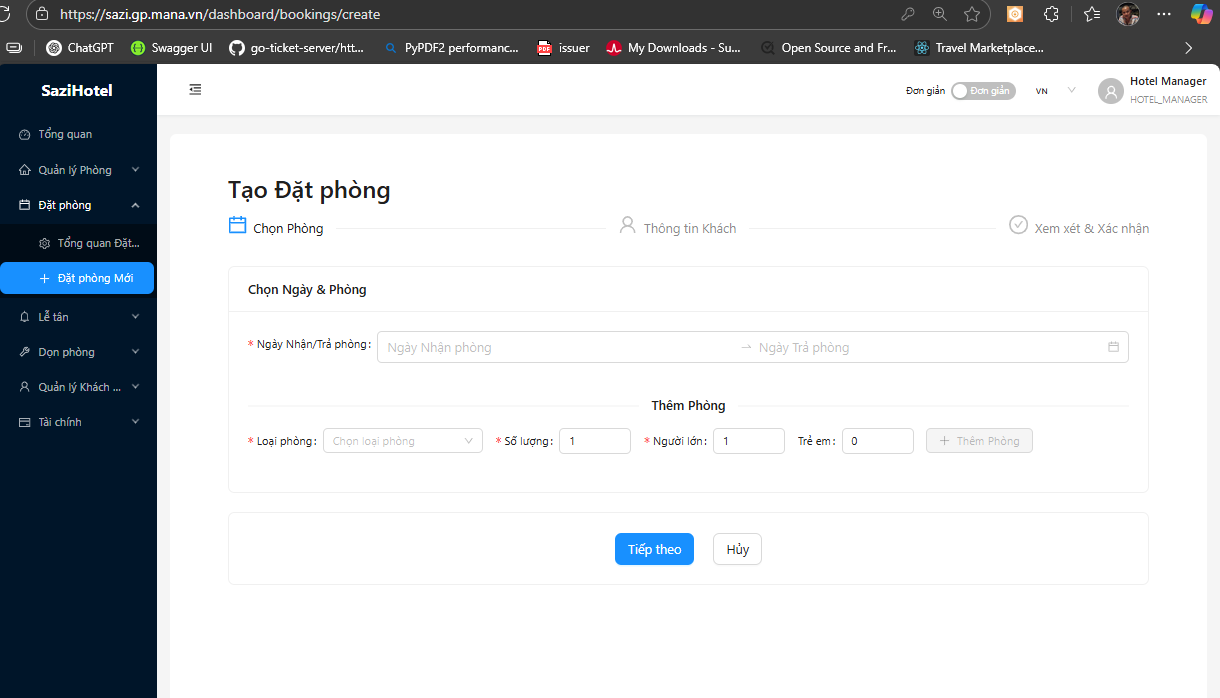
Trang Tạo Đặt Phòng cho phép staff tạo reservations mới cho guests, bao gồm room selection, guest information, pricing, payment và các thông tin liên quan. Hỗ trợ cả individual bookings, group bookings và multi-room reservations.


Tổng Quan

Create Booking Overview - Trang tạo đặt phòng

Trang tạo booking hiển thị:

  • Stepper/Progress Bar: Các bước tạo booking (Room Selection → Guest Info → Pricing → Confirmation)
  • Form Sections: Từng section với clear headings
  • Availability Calendar: Real-time room availability
  • Price Calculator: Dynamic pricing based on selections
  • Validation: Real-time form validation
  • Save Draft: Lưu booking dở dang để hoàn thành sau

Booking Creation Workflow

graph TD 
    A[Start] --> B[Select Dates & Guests]
    B --> C[Search Available Rooms]
    C --> D[Select Room Type]
    D --> E[Enter Guest Info]
    E --> F[Review Pricing]
    F --> G{Add Extras?}
    G -->|Yes| H[Add Services/Packages]
    G -->|No| I[Payment Method]
    H --> I
    I --> J[Confirm & Create]
    J --> K[Send Confirmation Email]
    K --> L[Booking Created]

Availability Search - Tìm kiếm phòng trống

Date Selection

Check-in Date: - Date picker với calendar - Minimum: Today - Blocked dates: Past dates disabled - Default: Today hoặc next available date

Check-out Date: - Date picker với calendar - Minimum: Check-in + 1 day - Auto-calculate nights - Default: Check-in + 1 night

Number of Nights: - Auto-calculated: Check-out - Check-in - Display: "X night(s)" badge - Editable: Change check-out date khi edit

Guest Configuration

Guest Configuration - Cấu hình khách

Adults: - Number input: Min 1, Max per room type occupancy - Default: 2 - Label: "Adults (18+ years)"

Children: - Number input: Min 0, Max per room policy - Default: 0 - Label: "Children (0-17 years)" - Child Age Inputs (nếu Children > 0): - Age 1: Input (0-17) - Age 2: Input (0-17) - ...

Rooms: - Number input: Min 1, Max 10 (hoặc available inventory) - Default: 1 - Label: "Number of Rooms"

Search Button

Action: "Search Available Rooms" - Triggers availability check - Shows loading spinner - Displays results below

Validation: - Check-in date required - Check-out date > Check-in date - Adults >= 1 - Children ages required if Children > 0


Step 2: Room Selection

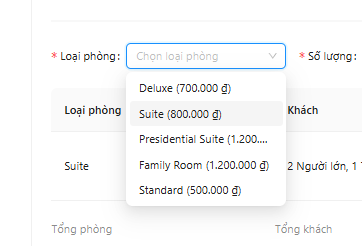
Room Selection - Chọn loại phòng

Multi-Room Selection

Multi-Room Selection - Chọn nhiều phòng

Nếu guest chọn multiple rooms:

Room Selection Table:

Room # Room Type Rate Plan Adults Children Price/Night Nights Total
1 Deluxe Ocean View BAR 2 0 2,500,000 2 5,000,000
2 Deluxe Ocean View BAR 2 1 2,500,000 2 5,000,000
Total 10,000,000

Actions: - Edit room (change room type, rate plan, guests) - Remove room - Add another room


Step 3: Guest Information

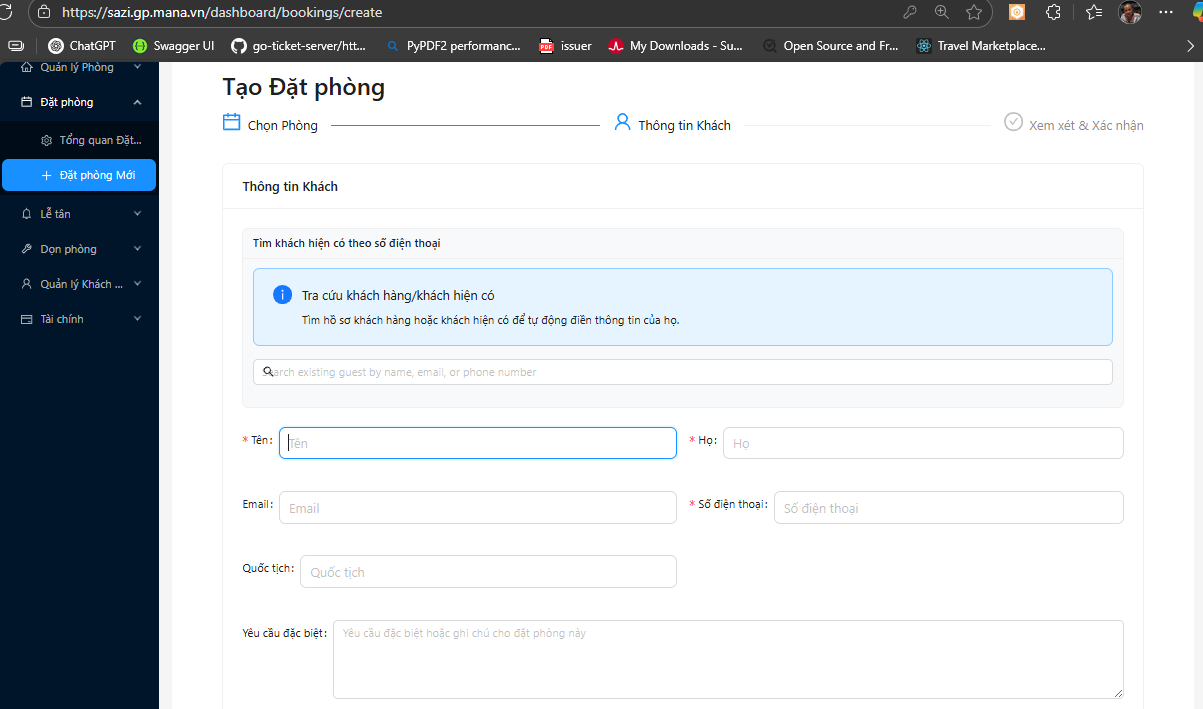
Guest Information - Thông tin khách

Guest Search (Existing Guests)

Search Box: - Input: Email, Phone, hoặc Name - Autocomplete: Dropdown với matching guests - Select guest: Auto-fill form với saved info

Guest Search - Tìm kiếm khách 📸 Chụp từ: Guest search field

Primary Guest Details

Personal Information:

First Name: * [_________________]
Last Name:  * [_________________]
Email:      * [_________________]
Phone:      * [+84 _____________]

Country:    * [Vietnam ▼]

Address (Optional):

Address Line 1: [_____________________________]
Address Line 2: [_____________________________]
City:           [_____________________________]
State/Province: [_____________________________]
Postal Code:    [_____________________________]

Additional Info:

Date of Birth:     [DD/MM/YYYY]
Nationality:       [Vietnam ▼]
ID/Passport Number: [_____________________________]
ID Type:           ○ National ID  ○ Passport  ○ Driver License

Additional Guests (Multi-Room)

Additional Guests - Khách bổ sung 📸 Chụp từ: Khi có multiple rooms

Nếu multi-room booking:

Room 2 Guest:

□ Same as primary guest
☑ Different guest

First Name: [_________________]
Last Name:  [_________________]
Email:      [_________________]
Phone:      [_________________]

Repeat for each room

Special Requests

Special Requests - Yêu cầu đặc biệt 📸 Chụp từ: Special Requests section

Request Types:

Special Requests:
□ Early Check-in (before 14:00)
   Preferred time: [12:00 ▼]
□ Late Check-out (after 12:00)
   Preferred time: [16:00 ▼]
□ Airport Transfer
   Flight number: [_________] Arrival time: [______]
□ High Floor
□ Low Floor
□ Connecting Rooms
□ Crib/Baby Cot
□ Extra Bed
□ Other

Additional Notes:
[________________________________________
________________________________________
________________________________________]

Step 4: Pricing & Extras

Pricing Breakdown - Chi tiết giá 📸 Chụp từ: https://sazi.gp.mana.vn/bookings/create

Price Summary

Room Charges:

Item Quantity Price Subtotal
Deluxe Ocean View - Room 1 2 nights 2,500,000/night 5,000,000
Deluxe Ocean View - Room 2 2 nights 2,500,000/night 5,000,000
Room Subtotal 10,000,000

Add-ons & Services:

Available Add-ons

Add-ons Selection - Chọn dịch vụ thêm 📸 Chụp từ: Add-ons section

Service Categories:

Meals:

□ Breakfast (Buffet)
  Per person per day: 350,000 VND
  Quantity: [0] persons × [2] days = 0 VND

□ Half Board (Breakfast + Dinner)
  Per person per day: 750,000 VND
  Quantity: [0] persons × [2] days = 0 VND

□ Full Board (All Meals)
  Per person per day: 1,200,000 VND
  Quantity: [0] persons × [2] days = 0 VND

Transfers:

□ Airport Transfer (One Way)
  Per car: 500,000 VND
  Quantity: [0] = 0 VND

□ Airport Transfer (Round Trip)
  Per car: 900,000 VND
  Quantity: [0] = 0 VND

Spa & Wellness:

□ Spa Package (60 min massage)
  Per person: 800,000 VND
  Quantity: [0] = 0 VND

□ Couple Spa Package
  Per couple: 1,500,000 VND
  Quantity: [0] = 0 VND

Experiences:

□ City Tour
  Per person: 600,000 VND
  Quantity: [0] = 0 VND

□ Cooking Class
  Per person: 450,000 VND
  Quantity: [0] = 0 VND

Packages:

Packages - Gói combo 📸 Chụp từ: Packages section

○ Romance Package
  Includes: Champagne, Rose petals, Couple massage, Romantic dinner
  Price: 3,500,000 VND (Save 500,000)

○ Family Fun Package
  Includes: Kids activities, Family tour, Ice cream vouchers
  Price: 2,500,000 VND (Save 300,000)

○ Business Package
  Includes: Meeting room 4 hours, Business center access, Late checkout
  Price: 1,800,000 VND (Save 200,000)

Tax & Fees

Subtotal (Rooms + Add-ons):  10,500,000 VND

Tax (10% VAT):               1,050,000 VND
Service Charge (5%):           525,000 VND
Tourism Tax:                   100,000 VND

TOTAL:                      12,175,000 VND

Discounts & Promotions

Discounts - Giảm giá 📸 Chụp từ: Discounts section

Promo Code:

Promo Code: [___________] [Apply]

Active Promotions:
☑ Early Bird Discount (10% off)
  - Booked 30+ days in advance
  - Discount: -1,000,000 VND

□ Member Discount (5% off)
  - Apply loyalty member rate
  - Discount: -500,000 VND

□ Long Stay Discount (3+ nights)
  - Not applicable (only 2 nights)

Final Total:

┌─────────────────────────────────────────┐
│ TOTAL AMOUNT:          12,175,000 VND   │
│ Discounts:             -1,000,000 VND   │
│ ─────────────────────────────────────   │
│ GRAND TOTAL:           11,175,000 VND   │
└─────────────────────────────────────────┘


Step 5: Payment & Policies

Payment Method - Phương thức thanh toán 📸 Chụp từ: https://sazi.gp.mana.vn/bookings/create

Payment Method Selection

Payment Options:

● Pay at Hotel (Pay on arrival)
  - Full payment on check-in
  - Credit card guarantee required

○ Pay Now (Credit/Debit Card)
  - Secure payment via Stripe/PayPal
  - Instant confirmation

○ Bank Transfer
  - Transfer to hotel account
  - Confirmation within 24 hours
  - Bank details will be emailed

○ Pay Deposit (30%)
  - Pay 30% now: 3,352,500 VND
  - Remaining 70% on arrival: 7,822,500 VND

Payment Details (if Pay Now selected)

Payment Details - Chi tiết thanh toán 📸 Chụp từ: Khi chọn "Pay Now"

Credit Card Information:

Card Number:     [____-____-____-____]
                 [Visa] [Mastercard] [Amex]

Cardholder Name: [_____________________________]

Expiry Date:     [MM/YY]
CVV:             [___]

Billing Address:
□ Same as guest address
○ Different address
  [___________________________________]
  [___________________________________]

Cancellation Policy

Cancellation Policy - Chính sách hủy 📸 Chụp từ: Cancellation Policy section

Policy Details:

CANCELLATION POLICY (Flexible)

✓ Free cancellation up to 24 hours before check-in
✓ Modify booking free of charge before check-in
✓ Full refund if cancelled before deadline

⚠ Cancellation after deadline:
  - 24h-0h before check-in: 50% charge
  - No-show: 100% charge (full booking amount)

✓ Early departure: No refund for unused nights

Policy Variations by Rate Plan:

Rate Plan Cancellation Terms
BAR Free cancellation 24h before check-in
Non-Refundable No refund, no changes allowed
Early Bird Free cancellation 7 days before check-in
Breakfast Included Free cancellation 24h before check-in

Terms & Conditions

☑ I have read and agree to the Terms & Conditions
☑ I have read and understand the Cancellation Policy
☑ I confirm that the information provided is accurate
□ Subscribe to newsletter for exclusive offers

Step 6: Review & Confirm

Booking Review - Xem lại đặt phòng 📸 Chụp từ: https://sazi.gp.mana.vn/bookings/create

Booking Summary

Stay Details:

Check-in:   Monday, January 20, 2025 (14:00)
Check-out:  Wednesday, January 22, 2025 (12:00)
Nights:     2 nights
Guests:     2 Adults

Room Details:

Room 1: Deluxe Ocean View
  - 2 Adults
  - Rate Plan: BAR (Best Available Rate)
  - Price: 2,500,000 VND × 2 nights = 5,000,000 VND

Room 2: Deluxe Ocean View
  - 2 Adults, 1 Child
  - Rate Plan: BAR (Best Available Rate)
  - Price: 2,500,000 VND × 2 nights = 5,000,000 VND

Guest Information:

Primary Guest:
  John Doe
  john.doe@email.com
  +84 123 456 789

Room 2 Guest:
  Jane Smith
  jane.smith@email.com
  +84 987 654 321

Special Requests:

- Early Check-in (12:00 PM)
- High Floor
- Connecting Rooms

Add-ons:

- Breakfast (Buffet): 4 persons × 2 days = 2,800,000 VND
- Airport Transfer (Round Trip): 1 car = 900,000 VND

Payment Summary:

Room Charges:              10,000,000 VND
Add-ons:                    3,700,000 VND
Subtotal:                  13,700,000 VND

Tax (10%):                  1,370,000 VND
Service Charge (5%):          685,000 VND
Tourism Tax:                  100,000 VND

Discounts:                 -1,000,000 VND

GRAND TOTAL:               14,855,000 VND

Payment Method: Pay at Hotel
Status: Guaranteed with credit card

Action Buttons

Action Buttons - Các nút hành động 📸 Chụp từ: Bottom of review page

[← Back]  [Save as Draft]  [Confirm Booking →]

Button States: - Back: Return to previous step - Save as Draft: Save incomplete booking (gửi email với link để hoàn thành sau) - Confirm Booking: Validate và create booking


Confirmation Page

Booking Confirmation - Xác nhận đặt phòng 📸 Chụp từ: After clicking "Confirm Booking"

Success Message

┌─────────────────────────────────────────────────┐
│  ✓  BOOKING CONFIRMED                           │
│                                                  │
│  Your booking has been successfully created!    │
│                                                  │
│  Booking Reference: #BK-2025-001234             │
│  Confirmation sent to: john.doe@email.com       │
└─────────────────────────────────────────────────┘

Booking Details

Display full booking summary (same as review, but with Booking ID)

Booking Status: Confirmed

Actions:

[View Booking Details]  [Print Confirmation]  [Email Guest]  [Create Another Booking]

Next Steps

NEXT STEPS:

1. Confirmation email sent to guest
2. SMS notification sent (if enabled)
3. Booking appears in:
   - Booking List
   - Calendar/Timeline
   - Room Assignment

✓ Guest can manage booking via:
  - Booking portal (link in email)
  - Contact front desk

⚠ Remember to:
  - Assign specific room numbers before check-in
  - Prepare welcome amenities (if applicable)
  - Check special requests

Advanced Features

Quick Booking (Express Mode)

Quick Booking - Đặt phòng nhanh 📸 Chụp từ: https://sazi.gp.mana.vn/bookings/create?mode=quick

Simplified 1-page form for fast bookings:

Compact Layout:

┌─────────────────────────────────────────────────┐
│ QUICK BOOKING                                   │
├─────────────────────────────────────────────────┤
│ Dates:  [Jan 20] to [Jan 22]  (2 nights)      │
│ Guests: [2] Adults  [0] Children              │
│                                                  │
│ Room:   [Deluxe Ocean View ▼]  Avail: 5        │
│ Rate:   [BAR ▼]                                │
│                                                  │
│ Guest:  [john.doe@email.com ▼] (search)        │
│ Name:   [John Doe]                              │
│ Phone:  [+84 123 456 789]                       │
│                                                  │
│ Total:  10,000,000 VND                          │
│                                                  │
│ [Create Booking]                                │
└─────────────────────────────────────────────────┘

Limitations: - Single room only - No add-ons - Pay at Hotel only - For repeat guests

Walk-in Booking

Walk-in Booking - Đặt phòng walk-in 📸 Chụp từ: https://sazi.gp.mana.vn/bookings/create?mode=walkin

For guests arriving without reservation:

Auto-filled: - Check-in: Today - Check-out: Tomorrow (editable) - Source: Walk-in

Required: - Guest information (full form) - Room selection - Payment (usually Pay Now or Deposit)

Special: - No confirmation email delay (instant check-in possible) - Can directly transition to Check-in process

Group Booking

Group Booking - Đặt phòng nhóm 📸 Chụp từ: https://sazi.gp.mana.vn/bookings/create?mode=group

For 5+ rooms:

Additional Fields:

Group Name:           [_____________________________]
Group Leader:         [_____________________________]
Contact Person:       [_____________________________]
Special Instructions: [_____________________________
                       _____________________________]

Number of Rooms:      [10]

Room Allocation:
- Standard:           5 rooms
- Deluxe:            3 rooms
- Suite:             2 rooms

Rooming List Upload:  [Upload Excel]
  Download Template: [template.xlsx]

Features: - Bulk room assignment - Group discount pricing - Rooming list import (Excel) - Group billing options - Special terms negotiation

Corporate Booking

Corporate Booking - Đặt phòng công ty 📸 Chụp từ: https://sazi.gp.mana.vn/bookings/create?mode=corporate

For corporate accounts:

Company Selection:

Company: [Tech Corp Vietnam ▼]
         (Auto-load corporate rate & billing)

Department:  [_____________________________]
Cost Center: [_____________________________]
Project Code: [_____________________________]

Booking For:
○ Employee
○ Guest of company

Employee ID: [_____________________________]

Corporate Benefits: - Pre-negotiated rates (auto-applied) - Company billing (invoice to company) - Late check-out included - Loyalty points to personal account


Validation & Error Handling

Form Validation

Form Validation - Xác thực form 📸 Chụp từ: Form với validation errors

Required Fields:

Check-in Date:   [Required] Please select check-in date
Check-out Date:  [Required] Check-out must be after check-in
Adults:          [Required] At least 1 adult required
Email:           [Required] Valid email required
Phone:           [Required] Valid phone number required

Real-time Validation: - Email format check - Phone number format check - Date logic validation - Credit card validation (if Pay Now)

Availability Conflicts

Availability Conflicts - Xung đột khả dụng 📸 Chụp từ: Khi selected room không còn available

Error Message:

⚠ AVAILABILITY CHANGED

The room you selected is no longer available for your dates.

- Deluxe Ocean View: Sold Out
- Alternative rooms available:
  • Suite (upgrade): +500,000 VND/night
  • Deluxe Garden View: Same price

[View Alternatives]  [Search Again]

Payment Errors

Payment Errors - Lỗi thanh toán 📸 Chụp từ: Khi payment fails

Error Handling:

❌ PAYMENT FAILED

Your payment could not be processed.

Reason: Card declined - Insufficient funds

Options:
1. Try different card
2. Choose different payment method
3. Contact your bank

Booking saved as DRAFT for 30 minutes.
Reference: DRAFT-2025-001234

[Try Again]  [Change Payment Method]


Save Draft & Resume

Save Draft

Save Draft - Lưu nháp 📸 Chụp từ: Click "Save as Draft"

Draft Saved:

✓ Booking Draft Saved

Your booking has been saved and can be completed later.

Draft ID: DRAFT-2025-001234
Valid until: January 20, 2025, 5:00 PM (24 hours)

Resume link sent to: john.doe@email.com

[Continue Booking]  [Exit]

Email Sent:

Subject: Complete Your Hotel Booking - Draft Saved

Dear John,

Your hotel booking is almost complete!

Reservation Details:
- Check-in: Jan 20, 2025
- Check-out: Jan 22, 2025
- Room: Deluxe Ocean View

Click here to complete your booking:
[Complete Booking →]

This link expires in 24 hours.

Questions? Contact us at reservations@hotel.com

Resume Draft

Resume Draft - Tiếp tục nháp 📸 Chụp từ: https://sazi.gp.mana.vn/bookings/draft/DRAFT-2025-001234

Resume Message:

RESUME BOOKING

You have a saved draft booking:

Check-in:  Jan 20, 2025
Check-out: Jan 22, 2025
Room:      Deluxe Ocean View
Total:     11,175,000 VND

Created:   2 hours ago
Expires:   in 22 hours

⚠ Note: Availability and prices may have changed.

[Resume & Complete]  [Start New Booking]


Tips & Best Practices

💡 Tip 1: Search Existing Guests First - Tìm kiếm guest trước khi tạo mới - Tránh duplicate guest profiles - Tận dụng saved information - Track guest history

💡 Tip 2: Verify Availability Real-time - System checks availability on every step - Always show current available count - Alert staff if inventory low - Prevent overbooking

💡 Tip 3: Use Rate Plans Strategically - Offer Non-Refundable for better yield - Highlight Early Bird for advance bookings - Package deals increase revenue per booking - Clear cancellation terms reduce disputes

💡 Tip 4: Collect Complete Information - Full guest details for smooth check-in - Phone number for SMS confirmations - Email for automated communications - ID info for legal requirements

💡 Tip 5: Review Before Confirming - Double-check dates (common error) - Verify guest count vs occupancy - Confirm total price with guest - Check special requests feasibility

💡 Tip 6: Use Quick Booking for Efficiency - For repeat guests - Walk-ins during busy times - Simple, single-room bookings - Training new staff


FAQs

1. Làm thế nào để tạo booking cho guest đã từng ở?

Câu trả lời:

Method 1: Guest Search (Recommended)

  1. Tại trang Create Booking, section "Guest Information"
  2. Sử dụng Guest Search box
  3. Nhập email, phone, hoặc name của guest
  4. Hệ thống hiển thị matching guests với:
  5. Full name
  6. Contact info
  7. Last stay date
  8. Total bookings
  9. Click "Select Guest"
  10. Form auto-fill với saved information
  11. Review và update nếu cần (e.g., new phone number)
  12. Continue với booking process

Benefits: - ✅ Tránh duplicate profiles - ✅ Guest history tracking - ✅ Loyalty benefits auto-applied - ✅ Saved preferences (room type, floor, etc.) - ✅ Faster booking creation

Method 2: From Guest Profile

  1. Go to Guests/Customers management
  2. Search và click vào guest profile
  3. Click "Create New Booking" button trong profile
  4. Guest info automatically pre-filled
  5. Complete booking details

2. Tôi có thể sửa booking sau khi đã confirm không?

Câu trả lời:

Có, bạn có thể modify booking sau khi confirm:

Modifiable Elements:

Easy Changes (no re-calculation): - Guest information (name, email, phone) - Special requests - Add-ons/Services (add or remove) - Payment method (before check-in)

Moderate Changes (price may change): - Check-in/Check-out dates - Subject to availability - Price recalculated based on new dates - Cancellation policy may apply - Number of guests - Within room occupancy limits - May incur extra person charges

⚠️ Complex Changes (require approval): - Room type change - Subject to availability - Price difference charged/refunded - May require cancellation & re-booking - Number of rooms (add/remove) - Affects total price significantly - May require manager approval

Non-Modifiable (depends on rate plan): - Non-Refundable bookings: No changes allowed - Advance Purchase rates: Limited changes - Check cancellation policy terms

How to Modify:

  1. Go to Booking List hoặc Booking Details
  2. Click on booking to view
  3. Click "Modify Booking" button
  4. Make changes in editable form
  5. System validates:
  6. Availability for new dates/room
  7. Price changes calculated
  8. Policy compliance checked
  9. Review changes summary
  10. Confirm modification
  11. Updated confirmation sent to guest

Modification Policies:

Rate Plan Modification Terms
BAR Free modification up to 24h before check-in
Non-Refundable No modifications allowed
Early Bird Free modification up to 7 days before check-in
Breakfast Included Free modification up to 24h before check-in

Price Adjustments:

  • Upgrade (higher price): Guest charged difference
  • Downgrade (lower price): Refund processed (may have fees)
  • Date change: New rate applied (may be higher/lower)
  • Add services: Additional charge
  • Remove services: Refund (if not yet consumed)

3. Khách muốn đặt phòng cho người khác, làm thế nào?

Câu trả lời:

Scenario: Guest A books for Guest B

Option 1: Booking on Behalf

  1. Booker Information:
  2. Tại section Guest Information, có checkbox:
    ☐ I'm booking for someone else
    
  3. Check box này

  4. Form Changes:

    Booker Details:
    Name:  [Guest A Name]
    Email: [Guest A Email]
    Phone: [Guest A Phone]
    
    Guest Details (Who will check-in):
    Name:  [Guest B Name]
    Email: [Guest B Email]
    Phone: [Guest B Phone]
    ID/Passport: [Guest B ID]
    

  5. Payment:

  6. Booker can pay (Guest A's card)
  7. Or Guest B pays on arrival

  8. Communications:

  9. Confirmation sent to BOTH emails
  10. Check-in instructions to Guest B
  11. Invoice to Guest A (booker)

Option 2: Corporate Booking

For company bookings:

Company:     [XYZ Corporation]
Booked By:   [HR Manager - Guest A]
Guest Name:  [Employee - Guest B]
Billing:     Invoice to Company

Option 3: Gift Booking

For gift reservations:

☑ This is a gift booking

Gift From:   [Guest A]
Gift To:     [Guest B]
Gift Message: [_________________________]

□ Don't reveal price to recipient
☑ Send surprise check-in amenities

Important Notes:

  • ID Verification: Guest B's ID required at check-in (not Guest A's)
  • Payment: Clarify who pays (booker pre-pay or guest pays on arrival)
  • Cancellation: Booker can cancel (if before deadline)
  • Communication: Both parties receive relevant emails
  • Special Requests: Should be from actual guest (Guest B)

Example:

Parent booking for adult child:
- Booker: Parent (pays, receives invoice)
- Guest: Child (checks in, stays)
- Both receive confirmations
- Child's ID used at check-in

4. Làm thế nào để apply corporate rate?

Câu trả lời:

Prerequisites: - Company must have corporate account setup trong system - Corporate contract active - Rates configured in system

Method 1: Corporate Booking Mode

  1. Tại Create Booking page
  2. Click "Corporate Booking" mode (nếu available)
  3. Hoặc select booking type: [Corporate ▼]

  4. Select Company:

    Company: [Search or Select ▼]
    
    Companies Found:
    • ABC Corporation (Contract: Active)
    • XYZ Tech (Contract: Active)
    

  5. Auto-Applied:

  6. Corporate rates automatically applied
  7. Negotiated benefits included:
    • Discounted ADR
    • Late checkout (if included)
    • Free upgrades (if applicable)
    • Loyalty points
  8. Payment terms: Direct billing to company

  9. Required Fields:

    Employee ID:  [___________]
    Department:   [___________]
    Cost Center:  [___________]
    Manager Approval: [Name/Email]
    

  10. Validation:

  11. System verifies employee ID (if integration exists)
  12. Checks contract valid dates
  13. Confirms rate code active

Method 2: Rate Code Entry

  1. Normal booking process
  2. At Rate Plan selection:

    Rate Plans:
    ○ BAR (Best Available)
    ○ Non-Refundable
    ● Corporate Rate
    
    Corporate Code: [ABCCORP2025]
    [Validate Code]
    

  3. Enter corporate rate code

  4. Click Validate
  5. System checks:
  6. Code valid
  7. Dates within contract period
  8. Room types eligible
  9. Corporate rate applied with discount badge

Method 3: Auto-Detection via Email

If company email domain registered:

Guest Email: john.doe@abccorp.com

✓ Corporate account detected: ABC Corporation
  Apply corporate rate? [Yes] [No]

Corporate Benefits Applied:

Room Rate:         2,500,000 VND
Corporate Discount: -500,000 VND (20%)
─────────────────────────────────
Corporate Rate:    2,000,000 VND ✓

Additional Benefits:
✓ Late checkout (4:00 PM, subject to availability)
✓ Free WiFi (already included)
✓ Complimentary breakfast
✓ 10% F&B discount
✓ Loyalty points (150% earning rate)

Billing Options:

Payment Method:
○ Direct Billing (Invoice to Company)
  - Company pays within 30 days
  - No payment required from guest
  - Guest signs charges to room

○ Employee Pays (Personal Card)
  - Guest pays at corporate rate
  - Company reimburses employee later
  - Receipt provided for reimbursement

Important:

  • Corporate rates usually non-transferable
  • May require verification at check-in (employee ID, business card)
  • Subject to contract terms (min nights, blackout dates)
  • Cancellation policy may differ from BAR

5. Guest muốn split payment giữa nhiều methods, có được không?

Câu trả lời:

Có, hệ thống hỗ trợ split payment:

Common Scenarios:

Scenario 1: Partial Deposit + Balance on Arrival

Total Amount: 10,000,000 VND

Payment Split:
1. Pay Now (Deposit):     3,000,000 VND (30%)
   Method: Credit Card
   Status: ✓ Paid

2. Pay on Arrival:        7,000,000 VND (70%)
   Method: Cash/Card at hotel
   Status: Pending

Scenario 2: Points + Cash

Total Amount: 10,000,000 VND

Payment Split:
1. Loyalty Points:        5,000,000 VND
   Points Used: 50,000 points
   Status: ✓ Redeemed

2. Credit Card:           5,000,000 VND
   Status: ✓ Paid

Scenario 3: Company + Personal

Total Amount: 10,000,000 VND

Payment Split:
1. Company Billing:       7,000,000 VND (Room only)
   Invoice to: ABC Corp
   Status: ✓ Authorized

2. Personal Card:         3,000,000 VND (Add-ons, minibar)
   Guest pays: Extras
   Status: ✓ Paid

Scenario 4: Multiple Cards

Total Amount: 10,000,000 VND

Payment Split:
1. Visa ending 1234:     5,000,000 VND
   Status: ✓ Paid

2. Mastercard ending 5678: 5,000,000 VND
   Status: ✓ Paid

How to Setup Split Payment:

  1. Tại Payment Method section:

    ☑ Split Payment
    
    Payment #1:
    Method:  [Credit Card ▼]
    Amount:  [5,000,000] VND
    
    [+ Add Another Payment]
    
    Payment #2:
    Method:  [Pay at Hotel ▼]
    Amount:  [5,000,000] VND (auto-calculated)
    
    Total:   10,000,000 VND ✓
    

  2. Validate amounts:

  3. Sum must equal total
  4. Each amount > 0
  5. System prevents under/overpayment

  6. Process each payment:

  7. Card payments processed immediately
  8. Other methods marked as pending
  9. Partial payment status tracked

Payment Status Tracking:

Booking #BK-2025-001234
Total: 10,000,000 VND

Payments:
✓ Deposit (Card):     3,000,000 VND - Paid Jan 15
⏳ Balance:           7,000,000 VND - Due on check-in

Payment Status: Partially Paid (30%)

Limitations:

  • ⚠ Some rate plans may not allow split payment:
  • Non-Refundable: Usually require full payment upfront
  • Advance Purchase: Require full payment

  • ⚠ Minimum amounts may apply:

  • Deposit minimum: 30% of total
  • Card payment minimum: 100,000 VND

  • ⚠ Multiple methods may have processing fees:

  • Card processing fee: 2-3% per transaction
  • Multiple card charges may increase costs

Best Practices:

✅ Clarify split before booking confirmation ✅ Document split arrangement in booking notes ✅ Send clear invoice showing split breakdown ✅ Confirm balance due on arrival ✅ Provide receipt for each payment

6. Làm thế nào để handle overbooking situation khi create booking?

Câu trả lời:

Overbooking Prevention:

System có built-in safeguards:

1. Real-time Availability Check:

When guest searches:
- Check inventory: Available rooms
- Check OOO: Out of order rooms
- Check bookings: Already booked rooms
- Calculate: True available count

Display: "5 rooms available" (live count)

2. Overbooking Threshold:

Settings → Inventory → Overbooking:

Room Type: Deluxe Ocean View
Total Rooms: 10
Max Overbooking: 10% (1 room)

Available to Sell: 11 rooms
(10 actual + 1 overbook buffer)

When booking #11:
⚠ Warning: "This booking will overbook the room type by 1 room"
[Proceed] [Cancel]

3. Last Room Warning:

⚠ LAST ROOM AVAILABLE

Only 1 Deluxe Ocean View room left for your dates.

Other guests may be booking now. Proceed quickly.

[Confirm Booking Now]

4. Sold Out Handling:

❌ ROOM TYPE SOLD OUT

Deluxe Ocean View is no longer available.

Alternative Options:
1. Deluxe Garden View (Same price)
   Available: 3 rooms
   [Select]

2. Junior Suite (Upgrade)
   Price: +300,000 VND/night
   Available: 2 rooms
   [Select]

3. Standard Room (Downgrade)
   Price: -800,000 VND/night
   Available: 8 rooms
   [Select]

[Search Different Dates]

If Overbooking Occurs (Manual Override):

Manager Approval Required:

⚠ MANAGER APPROVAL REQUIRED

This booking will create an overbooking situation:

Room Type: Deluxe Ocean View
Date: Jan 20-22, 2025
Current: 10 booked / 10 rooms (100%)
New Booking: 1 room
Result: 11 booked / 10 rooms (110% - OVERBOOKED)

Reason for Override:
[VIP guest - guaranteed room]

Manager Password: [_______]
[Approve Override] [Cancel]

Post-Override Actions:

  1. Flag booking:

    Booking Status: CONFIRMED (OVERBOOKED)
    Risk Level: HIGH
    Action Required: Resolve before check-in
    

  2. Create Alert:

    ⚠ Overbooking Alert Created
    
    Assigned to: Front Desk Manager
    Due: 24 hours before check-in
    Action: Arrange room solution
    

  3. Resolution Options:

  4. Upgrade guest to available higher room type
  5. Walk guest to partner hotel (last resort)
  6. Move booking to different date (if flexible)
  7. Use Out of Order room (if maintenance can wait)

Prevention Best Practices:

✅ Set conservative overbooking limits (5-10% max) ✅ Monitor booking pace vs availability daily ✅ Close channels early when approaching capacity ✅ Implement approval workflow for manual overbooking ✅ Maintain good relationships with nearby hotels (for walks) ✅ Train staff on overbooking policies và resolution procedures

Guest Communication (If Walk Required):

Template Email:

Dear [Guest Name],

We sincerely apologize, but due to unforeseen circumstances, we are
unable to honor your reservation at our property.

We have arranged accommodation at [Partner Hotel Name], a comparable
4-star property nearby.

What we're providing:
• Same or better room category
• Same rate (no additional cost)
• Complimentary transportation
• Complimentary upgrade (if available)
• Dining voucher for inconvenience (500,000 VND)

Your new booking details:
[Hotel Name, Address, Confirmation #]

We deeply apologize for this inconvenience and hope to welcome you
on a future visit.

[Contact Info]


Liên Kết Liên Quan


Cập nhật lần cuối: 2025-01-22 Phiên bản: 1.0