Giao Diện Hệ Thống
Tổng Quan Giao Diện
Giao diện SaziHotel được thiết kế theo chuẩn Material Design, thân thiện và dễ sử dụng.
Layout Chính
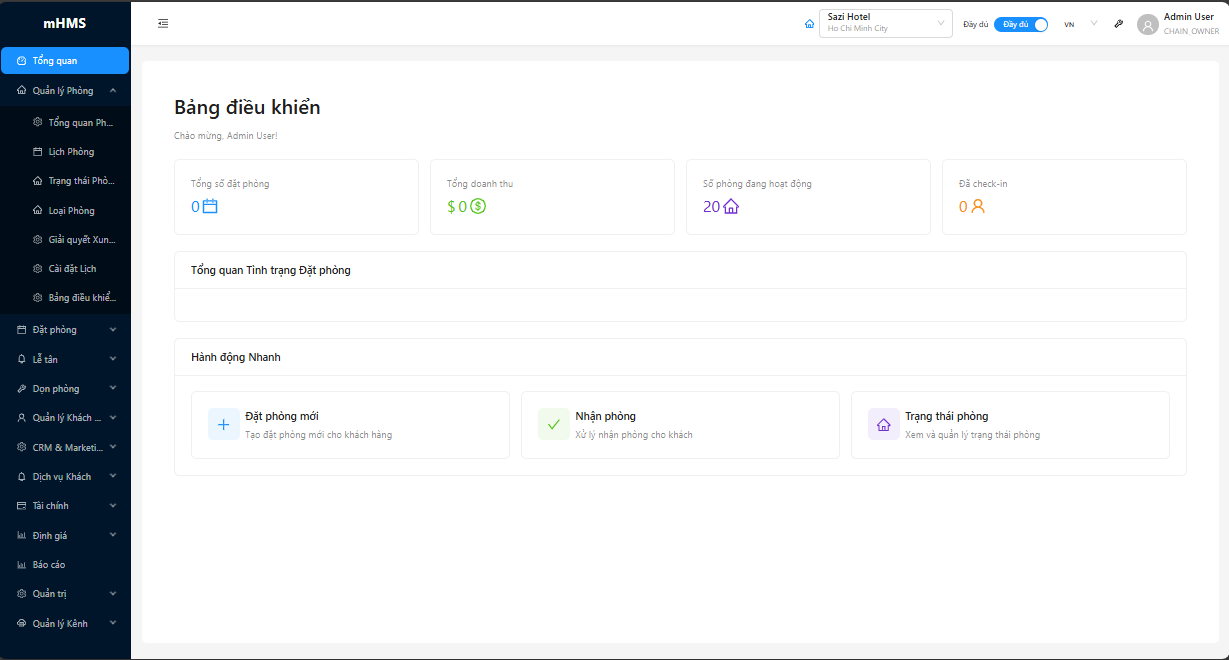
Thanh Tiêu Đề
Logo và Tên Khách Sạn
- Vị trí: Góc trái
- Click để về Bảng Điều Khiển
- Hiển thị logo và tên khách sạn hiện tại
Tìm Kiếm Toàn Cầu
- Tìm kiếm nhanh: Đặt Phòng, Khách, Phòng
- Phím tắt:
Ctrl + KhoặcCmd + K
Thông Báo
- Hiển thị thông báo real-time:
- Đặt phòng mới
- Nhận phòng sắp tới
- Nhiệm vụ dọn phòng
- Lỗi đồng bộ OTA
Chuyển Đổi Ngôn Ngữ
- Chuyển đổi ngôn ngữ: Tiếng Việt / Tiếng Anh
Menu Hồ Sơ
- Avatar người dùng
- Menu thả xuống:
- Hồ Sơ Của Tôi: Thông tin cá nhân
- Cài Đặt: Cài đặt
- Trợ Giúp: Trợ giúp
- Đăng Xuất: Đăng xuất
Menu Sidebar
Cấu Trúc Menu
Menu được tổ chức theo module chức năng:
Bảng Điều Khiển
- Tổng quan hệ thống
Quản Lý Phòng
- Tổng Quan Phòng
- Timeline Phòng
- Trạng Thái Phòng
- Loại Phòng
- Trình Phân Giải Xung Đột Đặt Phòng
- Cài Đặt Timeline
- Bảng Phân Tích Phòng
Đặt Phòng
- Tổng Quan Đặt Phòng
- Tạo Đặt Phòng
- Lịch Đặt Phòng
Lễ Tân
- Nhận Phòng
- Trả Phòng
- Nhận Phòng Nâng Cao
Dọn Vệ Sinh
- Bảng Điều Khiển Dọn Phòng
- Nhiệm Vụ Dọn Phòng
- Lập Lịch Nâng Cao
Quản Lý Khách Hàng
- Khách Hàng
- Chương Trình Khách Hàng Thân Thiết
- Thành Viên Thân Thiết
CRM & Marketing
- Hồ Sơ Khách Hàng
- Phân Tích Khách Hàng
- Phân Khúc Khách Hàng
- Bảng Điều Khiển Marketing
- Phản Hồi & NPS
- Phân Tích Chương Trình Thân Thiết
- Chiến Dịch Chương Trình Thân Thiết
- Hết Hạn Điểm
Dịch Vụ Khách Hàng
- Tổng Quan Dịch Vụ Khách Hàng
- Đặt Dịch Vụ
- Yêu Cầu Tiện Nghi
Tài Chính
- Hóa Đơn
- Thanh Toán
- Dịch Vụ Bổ Sung
- Cổng Thanh Toán
Định Giá
- Thiết Lập Nhanh (Cho Người Mới)
- Giá Phòng
- Gói Rate
- Phí Khách Thêm
- Giá Gói Ăn
- Giảm Giá Lưu Trú Dài Hạn
- Định Giá Theo Mùa
- Giá Theo Ngày Cụ Thể
- Cấu Hình Giá Kênh
- Khuyến Mãi
Quản Lý Kênh
- Bảng Điều Khiển Kênh
- Quản Lý Nhà Cung Cấp
- Ánh Xạ Phòng
- Ánh Xạ Giá
- Hoạt Động Đồng Bộ Hóa
- Phân Tích Kênh
- Quản Lý Lỗi
- Quản Lý Tài Khoản OTA
- Cấu Hình Chuỗi Khách Sạn
Báo Cáo
- Báo cáo và phân tích
Quản Lý Nền Tảng
- Bảng Điều Khiển Nền Tảng
- Quản Lý Tenant
- Onboarding Tenant
- Đăng Ký
- Thanh Toán Nền Tảng
- Phân Tích Đa Tenant
- Giám Sát Hệ Thống
- Nhật Ký Hệ Thống
- Cấu Hình Nền Tảng
- Người Dùng Nền Tảng
Quản Trị
- Người Dùng
- Quản Lý Nhân Viên
- Tenants
- Khách Sạn
- Chuỗi Khách Sạn
- Cài Đặt Khách Sạn
Thu Gọn/Mở Rộng Menu
- Click icon menu để thu gọn sidebar
- Menu thu gọn chỉ hiển thị icon
- Hover để xem label đầy đủ
Khu Vực Nội Dung Chính
Điều Hướng Breadcrumb
- Hiển thị vị trí hiện tại - Click để quay lại cấp trướcTiêu Đề Trang
- Tiêu Đề: Tiêu đề trang
- Hành Động: Nút hành động chính (Tạo, Xuất, Lọc...)
- Tabs: Các tab phụ (nếu có)
Phần Nội Dung
- Danh sách/Bảng
- Biểu Mẫu
- Biểu Đồ/Phân Tích
- Xem Chi Tiết
Phân Trang
- Hiển thị ở cuối danh sách
- Chọn số items per page: 10, 20, 50, 100
- Điều hướng trang: Đầu, Trước, Tiếp, Cuối
Thiết Kế Thích Ứng
Desktop (≥1024px)
- Sidebar menu đầy đủ
- Layout nhiều cột
- Tooltip khi hover
- Bảng đầy đủ
Tablet (768-1023px)
- Sidebar có thể thu gọn
- Layout thích ứng
- Nút thân thiện với cảm ứng
Mobile (<768px)
- Thanh điều hướng dưới cùng
- Menu hamburger
- Layout một cột
- Cử chỉ vuốt
- Bảng tối ưu hóa cho mobile
Phím Tắt
| Phím Tắt | Chức Năng |
|---|---|
Ctrl/Cmd + K |
Tìm kiếm toàn cầu |
Ctrl/Cmd + B |
Toggle sidebar |
Ctrl/Cmd + N |
Booking mới (trong trang bookings) |
Ctrl/Cmd + S |
Lưu form |
Esc |
Đóng modal/dialog |
Alt + 1-9 |
Chuyển tab nhanh |
Giao Diện
Chế Độ Sáng
- Nền trắng, text đen
- Dễ nhìn trong môi trường sáng
Chế Độ Tối
- Nền tối, text sáng
- Giảm mỏi mắt khi làm việc ban đêm
- Toggle: Click icon theme switcher ở header
Khả Năng Truy Cập
- Điều Hướng Bằng Bàn Phím: Hỗ trợ đầy đủ phím tắt
- Đầu Đọc Màn Hình: Tương thích ARIA labels
- Độ Tương Phản Cao: Tỷ lệ màu sắc chuẩn WCAG 2.1
- Tỷ Lệ Phông Chữ: Hỗ trợ phóng to chữ 200%
Tùy Chỉnh
Mỗi user có thể tùy chỉnh:
- Chủ Đề: Chế độ Sáng/Tối
- Ngôn Ngữ: Tiếng Việt/Tiếng Anh
- Mật Độ: Compact/Bình Thường/Thoải Mái
- Trang Mặc Định: Trang hiển thị sau khi login
- Thông Báo: Bật/tắt từng loại thông báo